

Punditas AI offers users the capability to assign labels or tags to their critical data, encompassing a wide range of resources including videos, help articles, enhancements, workarounds, bugs, reference documents, blogs, case studies, customer presentations, and beyond. Through the application of precise labels or tags, users can effectively categorize and structure their information for seamless organization and future retrieval.
This feature empowers users to efficiently manage their knowledge by enabling them to save and access relevant resources with ease. By leveraging specific labels or tags, users can streamline their workflow, enhance productivity, and optimize their knowledge management processes. This systematic approach to labeling and tagging fosters a more organized and intuitive user experience, facilitating smooth navigation and retrieval of essential resources whenever needed.
Follow the Steps and add tags to Video Tutorials
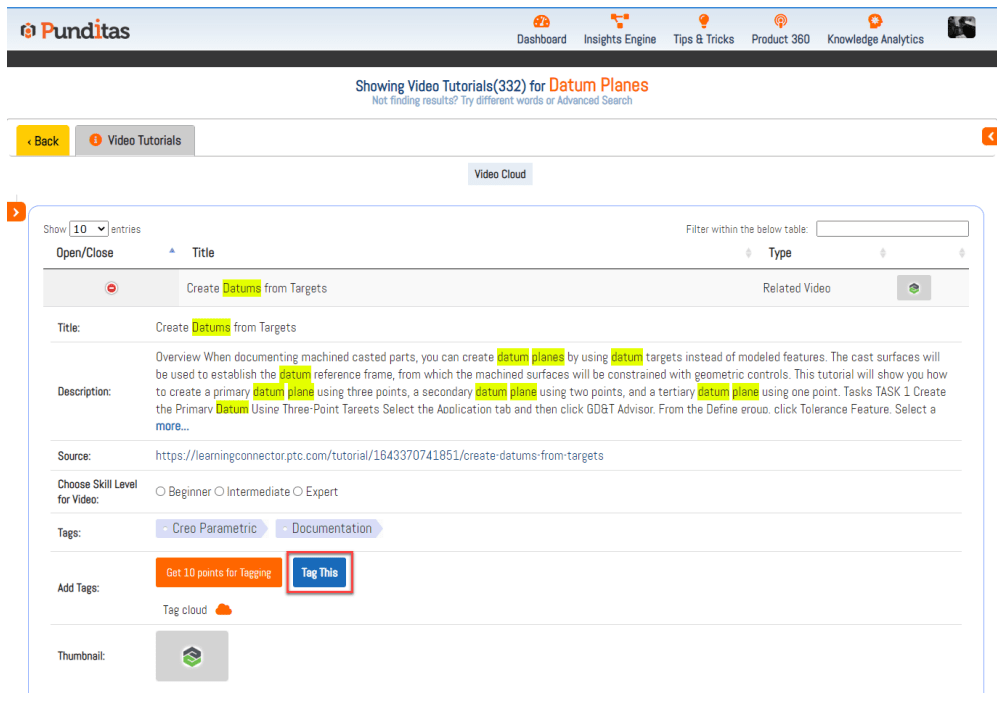
Step 1:- Open Video Tutorial detail

Step 2:- Click on Tag This button
Step 3:- Insert Tag name

Step 4:- Click on Add Tag button or hit the enter button

Tag added successfully

What is Punditas AI Advisor?
Punditas AI Advisor provides real-time guidance as you work in the Creo environment. Information on “how to use” a feature in Creo or best practices for working with Creo are presented within context, removing the need to guess or search for such information. Punditas AI driven content helps you leverage Creo to create your designs faster and with confidence.
For more information about Punditas AI Advisor, visit our website at Punditas AI or contact us at contact@punditas.com
 Punditas
Leave a comment