

The Punditas AI Dashboard is a dynamic interface comprising a series of tiles, each offering personalized insights into an Enterprise Product (For example, Creo Parametric). These tiles are crafted using advanced AI and ML algorithms, tailored to suit the unique preferences and behaviors of individual users. Through these intelligent algorithms, users are presented with a diverse array of perspectives and stories, providing valuable insights into the enterprise product that align with their specific interests and usage patterns.
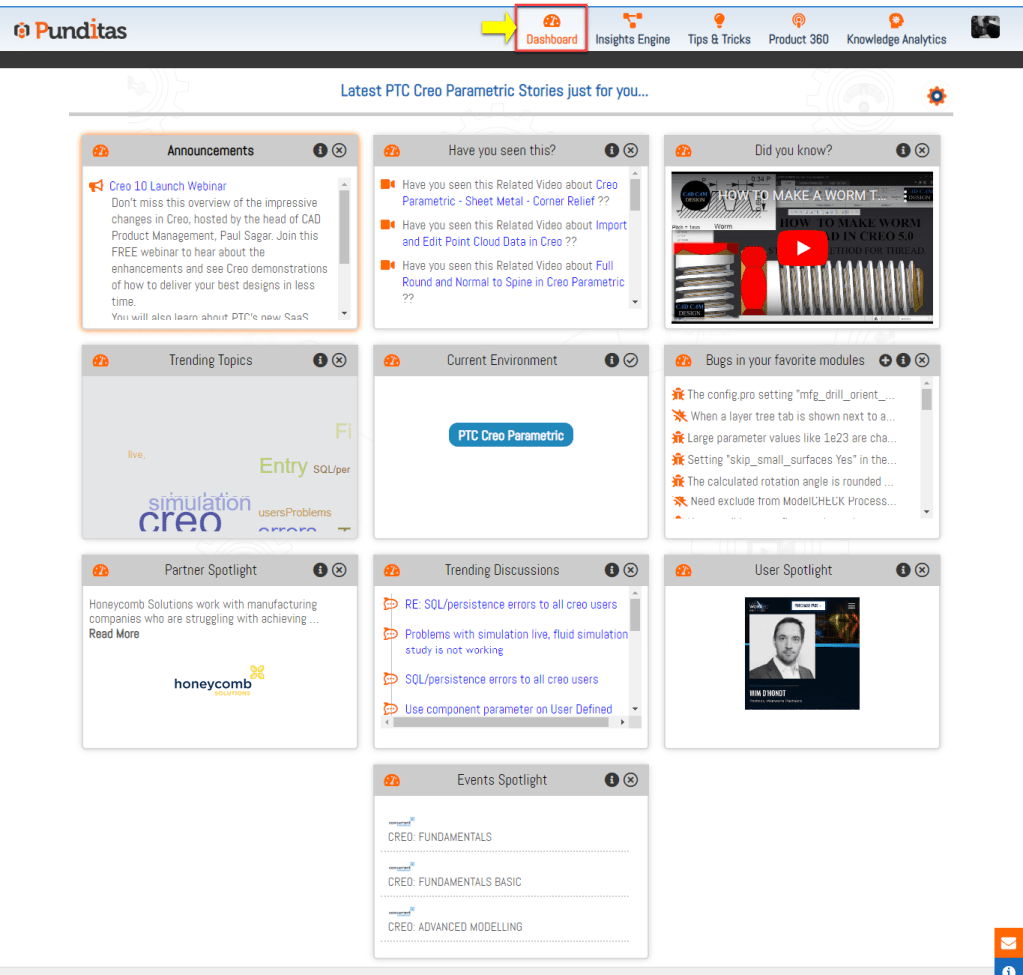
1. Announcements Tile:
This customizable tile allows each customer to display their company-specific announcements. Configuration of this tile is managed by an Admin user of Punditas through the Admin User Interface. The content within this tile is exclusively visible to all users within the company. Admins have the flexibility to add, delete, or modify the content as needed. Additionally, the displayed content is based on expiration dates set by the Admin, ensuring that only relevant announcements are showcased. Examples of content include notifications about upcoming Creo downtime or planned upgrades to Creo versions.
2. Have You Seen This?
This tile offers curated tutorials and courses tailored to your specific interests, all of which have been carefully vetted for quality. The content displayed here is directly influenced by the “Product” you’ve selected in the Current Environment tile, ensuring its relevance to your needs. Whether you’re an expert or a beginner, you’ll find valuable video tutorials and courses suited to your level. By simply reloading the Punditas AI Dashboard, you can discover a fresh selection of 10 video tutorials and courses each time, providing a dynamic and enriching learning experience.
3. Did You Know?
This tile showcases recently published video tutorials sourced from various online platforms such as YouTube, Vimeo, and Learning Connector. While the Punditas AI repository houses thousands of video tutorials, only the most recent ones are displayed here, selected randomly to match your specific interests. By reloading the Punditas AI Dashboard or through automatic updates, you’ll find the content in this tile constantly refreshed, offering you a dynamic selection of video tutorials tailored to your preferences.
4. Trending Topics
This tile presents a word cloud representing the topics currently dominating discussions across various online communities related to CAD, PLM, IoT, AR, and other relevant technologies. It offers a quick glimpse into the ongoing conversations within these fields, providing insight into the latest trends and interests. The size of each word in the cloud corresponds to its frequency of appearance in recent discussions, with larger words indicating greater prevalence. Governed by the selected “Product” from the Current Environment tile, this Trending Topics feature ensures relevance to your specific interests. Updated weekly, it reflects the most talked-about subjects over the past seven days.
5. Current Environment
This tile presents a comprehensive list of all the products licensed by the user’s organization, each corresponding to the subscriptions purchased. Users have the flexibility to select a product that aligns with their specific areas of interest. Importantly, the tiles available on the Punditas AI Dashboard are entirely dependent on the product selected from this tile. This ensures that the content and features provided within the dashboard are tailored to the chosen product, optimizing relevance and utility for the user.
6. Bugs in your favorite modules
This tile serves as a centralized hub for users to access both open and closed issues pertaining to their favorite modules. Users have the option to designate certain modules as favorites, allowing them to stay informed about bugs and issues specific to their areas of interest. Within the tile, open and closed bugs are visually distinguished by icons for user convenience. Not only does the tile provide a summary of each bug, but it also offers detailed information such as the update or modification date, reported release, resolved release, and any future plans regarding the issue. Importantly, the bugs showcased in this tile are tailored to the selected “Product” from the Current Environment tile, ensuring relevance and applicability to the user’s chosen product.
7. Partner Spotlight
This tile acts as a comprehensive directory, showcasing technology providers, solution providers, and global systems integrators. It offers users the chance to directly engage with partners associated with the selected product from the Current Environment tile. Through the Partner Spotlight feature, users can gain insight into partner companies, presented with brief introductions and logos. For instance, if the selected product is PTC Creo Parametric, the Partner Spotlight will highlight partners from the PTC Partner Network. The data displayed in this tile can be refreshed by reloading the Punditas AI Dashboard, ensuring users have access to up-to-date information on partner entities relevant to their chosen product.
8. Trending Discussions
This tile provides a comprehensive overview of the latest discussions spanning the past seven days across various online forums. Punditas AI aggregates discussions from prominent online communities such as the PTC Community, MCAD Central, Eng-Tips, 3DCAD Forum, and others. Users can stay informed about ongoing trends and topics related to the selected product from the Current Environment tile by reviewing the summarized discussions presented here. This feature enables users to remain up-to-date with relevant developments and insights within their chosen product domain.
9. User Spotlight
This tile serves as a platform for exploring profiles of professionals working in fields such as CAD, PLM, IoT, AR, and related technologies. Users can connect with fellow professionals worldwide, learning about their experiences, areas of interest, current roles, and more. Punditas AI also enables users to showcase their own profiles, fostering networking and collaboration within the community. Importantly, the content displayed in this tile is tailored to the selected “Product” from the Current Environment tile, ensuring relevance to users’ specific interests and expertise within their chosen product domain.
10. Event Spotlight
This tile presents a comprehensive view of ongoing and upcoming events, training sessions, and webinars. Users can quickly identify the hosting platforms by viewing company logos, while event titles provide essential information about each event directly on the Punditas AI dashboard through the Event Spotlight tile. Governed by the selected “Product” from the Current Environment tile, this feature ensures that users receive event listings tailored to their specific product interests. Additionally, Punditas AI offers organizations the opportunity to showcase their events within this tile, facilitating broader visibility and participation within the community.
11. Latest News
This tile provides a curated feed of the most recent news sourced directly from official websites and social media accounts, delivering accurate and up-to-date information relevant to the selected product from the Current Environment tile. Users can stay informed about the latest improvements, developments, and handy tips related to the product, ensuring they are always up-to-speed with valuable insights. The content within this tile is specifically tailored to the selected product, offering users targeted updates and enhancements directly from the source.
What is Punditas AI Advisor?
Punditas AI Advisor provides real-time guidance as you work in the Creo environment. Information on “how to use” a feature in Creo or best practices for working with Creo are presented within context, removing the need to guess or search for such information. Punditas AI driven content helps you leverage Creo to create your designs faster and with confidence.
For more information about Punditas AI Advisor, visit our website at Punditas AI or contact us at contact@punditas.com
 Punditas
Leave a comment