

Punditas AI offers an all-encompassing Tips & Tricks module thoughtfully designed to provide users with valuable guidance and insights tailored to their chosen product within the Current Environment tile. This module comprises three distinct tabs, each serving a unique purpose to elevate the user’s interaction:
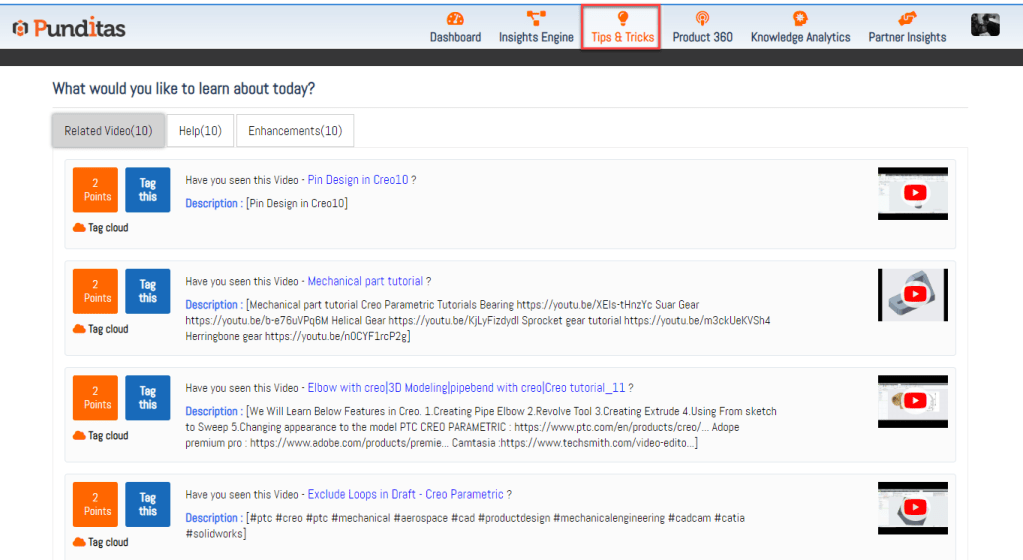
- Related Videos: Within this tab, Punditas AI thoughtfully curates the latest and most pertinent video content related to the selected product (e.g., Creo Parametric, ThingWorx, Solidworks, Onshape, Windchill, etc.). Users gain access to a handpicked selection of up-to-date and trending visual resources, spanning tutorials, demonstrations, and product overviews, enriching their learning experience with engaging multimedia content.
- Help: The Help tab emerges as an indispensable resource, bridging users to a vast repository of knowledge and support. Here, users discover a curated assortment of help articles, FAQs, and documentation specifically tailored to their chosen product. This section empowers users with comprehensive insights and step-by-step guidance, streamlining problem-solving and troubleshooting processes with ease.
- Enhancements: Serving as a portal to the latest product advancements and updates, the Enhancements tab ensures users remain abreast of ongoing developments. Punditas AI aggregates a comprehensive list of enhancements and feature additions pertinent to the selected product, enabling users to stay informed and capitalize on the latest innovations. Regular perusal of this tab equips users to harness product advancements effectively, maximizing their product experience.
By thoughtfully organizing these three tabs with the latest and most pertinent information, Punditas AI streamlines the user’s access to accurate and pertinent insights. This intuitive feature simplifies the acquisition of product information, empowering users to navigate, learn, and optimize their product usage with unparalleled efficiency.
What is Punditas AI Advisor?
Punditas AI Advisor provides real-time guidance as you work in the Creo environment. Information on “how to use” a feature in Creo or best practices for working with Creo are presented within context, removing the need to guess or search for such information. Punditas AI driven content helps you leverage Creo to create your designs faster and with confidence.
For more information about Punditas AI Advisor, visit our website at Punditas AI or contact us at contact@punditas.com
 Punditas
Leave a comment