
In the ever-evolving landscape of enterprise software, access to accurate and timely information is essential for both novice and experienced users. Punditas AI recognizes this need and offers a dedicated Help tab that serves as a bridge to a wealth of knowledge and support, tailored specifically to the product of interest. Let’s explore the features, benefits, and applications of this invaluable resource.
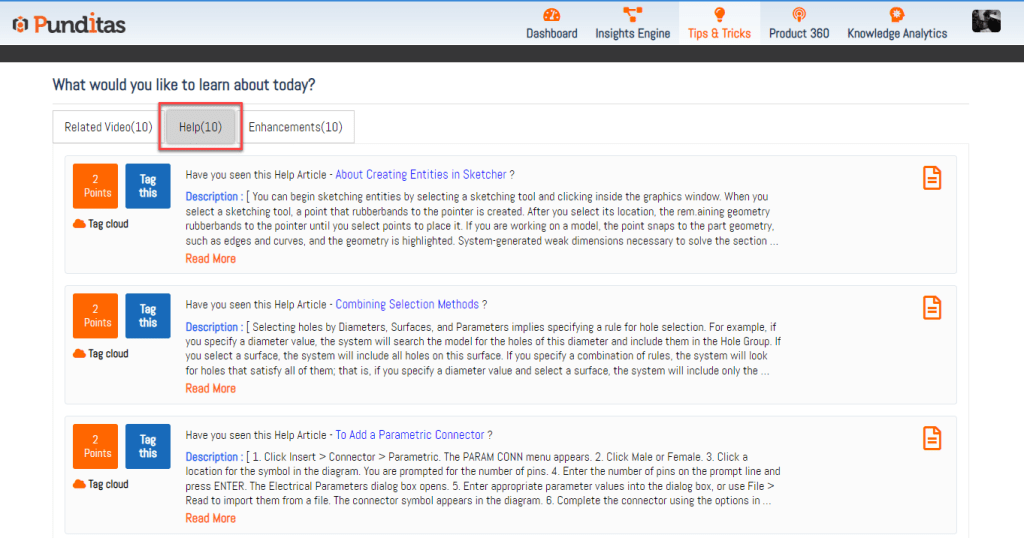
Understanding the Help Tab
The Help tab within Punditas AI is meticulously designed to provide users with easy access to a curated collection of help articles and comprehensive documentation. Here’s what makes this feature indispensable:
Curated Knowledge Base
- Tailored Content: The Help tab presents resources that are specifically relevant to the selected product, ensuring that users receive the most pertinent information for their needs.
- Comprehensive Guides: From detailed tutorials to in-depth documentation, this section covers a wide range of topics, enabling users to navigate and master their chosen software.
User-Friendly Design
- Step-by-Step Instructions: The Help tab offers clear, concise guides that simplify problem-solving and troubleshooting, making complex tasks more approachable.
- Accessible Resources: Whether you’re addressing common questions or seeking specialized information, the Help tab acts as your go-to repository, facilitating a smooth user experience.
Advantages of the Help Tab in Punditas AI
Enhanced User Experience
- Empowerment Through Knowledge: By providing access to a wealth of information, the Help tab empowers users to tackle challenges confidently and independently.
- Support for All Levels: Catering to both newcomers and seasoned professionals, the Help tab ensures that users of all experience levels can find the guidance they need.
Efficiency and Productivity
- Streamlined Problem-Solving: With direct access to comprehensive resources, users can resolve issues quickly, minimizing downtime and maximizing productivity.
- Focused Learning: The curated nature of the content allows users to focus on relevant information, avoiding the clutter of unrelated data.
Why Choose Punditas AI?
Punditas AI stands out as an essential tool for enterprise software users for several reasons:
- Advanced Content Curation: By tailoring resources to specific products, Punditas AI ensures that users receive targeted support, enhancing their learning experience.
- Continuous Improvement: Regular updates and additions to the Help tab keep users informed about the latest developments and best practices in their field.
When to Utilize Punditas AI
Punditas AI is particularly helpful in the following scenarios:
- Learning and Onboarding: New users can leverage the Help tab to familiarize themselves with the software, accessing step-by-step guides and tutorials.
- Troubleshooting and Support: Experienced users can quickly find solutions to specific issues, streamlining their workflow and minimizing disruptions.
The Help tab in Punditas AI is more than just a support feature—it’s a comprehensive resource designed to empower users by providing them with the information they need to succeed. Whether you’re a beginner seeking guidance or a seasoned professional looking for specific solutions, the Help tab offers a user-friendly repository of knowledge that enhances your software experience. Embrace the support of Punditas AI to navigate challenges with confidence and optimize your productivity in the enterprise software landscape.
What is Punditas AI Advisor?
Punditas AI Advisor provides real-time guidance as you work in the Creo environment. Information on “how to use” a feature in Creo or best practices for working with Creo are presented within context, removing the need to guess or search for such information. Punditas AI driven content helps you leverage Creo to create your designs faster and with confidence.
For more information about Punditas AI Advisor, visit our website at Punditas AI or contact us at contact@punditas.com
 Punditas
Leave a comment