

Staying current with Creo software is often a challenge for many users. Finding the right training sessions can feel overwhelming, especially with the multitude of available options. Punditas AI provides an innovative solution that transforms how users engage with their learning. By utilizing artificial intelligence, this platform tailors training to individual needs, making it easier than ever to boost skills and career prospects.
This article explores how to harness Punditas AI’s Event Spotlight feature, enabling you to maximize your Creo capabilities.
Accessing and Navigating Punditas AI’s Event Spotlight
Locating the Event Spotlight Tile
To access the Event Spotlight within the PTC Creo interface, follow these steps:
- Open your PTC Creo application.
- Look for the Punditas AI Tab on Creo embedded browser.
- Event Spotlight tile is the very first tile available on Punditas AI page.
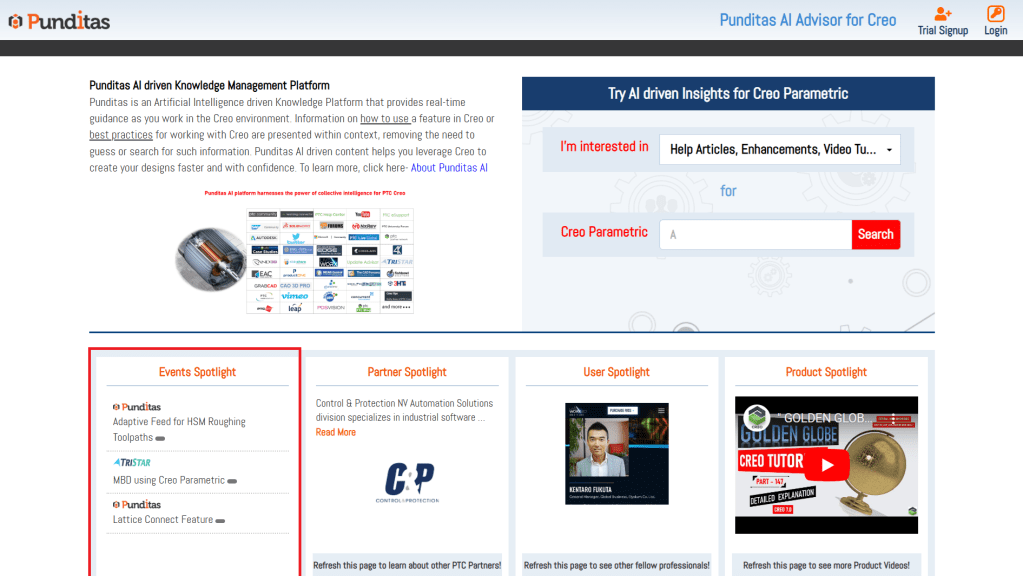
Understanding the Event Spotlight Interface
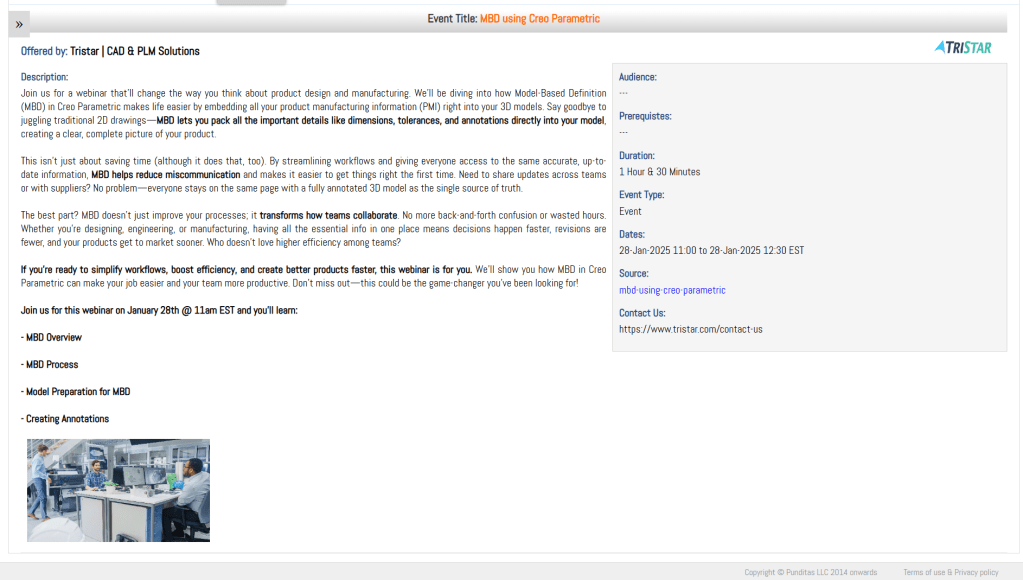
The Event Spotlight tile provides essential information for each event, including:
Title: The name of the event.
Description: A summary of what the event covers.
Link: A direct route to the event registration page.
Schedule: Details about the date and time of the event.
Duration: How long the event will last.
Filtering and Searching for Events
Punditas AI offers a variety of formats, such as:
Webinars: Online sessions featuring expert speakers.
Workshops: Interactive sessions with hands-on learning.
Training Courses: In-depth studies on specific topics.
Identifying Relevant Events
Read through event descriptions carefully to find those that match your career goals. Look for keywords or concepts related to skills you want to develop.
Registering for Events
To register for an event, follow these steps:
Click on the chosen event in the Event Spotlight tile.

Review the event details to ensure it aligns with your objectives.
Click the registration link and complete the required information.
Leveraging Punditas AI for Enhanced Creo Proficiency
Beyond Event Spotlight
Punditas AI features more than just Event Spotlight. Other tiles include:
Partner Spotlight: Information about partnerships and collaborations.
User Spotlight: Insights based on user activity and preferences.
Product Spotlight: Details about specific PTC products and tools.
Integrating AI-Driven Learning into Your Workflow

As you work within the Creo environment, Punditas AI provides real-time guidance. Context-sensitive information helps you understand features and best practices without needing to search for answers.
Staying Updated with Industry Trends and Best Practices
The Value of Continuous Learning
In the CAD industry, ongoing learning is vital. Statistics show that nearly 70% of employers seek professionals who commit to skill advancement. Keeping up with new trends is essential for career growth.
Utilizing Punditas AI for Continuous Improvement
Make it a habit to check for new training events regularly. Punditas AI helps you stay informed about the latest advancements and learning opportunities.
Building a Personalized Learning Plan
Create a structured plan for your skill development by using Punditas AI’s resources. Identify areas for growth, select relevant events, and track your progress over time.
Maximize Your Creo Skills with Punditas AI
Utilizing Punditas AI’s Event Spotlight offers significant benefits. It provides tailored learning opportunities, real-time guidance, and ongoing updates that help users excel in their careers. Explore the platform and register for upcoming events today to take your Creo skills to the next level.
For more information, visit the Punditas AI website and connect with us on LinkedIn, Facebook, and Twitter.
 Punditas
Leave a comment