

In the high-pressure world of design and engineering, every second matters. You’re on tight deadlines. You need answers quickly, and they must be relevant. Yet, the typical search experience—whether on a corporate portal, help documentation, or even external forums—can leave you endlessly scrolling through outdated or generic results.
Enter Punditas AI’s Insights Engine.
Unlike traditional search tools that rely on simple keyword matching, the Punditas Insights Engine uses context-aware AI to understand what you actually mean—and what you need next. Here’s how it redefines the search experience for PTC Creo users and design engineers.
Traditional search vs. Punditas AI: a broken experience fixed
Let’s break down a typical scenario:
You’re working on a complex model in PTC Creo and need help with “Fast Bounding Box Calculation”
What traditional search gives you:
- A list of articles with vague or mismatched titles.
- Results from outdated versions of Creo.
- General documentation that doesn’t address your specific scenario.
- No clear guidance on what to do next.
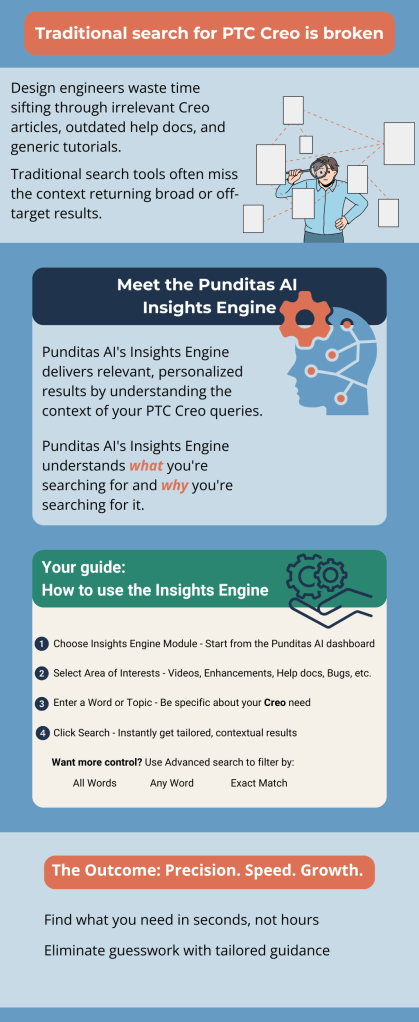
What Punditas AI delivers:
- Targeted results specific to your Creo version.
- Results grouped by relevance: Video tutorials, bugs, help docs, customer experiences.
- AI-powered suggestions based on your past searches.
- Actionable tips and banners showing latest enhancements or workarounds.
The difference? Punditas AI doesn’t just search. It understands.
How Punditas AI understands you
The magic lies in its Insights Engine, which uses advanced AI and machine learning techniques to analyze the context behind your search:
Context-aware understanding:
If you search for “Fast Bounding Box Calculation” the AI doesn’t just match those words. It understands:
- What version of Creo you’re using.
- Whether you’re looking for a tutorial, help doc, or known bug.
- The common issues users face with this feature.
- Similar past queries by other users.
Machine learning gets smarter over time:
Each time you use Punditas AI, it learns from:
- Your selections.
- The type of content you consume.
- Your role and behavior patterns.
That means your experience gets better the more you use it.
Personalized, filtered, and fast
One of the standout features of Punditas AI is its Search Mode Customization:
- All Word Search – Finds results that include every word in your query.
- Exact Phrase Search – Returns results matching your full phrase exactly.
- Any Word Search – Pulls up results for any of the words used.
This flexibility makes it easy to tailor your search depending on what you’re looking for. You’re never overwhelmed or misled.
Recommendations That Work With You
What if you didn’t even have to search?
Punditas AI’s smart recommendations work proactively by:
- Analyzing your past search behavior.
- Tracking the most viewed content in your domain.
- Recommending learning resources, bug fixes, or case studies without you asking.
Imagine opening your dashboard and instantly seeing:
- A new workaround for a known bug you’ve searched before.
- A recently published video tutorial on a command you use frequently.
Real-time knowledge at your fingertips
Unlike static documentation, Punditas AI provides:
- Updates on new Creo features as banners within the app.
- A Knowledge Graph showing all information nodes connected to your search.
- Filters for perspectives—Product, Support, Customer, References, Partner.
This transforms your search into a visual, contextual knowledge discovery.
Final thoughts
Punditas AI gives Creo users and engineers that power—by delivering results that are contextual, personalized, and relevant. The more you use it, the more it works in your favor.
Why waste time digging through cluttered search results when answers could come to you?
Ready to See the Difference?
Join hundreds of design engineers using Punditas AI to save time, reduce rework, and unlock true productivity.
👉 Sign up now for Punditas AI
🔗 Let AI guide your design journey—smarter, faster, better.
 Punditas
Leave a comment