

New CAD features often promise better geometry control, speed, and flexibility—but only if users can learn and apply them efficiently. One such example is “Divide Surface” and “Unify Surfaces”—two powerful enhancements in Creo designed to give engineers greater surface control. But like many advanced modeling tools, they’re underused due to one reason: lack of timely, actionable guidance.
In this post, we’ll delve into how Punditas AI solves this learning bottleneck by turning fragmented CAD resources into a real-time, intelligent guidance system—using Divide & Unify Surfaces as a practical example.
Why “Divide” and “Unify” matter in Creo surface modeling
The Divide Surface feature in Creo allows users to split a surface into multiple regions based on sketch entities. This is incredibly useful for:
- Applying different boundary conditions in simulation
Meanwhile, Unify Surfaces lets you merge multiple adjacent surfaces into one. It’s invaluable for:
- The new feature Unify Surfaces can be used to reunify surfaces that have been previously created by the Divide Surface feature or have been created during a model import.
These tools offer significant downstream impact—but they also come with nuances. Misuse or incomplete understanding can lead to broken references, unintended geometry changes, or rebuild errors.
The challenge: Learning in the middle of work

Here’s the reality for most Creo users:
“I saw the release notes, but I haven’t tried this feature yet.”
“I tried it once… and things didn’t work as expected.”
“I just don’t have time to figure this out.”
Traditional training methods—PDF manuals, lengthy videos, or static help centers—fail in the real-world pace of product design.
That’s where Punditas AI makes a meaningful difference.
Context-aware learning with Punditas AI
When a Creo user activates or searches for a new feature like Divide and Unify Surfaces, Punditas AI Advisor immediately serves up:
- Short, task-specific video clips, Help docs
- Workarounds and real-world usage tips from power users
- Known issues or bugs reported for that exact command
- Community discussions answering “why” and “when” to use it

This is not just a collection of links—it’s a Knowledge Graph filtered, ranked, and presented based on your exact context in Creo.
Discover Punditas AI Knowledge Graph
A real example: Precision mesh control on a curved surface
You’re modeling a turbine blade and need to define a refined mesh zone on its curved suction side. It’s not a simple flat face—this surface has complex curvature.
Without Punditas:
- You sit through a generic, outdated tutorial—helpful only for flat geometry.
- You try projecting a sketch manually—unsure if the curvature is causing errors.
- You waste time debugging broken features after a regeneration fails.
With Punditas:
- A focused Creo guide walks you through dividing complex surfaces—specifically curved ones.
- You get an instant information about the ongoing or resolved issues relation to feature or functionality (Dive and Unify surfaces)
- A smart workaround appears: “Suggested Technique for Applying Mesh Control in Creo”
The difference?
You understand what went wrong, learn how to fix it, and confidently apply mesh control—without guesswork or rework.
Why structured knowledge paths matter
When your team is trying to adopt new modeling techniques across a workflow, Knowledge Paths from Punditas provide structured content in logical steps:
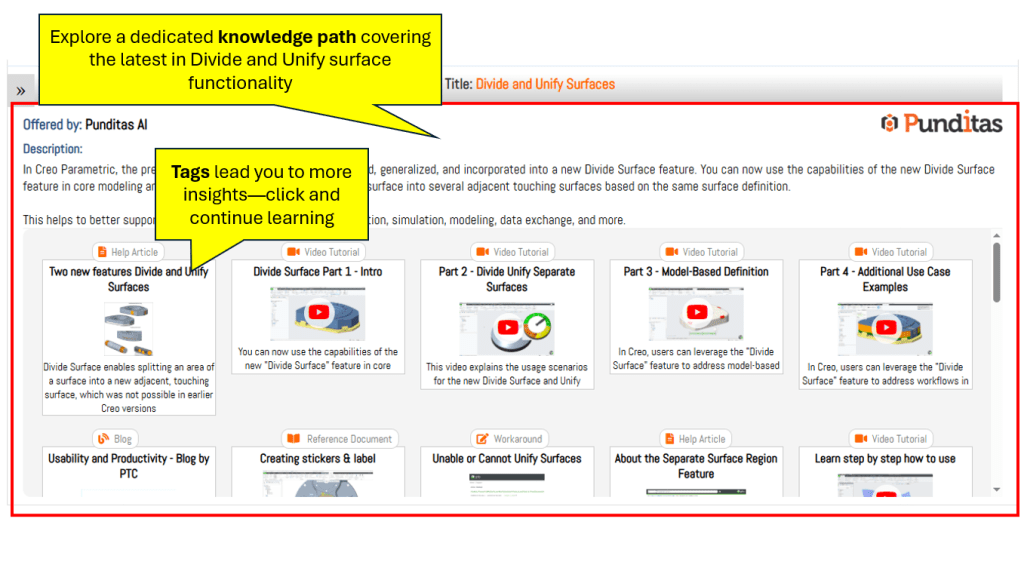
- What it is (feature documentation)
- Why it matters (blogs, case studies, design applications)
- How to use it (tutorials, guidance, Help docs)
- What to avoid (known issues, performance notes)
- How to extend it (community tricks, related tools)
This approach helps engineering teams standardize usage, reduce errors, and increase design throughput without pulling users away from their projects.
Discover Punditas AI Knowledge Path
What’s behind the scenes: the Punditas AI engine
Punditas isn’t a static library—it’s a dynamic, self-updating AI engine that monitors:
- New Creo releases and feature changes
- User activity patterns (what they search, what they skip)
- Bug reports and issue resolutions
- Community Insights across 500,000+ discussions
- Effectiveness of learning materials based on engagement

Every suggestion it makes is based on actual usage data and performance impact, not just what’s new or flashy.
The future of Creo productivity isn’t more features—it’s smarter learning
Creo will continue to innovate. But unless users can confidently and efficiently adopt new tools, the value stays locked.
Punditas AI helps engineers:
- Shorten learning curves from hours to minutes
- Get context-aware help exactly when needed
- Adopt new Creo features like Divide & Unify Surfaces without breaking design flow
- Make better design decisions backed by real-world data
Whether you’re a Creo power user, a team lead responsible for productivity, or a new designer navigating complex surfacing—Punditas is the AI layer that turns Creo from a tool into a learning system
What is Punditas AI Advisor?
Punditas AI Advisor provides real-time guidance as you work in the Creo environment. Information on “how to use” a feature in Creo or best practices for working with Creo are presented within context, removing the need to guess or search for such information. Punditas AI driven content helps you leverage Creo to create your designs faster and with confidence.
For more information about Punditas AI Advisor, visit our website at Punditas AI or contact us at contact@punditas.com
 Punditas
Leave a comment