

Whenever PTC brings out a new release of Creo—regardless of whether it’s a major or minor release—the one question that is on every designer’s mind is:
What’s new?
What additional features have been added? Which tools have been enhanced? How can we make better use of these enhancements to work smarter and faster?
But even though the pace of innovation has been nothing short of staggering, the fact of the matter is that it can be overwhelming trying to stay on top of each and every improved feature, added function, or subtle change of workflow— especially when you’re already dealing with tough deadlines and intricate design projects.
That’s exactly where the Punditas AI comes in—by converting “what’s new in Creo” from a vague curiosity into a clear, actionable knowledge experience.
Explore every angle with product 360
To bridge the gap between Creo releases and user adoption, Punditas AI introduces the Product 360 module—an immersive environment offering a complete, 360-degree view of the latest product updates.
Whether you’re exploring Creo, Windchill, SolidWorks, or other supported platforms, the Product 360 module gives you:
- A detailed “What’s New” overview
- Hands-on tutorials and help articles
- Real user feedback from community discussions
- Contextual value summaries for every feature
This means Creo users don’t just learn what has changed—they understand why it matters and how to apply it effectively.

Breaking it down: What you’ll find in Product 360
The Product 360 module is not just a summary—it’s a strategically curated exploration hub. Each enhancement or new feature is presented with multiple layers of insight:
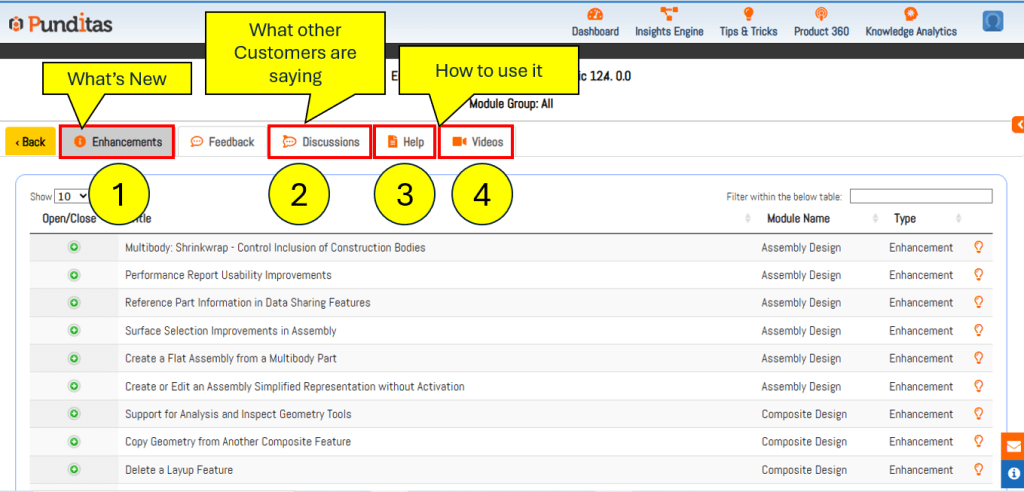
- What’s New: Quickly scan through recent Creo feature updates across releases. From UI improvements to modeling enhancements, nothing gets missed.
- How to Use It: Access contextual tutorials, videos, and help docs directly tied to the new features. No need to hunt through long manuals or outdated guides—this is hands-on learning, right where you need it.
- What Other Customers Are Saying: Learn from real-world usage. This section shares feedback, workarounds, and peer discussions from the global Creo user community—giving you a wider lens into actual design practices.
Stay ahead without slowing down
New Creo features hold immense value—but only if they’re discovered, understood, and used.
With Punditas AI, your team gets the tools to do just that—without interrupting work, attending extra training, or navigating scattered resources.
Ready to unlock the full potential of Creo’s latest releases?
Explore the Product 360 module in Punditas AI—and stay current, confident, and connected with everything Creo has to offer.
What is Punditas AI Advisor?
Punditas AI Advisor provides real-time guidance as you work in the Creo environment. Information on “how to use” a feature in Creo or best practices for working with Creo are presented within context, removing the need to guess or search for such information. Punditas AI driven content helps you leverage Creo to create your designs faster and with confidence.
For more information about Punditas AI Advisor, visit our website at Punditas AI or contact us at contact@punditas.com
 Punditas
Leave a comment