
When Creo users run into a problem — maybe a modeling error, a complex feature, or something just not working right — their natural instinct is to look for help online.
And for most users, the go-to destination is YouTube.
It’s fast, it’s free, and it’s full of content. But here’s the question:
Is YouTube always the best place to solve a Creo design issue?
We’ve been observing and interacting with many Creo users recently, and a common pattern emerged:
Most users start with YouTube, but don’t always find what they need quickly — or even at all.

What’s the problem with traditional search?
Platforms like YouTube, Vimeo etc. have a massive amount of content — but they suffer from a critical flaw:
They don’t know what you’re really trying to do.
They treat your search as just a string of words. They don’t:
- Understand if you’re a beginner or advanced user
- Know which Creo version you’re on
- Realize you’re in the middle of designing a complex gear system or editing a part model
This leads to vague, generic results. You end up watching multiple videos, reading outdated articles, and still feeling stuck.
Enter Punditas AI’s insights engine: context is everything
Punditas AI is built specifically to support PTC Creo users in real-time. Its Insights Engine goes far beyond keyword search.
Here’s how it’s different:
It understands your intent
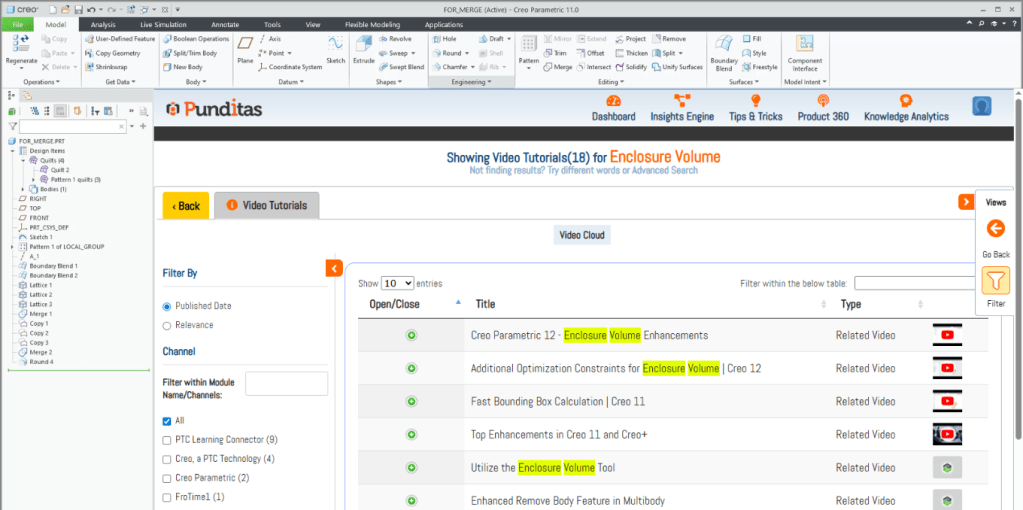
Whether you’re searching for a feature like “Enclosure Volume” or an error like “Errors during model retrieval,” the engine knows the context and provides targeted results.
It gives personalized answers
Using AI + machine learning, it adapts to your behavior over time — serving more of what you need, less of what you don’t.
It aggregates from everywhere — and curates
Yes, Punditas pulls videos from YouTube, Vimeo, PTC Learning Connector, blogs, help centers, and even internal knowledge bases.
But it doesn’t stop there. It verifies and organizes this content using a Knowledge Graph, ensuring that the most relevant and updated resources are shown first.
Everything in one place: The Video Tutorials Node
Instead of hopping between browser tabs, you get a single view showing curated, categorized video tutorials related to your search — directly inside Creo.
Designed for flow, not friction
Punditas AI isn’t just a help tool — it’s a real-time guidance engine that works inside Creo.
That means no more:
- Distractions from YouTube rabbit holes
- Guessing the right search phrase
- Wasting time on irrelevant or outdated tutorials
With Punditas AI, you stay focused, stay inside Creo, and get unstuck — faster.
While YouTube and other platforms are great starting points, they’re not built for precision — especially not for Creo users who need accurate, contextual guidance.
Punditas AI bridges that gap with:
- Verified videos from multiple platforms
- Personalized recommendations
- Real-time, in-app help based on your current design context
Ready to Try It?
👉 Supercharge your Creo Design with Free AI Tips → https://home.punditas.com/Advisor/signup
 Punditas
Leave a comment