

To enhance user efficiency and productivity, Punditas AI has implemented a filtering mechanism within the Video Tutorials node. Given the vast array of video tutorials available based on user search queries, this feature enables users to fine-tune their search and access more precise and relevant information. By leveraging this functionality, users can streamline their search results within the table.
This capability effectively saves users valuable time by eliminating the need for manual sorting through an extensive number of tutorials. The “Filter within the table” feature empowers users to pinpoint the desired video tutorials with precision and ease, enhancing their overall browsing experience and facilitating quicker access to valuable learning resources.
Follow the steps and learn how to use Filter within the below table feature
Step 1:- Insert topic, word or phrase inside the box
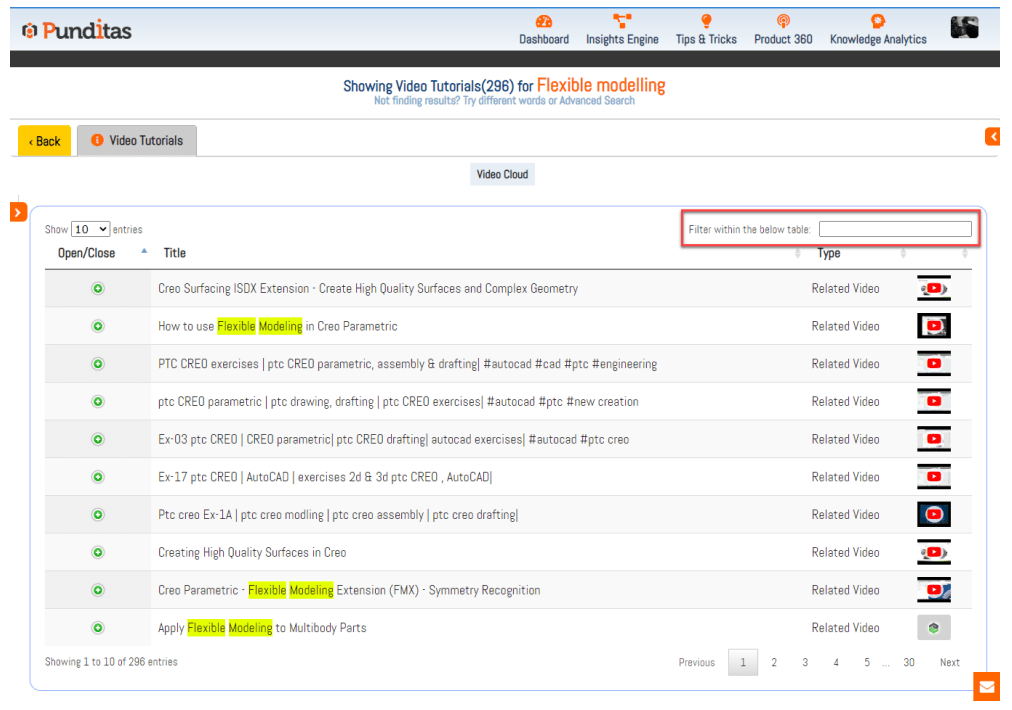
Step 2:- Open Video Tutorial details for searched topic, phrase or word

What is Punditas AI Advisor?
Punditas AI Advisor provides real-time guidance as you work in the Creo environment. Information on “how to use” a feature in Creo or best practices for working with Creo are presented within context, removing the need to guess or search for such information. Punditas AI driven content helps you leverage Creo to create your designs faster and with confidence.
For more information about Punditas AI Advisor, visit our website at Punditas AI or contact us at contact@punditas.com
 Punditas
Leave a comment