
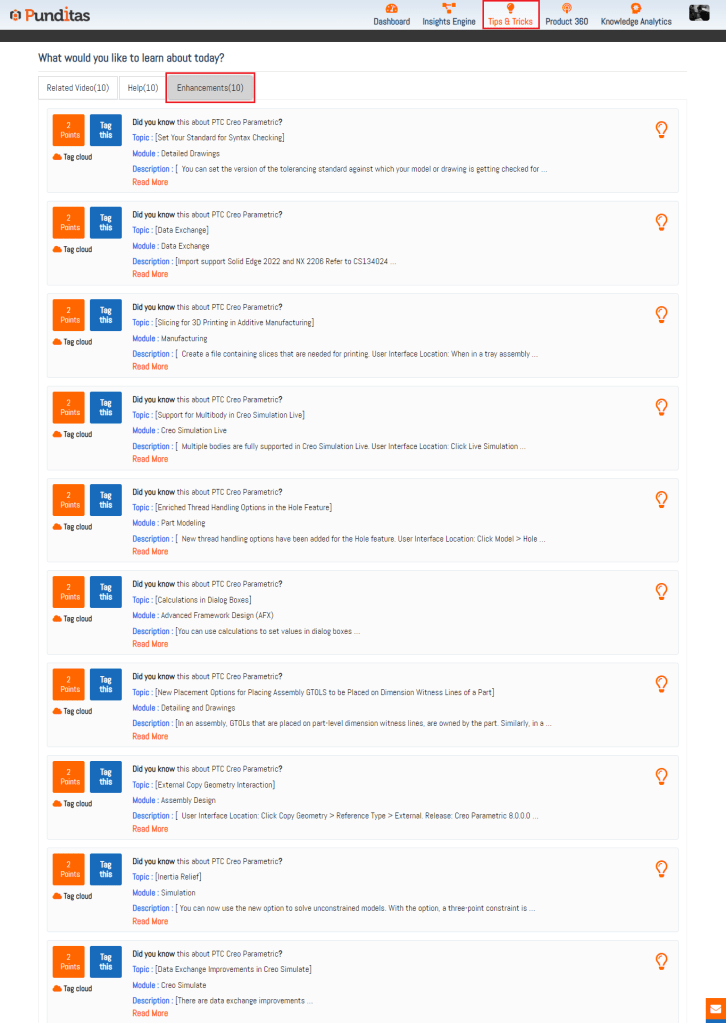
In the fast-paced world of technology, staying updated with the latest insights and guidance is crucial for maximizing the potential of your chosen products. Punditas AI’s Tips & Tricks module is designed to empower users with valuable resources and streamline the process of acquiring essential information. Located within the Current Environment tile, this module consists of three tabs that cater to different user needs: Related Videos, Help, and Enhancements.
Related Videos: Visual Learning at Its Best
The Related Videos tab is a curated collection of the latest and most relevant video content related to your selected product, be it Creo Parametric, ThingWorx, Solidworks, Onshape, Windchill, or any other supported platform. Handpicked to ensure users have access to up-to-date and trending visual resources, these videos range from tutorials and demonstrations to comprehensive product overviews. Whether you’re a beginner looking to learn the basics or an experienced user seeking advanced tips, this tab is a treasure trove of informative videos that enhance your learning experience.

Help: Your Go-To Knowledge Hub
The Help tab serves as a valuable resource, connecting users with a wealth of knowledge and assistance. Here, you’ll find a curated collection of help articles, FAQs, and documentation specific to your chosen product. This section aims to empower users with detailed information and step-by-step guides, making problem-solving and troubleshooting easier than ever. Whether you’re tackling a complex issue or looking for quick answers, the Help tab provides the support you need to navigate challenges effectively.

Enhancements: Stay Ahead with the Latest Updates
The Enhancements tab keeps you informed about the latest product improvements and updates. Punditas AI compiles a comprehensive list of enhancements and feature additions related to your selected product. By regularly checking this tab, users can stay updated on product advancements and leverage new features to optimize their experience. This proactive approach ensures you are always ahead of the curve, utilizing the most recent tools and functionalities available.
Why Punditas AI?
Punditas AI stands out as a powerful tool for several reasons:
- Comprehensive Resource Hub: Consolidates videos, help articles, and enhancements in one place.
- Curated Content: Ensures users have access to the most relevant and up-to-date information.
- User Empowerment: Provides resources that empower users to solve problems and enhance their skills independently.
- Efficiency: Simplifies the process of finding accurate and pertinent insights, saving users time and effort.
When Can Punditas AI Be Helpful?
- Learning New Products: Ideal for beginners who need structured and reliable resources.
- Troubleshooting: Provides detailed guides and FAQs for resolving issues.
- Staying Updated: Keeps users informed about the latest product enhancements and updates.
- Optimizing Usage: Helps advanced users discover new features and tips to maximize their product’s potential.
Advantages of Using Punditas AI
- Enhanced Learning: With access to high-quality videos and comprehensive help articles, users can learn and master their products efficiently.
- Improved Problem-Solving: The Help tab offers step-by-step solutions, making troubleshooting straightforward and less time-consuming.
- Informed Decision-Making: The Enhancements tab ensures users are aware of the latest updates, allowing them to make informed decisions about product usage.
- Time Savings: By consolidating resources in one place, Punditas AI reduces the time spent searching for information, allowing users to focus on their core tasks.
Punditas AI’s Tips & Tricks module is a powerful ally in the journey towards mastering your chosen products. By offering a curated selection of videos, detailed help resources, and updates on the latest enhancements, it ensures that users are always equipped with the knowledge and tools they need. Embrace the power of Punditas AI and transform the way you learn, troubleshoot, and optimize your product usage.
With Punditas AI, you are not just keeping up with the pace of technology; you are setting the pace. Unlock the full potential of your products today and drive your success with the unparalleled insights and guidance that Punditas AI provides.
What is Punditas AI Advisor?
Punditas AI Advisor provides real-time guidance as you work in the Creo environment. Information on “how to use” a feature in Creo or best practices for working with Creo are presented within context, removing the need to guess or search for such information. Punditas AI driven content helps you leverage Creo to create your designs faster and with confidence.
For more information about Punditas AI Advisor, visit our website at Punditas AI or contact us at contact@punditas.com
 Punditas
Leave a comment