

In a fast-paced design environment, performance isn’t just a goal—it’s a necessity. As Creo evolves with powerful tools like Performance Reports for analyzing part and assembly regeneration time, the opportunity to fine-tune model efficiency has never been better. But here’s the catch: even the most powerful tool is only as useful as the user’s ability to access, understand, and apply it in real time.

This is where Punditas AI is paving the smart way of having intelligent information about Creo Parametric within the Creo environment—and redefining how engineers learn, adapt, and excel.
What’s new in Creo: performance report for regeneration analysis
In Creo 11, the Performance Report tool introduces a game-changing enhancement. With just a few clicks, users can analyze how long individual features or components take to regenerate—both in parts and assemblies. Whether you’re dealing with nested subassemblies or a large flat component list, this tool brings clarity and precision.
- See detailed regeneration times
- Sort features and components by performance impact
- View reports in structured or flat lists
- Dive into regeneration bottlenecks and resolve them efficiently
It’s an engineer’s dream—if they know how to use it.
The learning gap: Knowing about vs. knowing how
Here’s the challenge: new capabilities in Creo often go unnoticed or underutilized. Engineers don’t lack curiosity—they lack time. Most can’t afford to browse forums, PDFs, or watch lengthy videos just to understand one enhancement.

That’s why Punditas AI exists—not just as a content aggregator but as a smart, context-aware assistant within Creo that delivers knowledge tailored to your task, model, and tool.
Accelerated Learning with Punditas AI knowledge path
To help users immediately benefit from new tools like Performance Reports, Punditas AI’s Knowledge Path acts like a curated course—one that lives inside Creo and adapts to what you’re working on.
- Step-by-step tutorials
- Feature-specific tips and tricks
- Help documentation explained in practical terms
- Real-world use cases and workflows
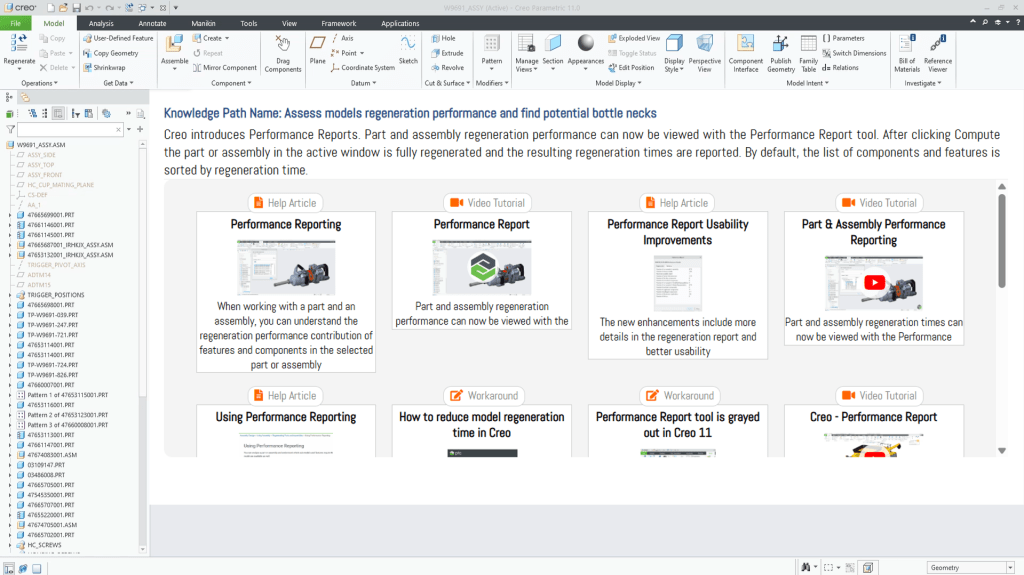
Whether you’re exploring the feature for the first time or using it to debug a large assembly, the Knowledge Path shortens the distance from curiosity to application.
Precision search with Punditas AI knowledge graph
When you’re stuck or unsure, searching the web is often the default behavior—but it’s slow, cluttered, and filled with irrelevant results. Punditas AI’s Knowledge Graph transforms that experience.

It intelligently indexes:
- 40,000+ Creo video tutorials
- 500,000+ online discussions
- 50,000+ known workarounds
- 20,000+ help articles and case studies
Need to troubleshoot regeneration performance? Instead of guessing keywords, Punditas delivers curated, ranked, and structured answers right within Creo.
Punditas AI: Bridging knowledge with intelligence
The Performance Report tool in Creo is just one example of a great feature that’s often underutilized. By combining Knowledge Path, Knowledge Graph, and Knowledge Tags, Punditas AI gives Creo users the exact tools they need to learn quickly, recall accurately, and apply confidently.
In a world where design decisions happen fast and every second counts, Punditas AI makes sure you’re not just using Creo—but mastering it.
See smarter. Learn faster. Design better. That’s Punditas AI
Explore how it helps you work smarter—not just harder.
Explore Knowledge Graph
Access Knowledge Path
Contact us: contact@punditas.com
Try Punditas AI Free
 Punditas
Leave a comment