
From Creo’s earliest releases to the powerful new capabilities of Creo 12.4, PTC has consistently added thousands of features and enhancements—each supported by a wealth of resources: video tutorials, help articles, case studies, presentations, community discussions, bug reports, and more.
But here’s the challenge:
How can any Creo user possibly remember, retrieve, and reuse all of this information when they need it the most—without leaving the Creo environment?
That’s where Punditas AI’s Knowledge Tags come in—transforming how users organize, recall, and act on information inside Creo.
Why bookmarks are not enough for engineers
We’ve all used bookmarks to save useful links. But in the context of a high-performance engineering platform like Creo, a basic URL just doesn’t cut it.
- You still have to open a new browser window.
- You still have to navigate away from your design.
- You still have to sift through tabs or folders to find what you saved.
In fast-paced design workflows—where accuracy and speed matter—this simply adds friction. Bookmarks are passive. Engineers need active, contextual, always-available knowledge.
Introducing knowledge tags: Smart, structured, in-context
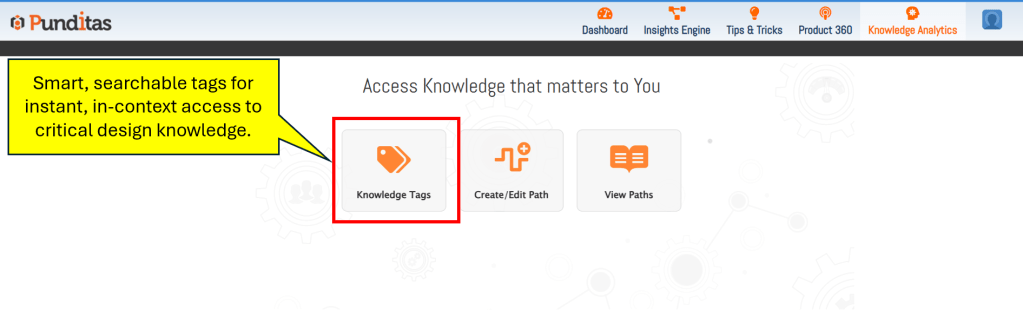
Punditas AI recognized this gap and developed Knowledge Tags, a smarter way to preserve, access, and apply information—without breaking your design flow.
Knowledge Tags go beyond bookmarks. Here’s how:
- Embedded directly in the Creo environment—no switching apps
- Tagged with context (feature, version, task type, etc.) for smarter recall
- Instant access to structured information—videos, help docs, workarounds, bugs, enhancements
- Searchable, reusable, and shareable across teams
Whether you’re troubleshooting an issue, revisiting a modeling technique, or preparing training for your team, Knowledge Tags make it easy to capture what matters and reuse it with precision.
How knowledge tags actually work in Creo
Let’s say you just learned a new surface extension technique in Creo 12.4 using the “Extrapolate” method. You found a great tutorial, explored a help doc, and reviewed a few community tricks.
Now, instead of copying URLs and saving them in a cluttered folder, you simply:
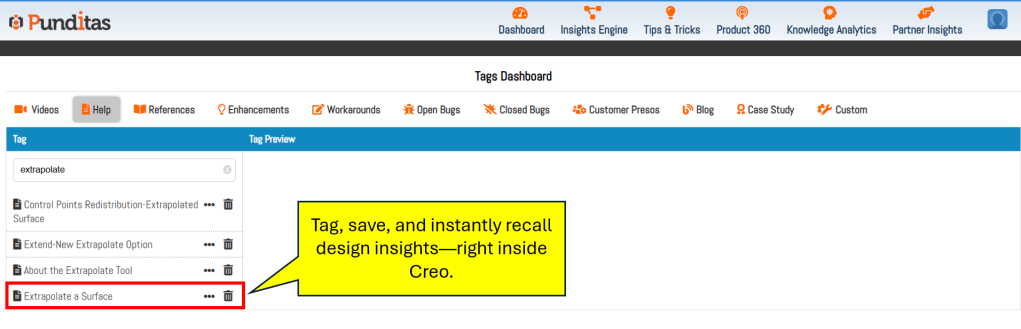
- Tag the content in Punditas AI with relevant labels like “Surface Modeling,” “Creo 12.4,” and “Extrapolate.”
- Add a short note if needed.
- Save it—all within the Punditas AI Advisor, directly inside Creo.
Later, when you’re in a similar modeling task or teaching someone else, you just search or access your Tags in the Knowledge Tags tab. Everything is there—contextually relevant, complete, and one click away.
How this benefits Creo users
The real-world benefits of using Knowledge Tags in Punditas AI are significant:
- Faster Reuse: No more wasting time finding the same info again.
- Context Preservation: You save the content with purpose, not just a link.
- Collaborative Sharing: Teams can align better when critical knowledge is tagged, reused, and shared across projects.
- Smarter Searches: Tags work with AI-driven categorization to help retrieve the most relevant content at the right moment.
- Stay Within Creo: Never lose focus—access guidance right where you work.
Engineering confidence at your fingertips
In today’s fast-moving product development cycles, the ability to find the right knowledge at the right time is a competitive advantage.
Punditas AI’s Knowledge Tags module empowers Creo users to not just consume information—but curate, structure, and apply it intelligently.
It’s the end of forgotten bookmarks and scattered resources—and the beginning of smarter, faster, more confident Creo design.
What is Punditas AI Advisor?
Punditas AI Advisor provides real-time guidance as you work in the Creo environment. Information on “how to use” a feature in Creo or best practices for working with Creo are presented within context, removing the need to guess or search for such information. Punditas AI driven content helps you leverage Creo to create your designs faster and with confidence.
For more information about Punditas AI Advisor, visit our website at Punditas AI or contact us at contact@punditas.com


Leave a Reply