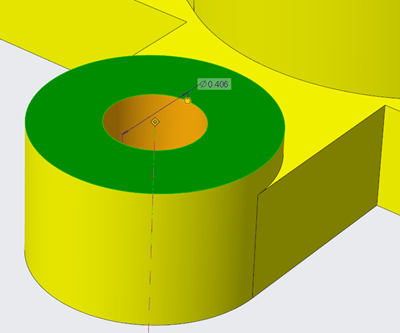
There are new configuration options for displaying or controlling the appearance of dimensions in Creo Parametric 6.0.0.0 release Use the below configuration options to control the appearance of background for dimensions 1. dim_background 2. dim_background_color 3. dim_background_trans A semi-transparent dimension background is set by default. This makes it easier to see and decipher dimension information... Continue Reading →
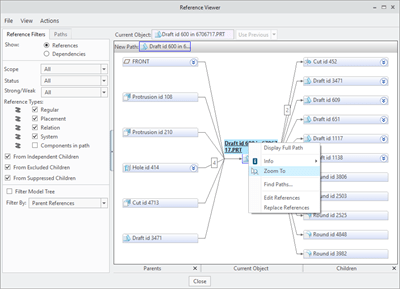
Creo Parametric Tip#1: Did you know that you can easily zoom into the selected reference in the model
In Creo Parametric 6.0.0.0, you can zoom into the selected reference in the model, and to place it in the center of the graphics window. This makes it easier to identify and locate references when you are investigating. For this just goto Tools --> Reference Viewer in Creo Parametric Punditas AI based Knowledge-Centric system automatically... Continue Reading →
Punditas AI Advisor now supports Creo 4.0 M100
Punditas AI Advisor supports Creo 4.0 M100. Punditas AI allows users to learn more about “How”, What” and “Why” of these enhancements through Product 360 module. The picture below shows the Module groups and the corresponding enhancements added within each group. To try this out, please signup for a FREE trial at Punditas AI Modules and... Continue Reading →
Punditas AI Advisor now supports Creo 4.0 M090
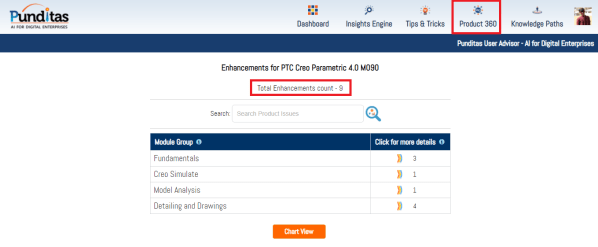
Punditas AI Advisor supports Creo 4.0 M090.Punditas AI allows users to learn more about “How”, What” and “Why” of these enhancements through Product 360 module. The picture below shows the Module groups and the corresponding enhancements added within each group. To try this out, please signup for a FREE trial at Punditas AI Modules and Enhancements... Continue Reading →
Punditas AI Advisor now supports Creo 4.0 M080
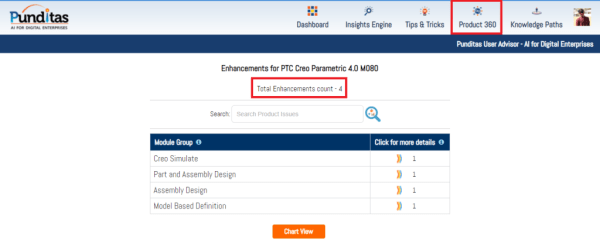
Punditas AI Advisor supports Creo 4.0 M080.Punditas AI allows users to learn more about “How”, What” and “Why” of these enhancements through Product 360 module. The picture below shows the Module groups and the corresponding enhancements added within each group. To try this out, please signup for a FREE trial at Punditas AI Modules and Enhancements... Continue Reading →
Punditas AI Advisor now supports Creo 4.0 M070
Punditas AI Advisor supports Creo 4.0 M070. Punditas AI allows users to learn more about “How”, What” and “Why” of these enhancements through Product 360 module. The picture below shows the Module groups and the corresponding enhancements added within each group. To try this out, please signup for a FREE trial at Punditas AI Modules and... Continue Reading →
Punditas AI Advisor now supports Creo 4.0 M050
Punditas AI Advisor supports Creo 4.0 M050.Punditas AI allows users to learn more about “How”, What” and “Why” of these enhancements through Product 360 module. The picture below shows the Module groups and the corresponding enhancements added within each group. To try this out, please signup for a FREE trial at Punditas AI Modules and Enhancements... Continue Reading →
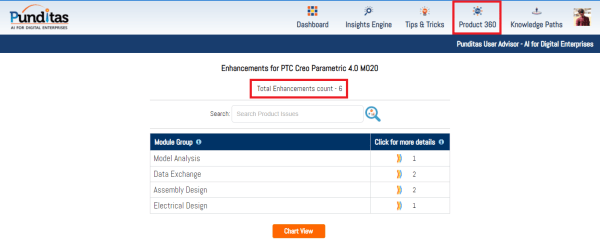
Punditas AI Advisor now supports Creo 4.0 M020
Punditas AI Advisor supports Creo 4.0 M020. Punditas AI allows users to learn more about “How”, What” and “Why” of these enhancements through Product 360 module. The picture below shows the Module groups and the corresponding enhancements added within each group. To try this out, please signup for a FREE trial at Punditas AI Modules and... Continue Reading →
Punditas AI Advisor now supports Creo 4.0 F000
Punditas AI Advisor supports Creo 4.0 F000. Punditas AI allows users to learn more about “How”, What” and “Why” of these enhancements through Product 360 module. The picture below shows the Module groups and the corresponding enhancements added within each group. To try this out, please signup for a FREE trial at Punditas AI Modules and... Continue Reading →