

Within the immersive learning environment of Punditas AI‘s Video Tutorials Node, a dynamic and comprehensive feature known as the “Tags” field takes center stage. This field represents a treasure trove of metadata meticulously curated by the original creators of the video tutorials.
Drawing from the rich source material, the Tags field showcases an array of descriptors, seamlessly integrated to offer users an unparalleled depth of knowledge. These tags, effortlessly collected from the source site, provide a valuable glimpse into the essence and content of each tutorial. They act as powerful signposts, guiding users towards topics of interest and ensuring a seamless navigation experience.
The beauty of the Tags field lies not only in the wisdom of the original creators but also in the collective intelligence of the Punditas AI community. Empowering individual users with a sense of agency, the platform invites them to contribute their own unique perspectives by adding user-created tags. Represented in a striking green color, these custom tags expand the searchability and categorization of the tutorials, enhancing the overall learning journey.
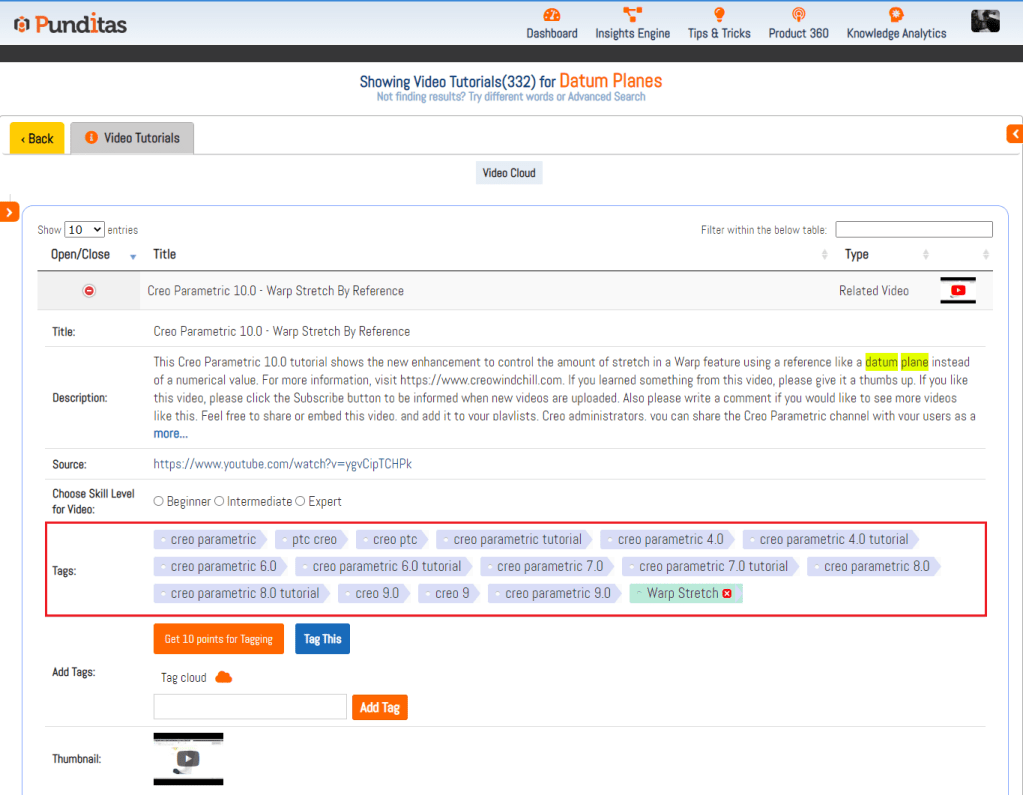
As users delve into the vast repository of video tutorials, they encounter a harmonious blend of system tags, thoughtfully represented in a captivating blue color, and user-created tags that stand out vibrantly in green. This visually intuitive interface creates a seamless and engaging experience, allowing users to effortlessly distinguish between predefined and personalized tags.
The “Tags” field serves as an ever-growing reservoir of knowledge, facilitating swift and precise discovery of tutorials based on specific areas of interest or subject matter. By leveraging this comprehensive collection of metadata, users gain an invaluable tool to navigate the vast landscape of tutorials and delve into the content that aligns most closely with their individual needs and preferences.
The Tags field in Punditas AI’s Video Tutorials Node is a dynamic and visually captivating feature that bridges the collective wisdom of original creators and the unique perspectives of individual users. Through a harmonious fusion of system and user-created tags, this feature enriches the searchability and discoverability of tutorials, enabling users to embark on a personalized learning journey that caters to their specific interests and needs.
What is Punditas AI Advisor?
Punditas AI Advisor provides real-time guidance as you work in the Creo environment. Information on “how to use” a feature in Creo or best practices for working with Creo are presented within context, removing the need to guess or search for such information. Punditas AI driven content helps you leverage Creo to create your designs faster and with confidence.
For more information about Punditas AI Advisor, visit our website at Punditas AI or contact us at contact@punditas.com
 Punditas
Leave a comment