

Punditas AI improves the user experience by providing an intuitive visual representation of Creo data with its cutting-edge chart view function. The relationship between modules and the number of enhancements is graphically represented for users by this dynamic chart.

This chart view, in contrast to conventional text-based reports, offers a new level to data analysis, making it simpler for users to understand complex information quickly. This chart view’s flexibility comes from its capacity to make it easier to find crucial data.
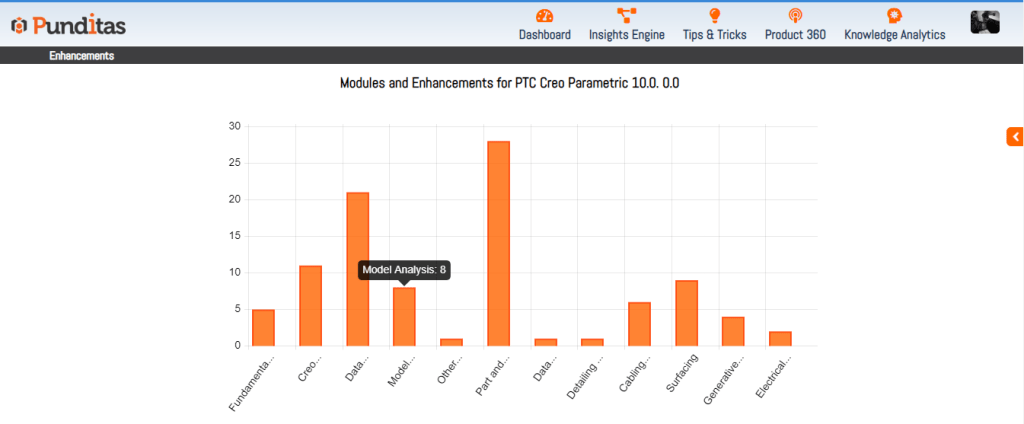
The Chart View serves as a powerful tool for product managers, developers, and users alike, offering a clear and concise way to explore the Creo’s strengths, weaknesses, and areas of improvement. It transforms data into actionable insights, providing users with the flexibility to extract valuable information effortlessly and make informed choices to optimize their experience with the Creo.
What is Punditas AI Advisor?
Punditas AI Advisor provides real-time guidance as you work in the Creo environment. Information on “how to use” a feature in Creo or best practices for working with Creo are presented within context, removing the need to guess or search for such information. Punditas AI driven content helps you leverage Creo to create your designs faster and with confidence.
For more information about Punditas AI Advisor, visit our website at Punditas AI or contact us at contact@punditas.com
 Punditas
Leave a comment