

When using alternative browsers or applications for searching, obtaining specific information about PTC Creo Parametric topics can be quite challenging. However, Punditas AI provides a much more user-friendly approach through its perspective-based system.
Punditas AI gathers data from reputable websites, categorizing Creo information into various sections such as “Video Tutorials,” “Help Documents,” “Enhancements,” “Open & Closed Bugs,” “Workarounds,” “General Presentations,” “Customer Presentations,” “Discussions,” “Blogs,” “Case Studies,” and more. It then presents search results based on the user’s input, making it a convenient and efficient way to access the desired information.
Follow the Steps and Search in Punditas AI
Step 1 :- Login to Punditas AI Advisor
Step 2 :- Click on Insights Engine
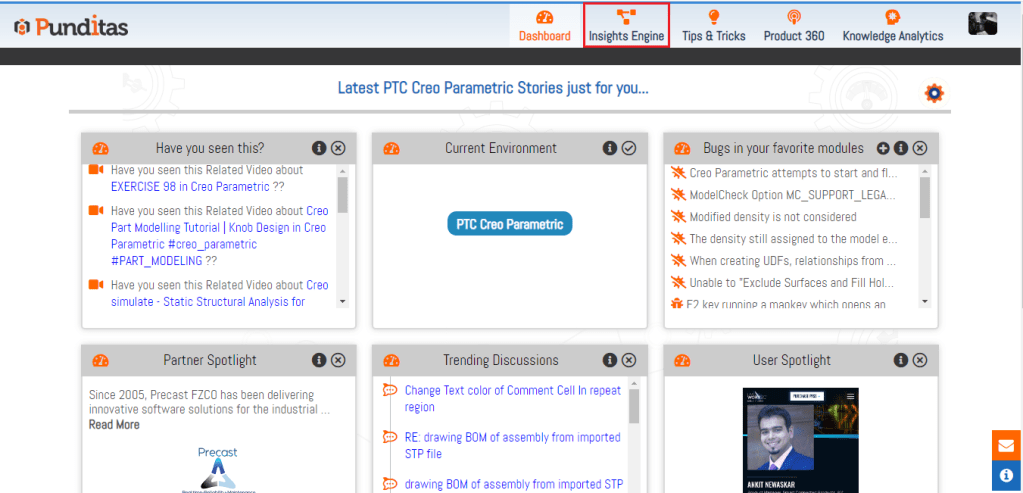
Step 3 :- Select Perspective from the Dropdown, In the below image Product Perspective is selected

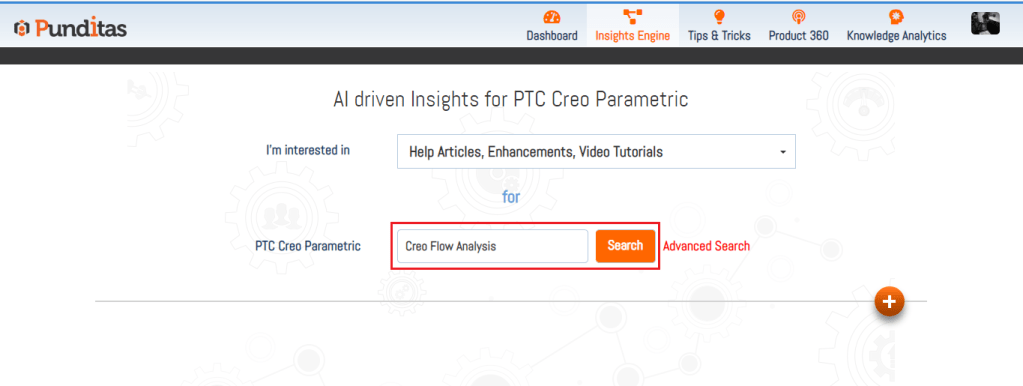
Step 4:- Provide PTC Creo Parametric Related Topic inside Search box and hit the Search button
What is Punditas AI Advisor?
Punditas AI Advisor provides real-time guidance as you work in the Creo environment. Information on “how to use” a feature in Creo or best practices for working with Creo are presented within context, removing the need to guess or search for such information. Punditas AI driven content helps you leverage Creo to create your designs faster and with confidence.
For more information about Punditas AI Advisor, visit our website at Punditas AI or contact us at contact@punditas.com
 Punditas
Leave a comment