

Within Punditas AI, you’ll discover a comprehensive collection of vital documents, encompassing Configuration Options, Hardware Notes, Installation and Administration Guides, Creo Platform Information, Creo Parametric TOOLKIT Guides, Creo Data Management Instructions, Release Notes, and more. All of these valuable resources are conveniently housed within the Reference Docs node. Explore the Punditas AI search engine to effortlessly locate the documents you need.
Following are the steps to find out required documents
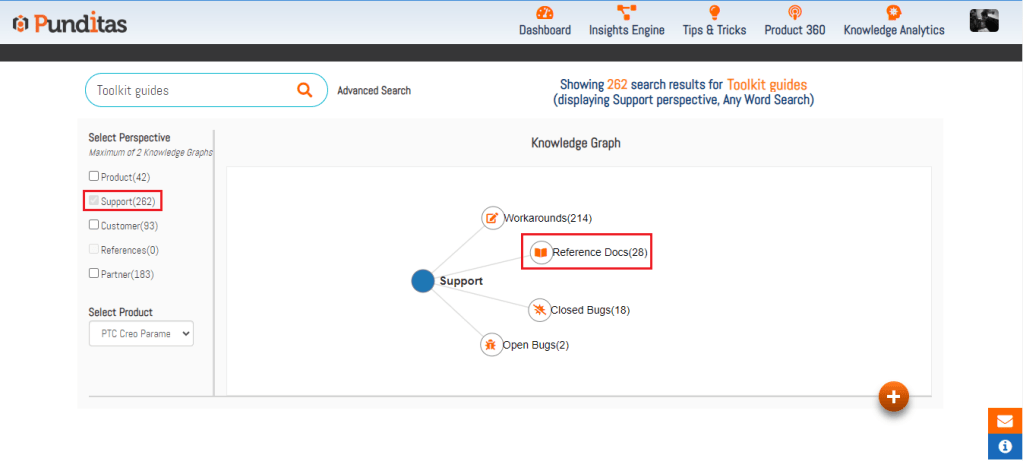
Step 1:- Search for the Creo topic, select Support perspective and click on Reference Docs node as displayed below in the image
Step 2 :- References Docs Cloud option is a visual representation of the words associated with the search topic. The font size of a word indicates how often the “word” occurs in the Title, descriptions, and tags within our database, while smaller font size indicates decreased availability of results for that search topic
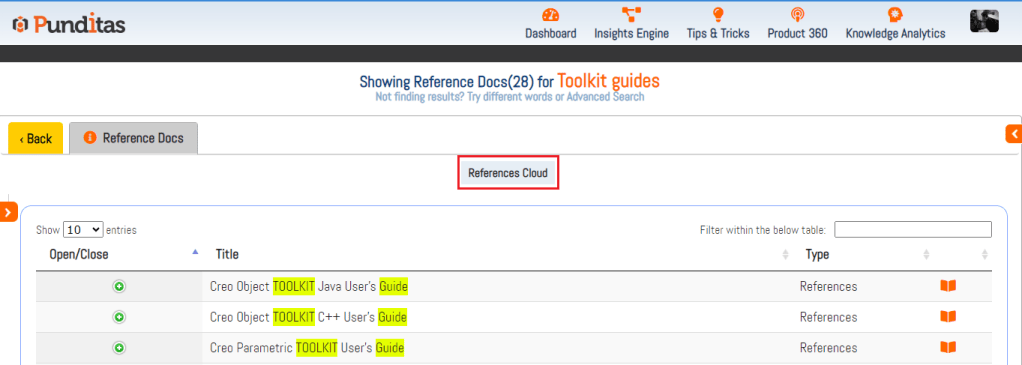
Step 3 :- click the “+” button or its title to explore further

Step 4 :- The full description of selected Document will be visible as shown below

Step 5 :- Click on the link available in the Source field and see whole Reference Doc on PTC site as shown below

Click on “Back” button to check other nodes of Support perspective for the same searched topic
What is Punditas AI Advisor?
Punditas AI Advisor provides real-time guidance as you work in the Creo environment. Information on “how to use” a feature in Creo or best practices for working with Creo are presented within context, removing the need to guess or search for such information. Punditas AI driven content helps you leverage Creo to create your designs faster and with confidence.
For more information about Punditas AI Advisor, visit our website at Punditas AI or contact us at contact@punditas.com
 Punditas
Leave a comment