

In the ever-evolving world of design and simulation, PTC Creo introduces a groundbreaking enhancement to its Creo Simulation Live CFD Analysis. This new functionality caters to the needs of Creo users by adding support for steady state fluids, a significant stride in fluid dynamics simulation.
The introduction of steady state functionality in Creo Simulation Live CFD Analysis brings forth several benefits. It allows engineers and designers to explore fluid behavior under conditions where the fluid properties remain constant. This is particularly valuable in scenarios where dynamic changes in fluid properties are not a critical aspect of the analysis. The steady state functionality enhances the efficiency of fluid studies by providing a solution that reflects the equilibrium state of the fluid.
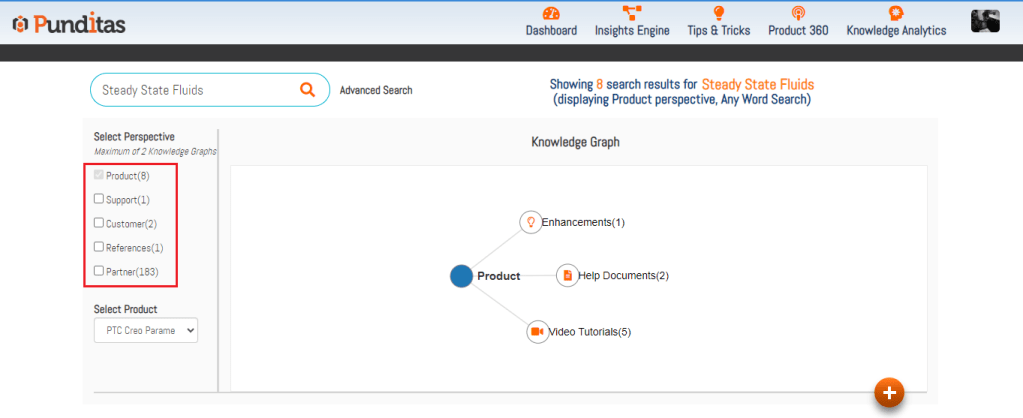
In the pursuit of specific information related to composite design and manufacturing, conventional search methods can prove to be cumbersome. Punditas AI emerges as a user-friendly solution, leveraging its perspective-based system to revolutionize the search experience.

Punditas AI systematically organizes Creo-related data from reputable sources into accessible categories, including video tutorials, help documents, enhancements, bug reports, workarounds, presentations, discussions, blogs, case studies, and more. Its perspective-based system ensures that users can efficiently navigate and access the information they need, contributing to an enhanced design and simulation experience.
What is Punditas AI Advisor?
Punditas AI Advisor provides real-time guidance as you work in the Creo environment. Information on “how to use” a feature in Creo or best practices for working with Creo are presented within context, removing the need to guess or search for such information. Punditas AI driven content helps you leverage Creo to create your designs faster and with confidence.
For more information about Punditas AI Advisor, visit our website at Punditas AI or contact us at contact@punditas.com
 Punditas
Leave a comment