

Explore the specific areas where your design team may require support and training in Creo Parametric using Punditas AI. Punditas AI maintains records of your design team’s activities, providing insights into who searched for specific topics. This valuable information assists your company in identifying team members who may benefit from training and support in particular areas.
Following are the Steps to see Strings and Users
Step 1 :- Click on Knowledge Analytics

Step 2 :- Click on Knowledge Needs

Step 3 :- Checkout Strings and Users, Strings and Users will help you identify the areas in which your design team needs support and training for Creo Parametric as displayed below in the Image
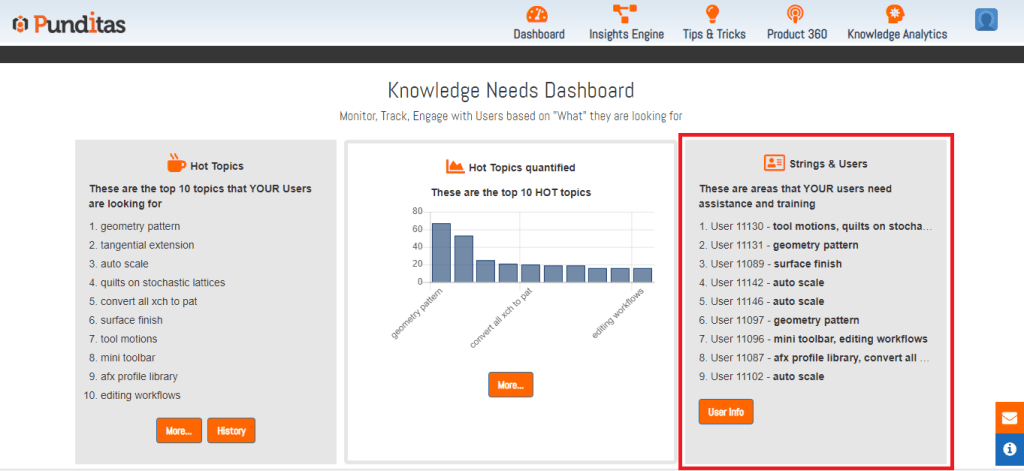
Step 4 :- Click on User Info and get detailed information

The below Image displays all the Users and searched Strings (For example :- Christopher searched for “afx profile library”, “convert all xch to pat”)

What is Punditas AI Advisor?
Punditas AI Advisor provides real-time guidance as you work in the Creo environment. Information on “how to use” a feature in Creo or best practices for working with Creo are presented within context, removing the need to guess or search for such information. Punditas AI driven content helps you leverage Creo to create your designs faster and with confidence.
For more information about Punditas AI Advisor, visit our website at Punditas AI or contact us at contact@punditas.com
 Punditas
Leave a comment