

Punditas AI provides a comprehensive collection of essential reference documents, workarounds, and information on both open and closed bugs. By delivering accurate results tailored to your search topic, Punditas AI efficiently saves your time and aids in quickly finding solutions to your concerns.
Follow the steps and get the solution to your issues regarding Creo Parametric
Step 1:- Login to Punditas AI Advisor
Step 2:- Click on Insights Engine
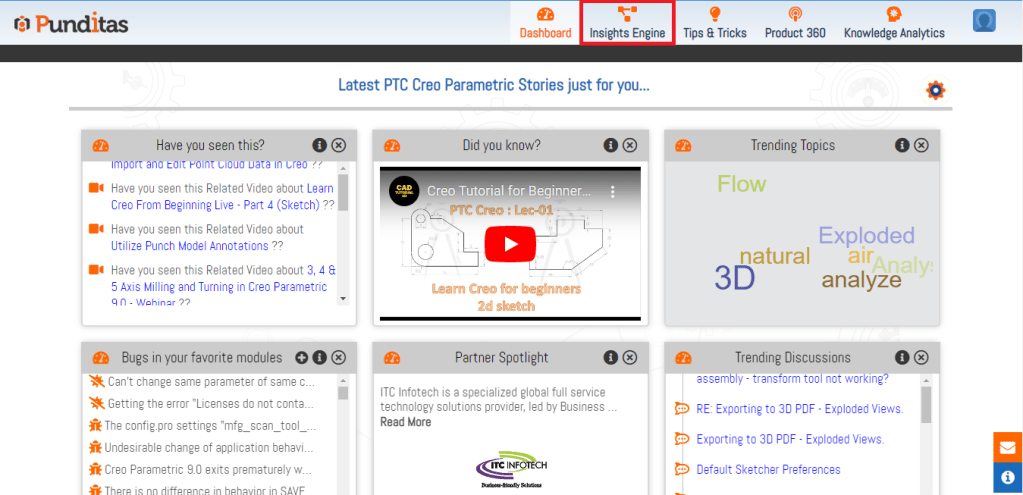
Step 3:- Select Support Perspective from the Dropdown

Step 4:- Insert your Creo Parametric Topic inside the Search box and Hit the Search button

Step 5:- Explore each node available in Support Perspective, Following Image displays Knowledge graph in Support Perspective for Creo Parametric topic Config.pro options. Support Perspective is showing total 2021 search results where 6 Reference Docs, 1500 Workarounds, 46 Open Bugs and 489 Closed Bugs are available. All these data collected from PTC eSuppot as well as PTC Update Advisor

What is Punditas AI Advisor?
Punditas AI Advisor provides real-time guidance as you work in the Creo environment. Information on “how to use” a feature in Creo or best practices for working with Creo are presented within context, removing the need to guess or search for such information. Punditas AI driven content helps you leverage Creo to create your designs faster and with confidence.
For more information about Punditas AI Advisor, visit our website at Punditas AI or contact us at contact@punditas.com
 Punditas
Leave a comment