

Punditas AI introduces a unique functionality known as Knowledge Tags, designed to streamline the organization and classification of data related to software applications such as PTC Creo Parametric, Windchill PDMLink, Solidworks, ThingWorx, Onshape, and more. Unlike traditional bookmarks, Knowledge Tags provide a systematic approach to accessing essential information promptly. By employing structured organization, they simplify the process of locating specific data within the system.
For CAD users, seamless access to relevant information is paramount. In a vast landscape of data, finding the right information at the right time can be overwhelming. This is precisely where Punditas AI’s Knowledge Tags feature shines. This powerful tool efficiently structures your data in a user-friendly manner, ensuring effortless discovery of crucial information precisely when it’s needed most.
Follow the Steps and explore Knowledge Tags
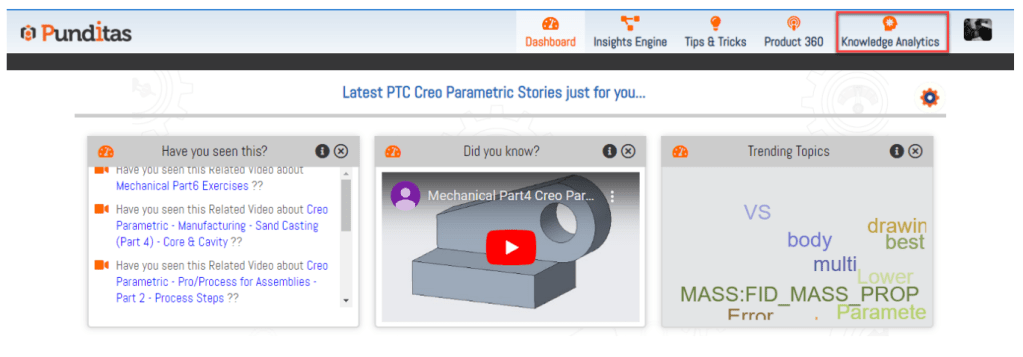
Step 1:- Click on Knowledge Analytics
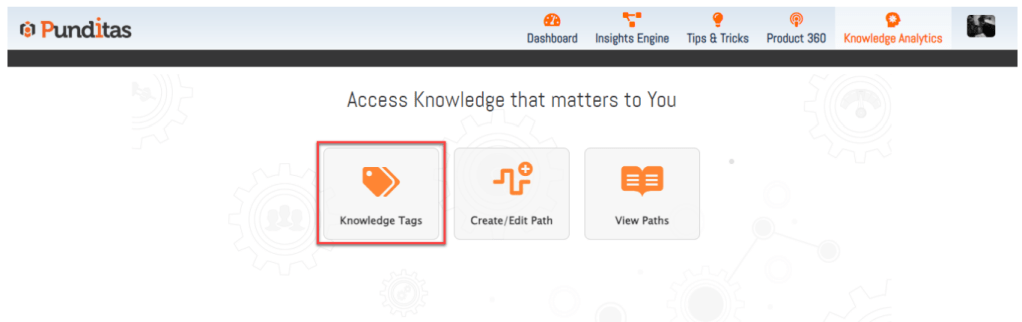
Steps 2:- Click on Knowledge Tags
What is Punditas AI Advisor?
Punditas AI Advisor provides real-time guidance as you work in the Creo environment. Information on “how to use” a feature in Creo or best practices for working with Creo are presented within context, removing the need to guess or search for such information. Punditas AI driven content helps you leverage Creo to create your designs faster and with confidence.
For more information about Punditas AI Advisor, visit our website at Punditas AI or contact us at contact@punditas.com
 Punditas
Leave a comment