

Recognizing the paramount importance of staying abreast of the latest video tutorials pertinent to a specific topic, phrase, or word, Punditas AI provides users with a seamless filtering option. This feature enables users to fine-tune their search results based on the publication date of the tutorials. Through this filter, users can prioritize their viewing experience by accessing the most recently published video tutorials first, ensuring access to the freshest content available.
The filter mechanism strategically rearranges search results, placing the newest video tutorials prominently at the top of the list, followed by older ones. This intuitive functionality empowers users to maintain pace with the dynamic landscape of video tutorials, facilitating access to the most pertinent and timely information relevant to their learning and exploration endeavors.
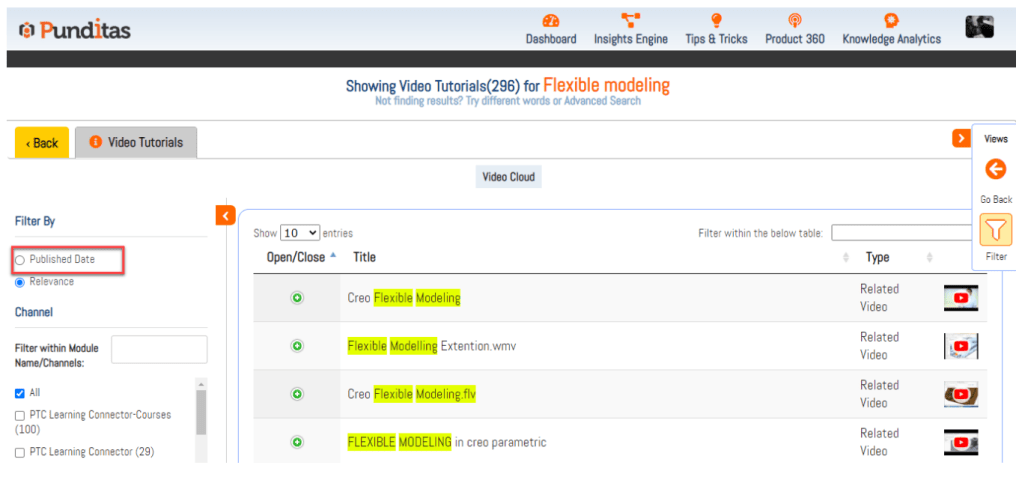
Follow the steps and use Filter by Published Date feature
Step 1:- Expand or Open Side navigation bar by clicking on < Arrow button

Step 2:- Click on Filter button
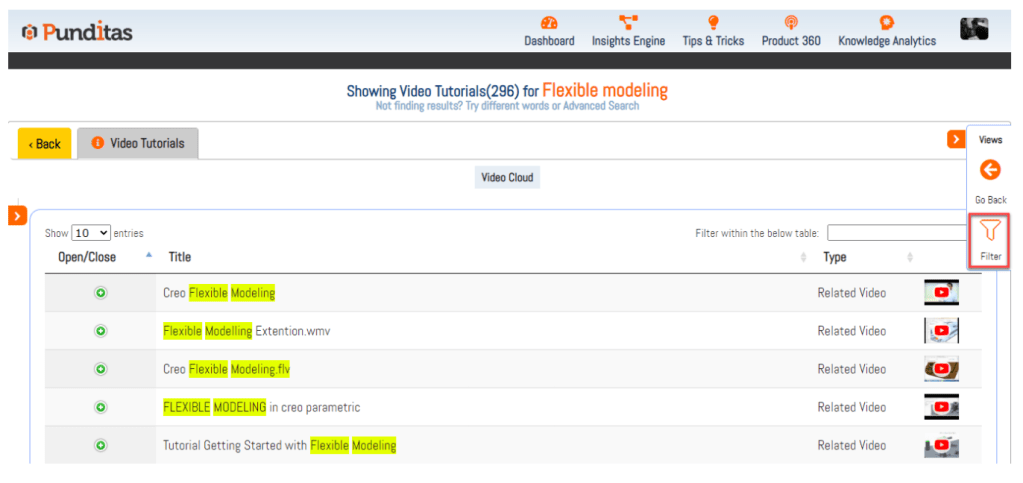
Step 3:- Click on Published by Date option
What is Punditas AI Advisor?
Punditas AI Advisor provides real-time guidance as you work in the Creo environment. Information on “how to use” a feature in Creo or best practices for working with Creo are presented within context, removing the need to guess or search for such information. Punditas AI driven content helps you leverage Creo to create your designs faster and with confidence.
For more information about Punditas AI Advisor, visit our website at Punditas AI or contact us at contact@punditas.com
 Punditas
Leave a comment