

Punditas AI meticulously gathers and organizes valuable insights regarding unresolved issues, bugs, or open tickets from credible sources. Within the Open Bugs node, users can explore search results tailored to their keywords, phrases, or topics of interest, with a primary focus on offering support and assistance. For instance, Punditas AI aggregates all open bugs spanning diverse modules including “Part Modeling,” “Part and Assembly Design,” “Installation or Administration,” “Data Exchange,” “Detailing and Drawing,” “Surfacing,” “Rendering,” “Layout,” “Advanced Framework Design,” “Welding,” “Electric Design,” “Piping,” “Manufacturing,” “Sheetmetal,” and more, specifically catering to the Creo Parametric product. This comprehensive functionality is also available across other product domains.
Follow the below steps and get access the Open Bugs node
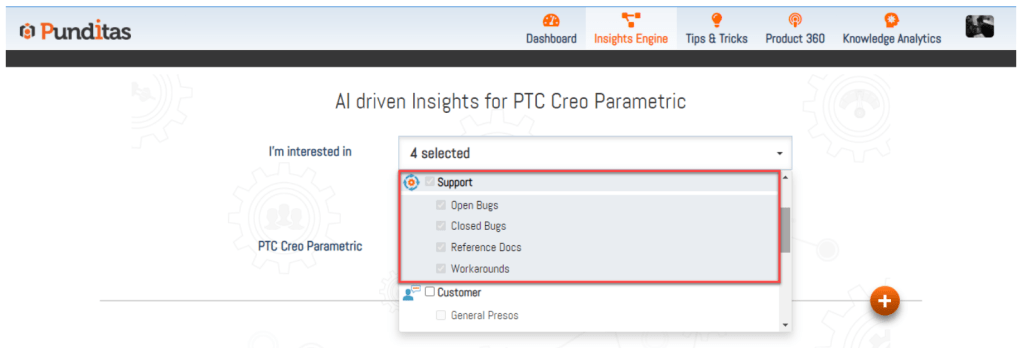
Step 1:- Select Support Perspective from the Drop-down
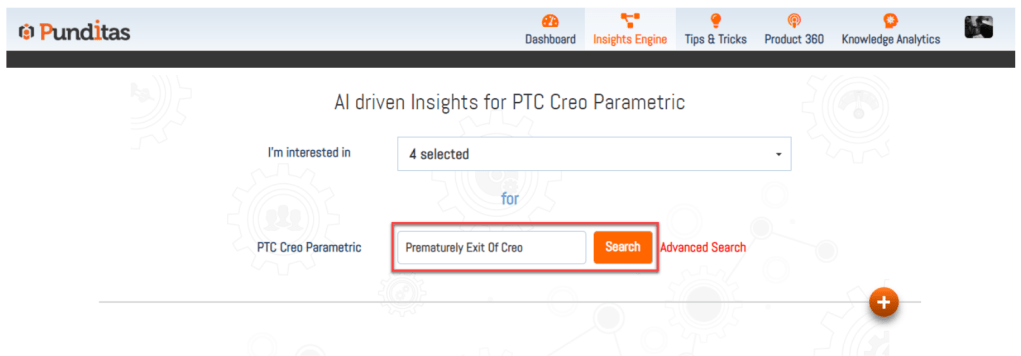
Step 2:- Insert the word, phrase or topic and hit the Search button
Step 3:- Click on Open Bugs node

What is Punditas AI Advisor?
Punditas AI Advisor provides real-time guidance as you work in the Creo environment. Information on “how to use” a feature in Creo or best practices for working with Creo are presented within context, removing the need to guess or search for such information. Punditas AI driven content helps you leverage Creo to create your designs faster and with confidence.
For more information about Punditas AI Advisor, visit our website at Punditas AI or contact us at contact@punditas.com
 Punditas
Leave a comment