
Punditas AI operates a sophisticated collection system that scours the depths of various video platforms, including YouTube, Vimeo, and PTC Learning Connector, among others. But we don’t stop at mere collection. Each video undergoes a meticulous verification process to ensure quality and relevance.
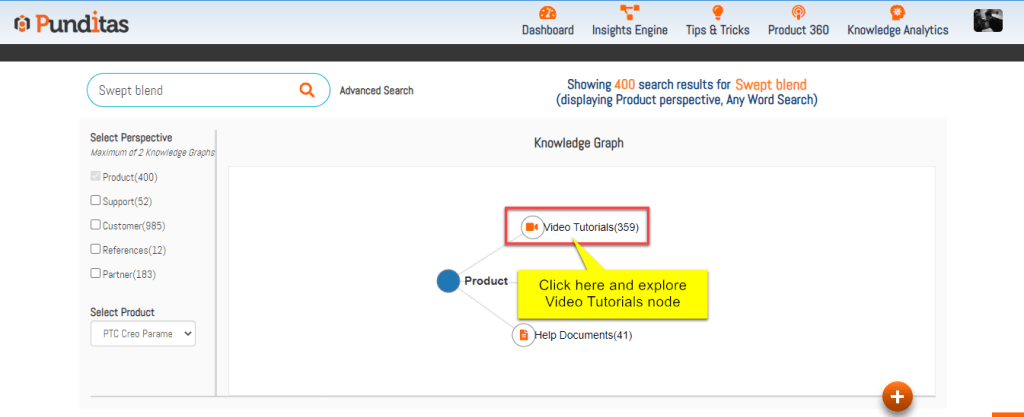
Once vetted, these videos are curated using our cutting-edge insights engine. This engine utilizes a Knowledge Graph, a sophisticated web of interconnected information, to present users with the most pertinent results in the Video Tutorials node.
This means that when users search for a specific topic, word, or phrase, they’re not just met with a random assortment of videos. Instead, they’re greeted with a tailored selection of content that aligns perfectly with their search query.
Our comprehensive approach ensures that users are not only presented with highly relevant content but also with materials of the utmost value, making their learning experience both efficient and effective.
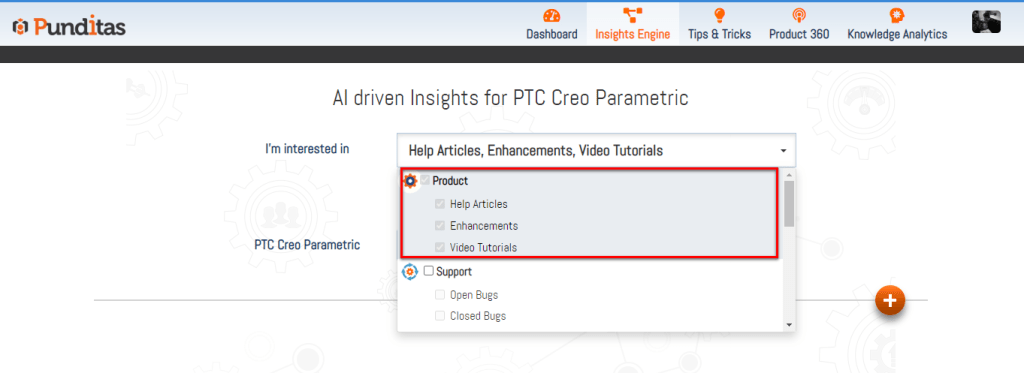
Follow the below steps and get access the Video Tutorials node
Step 1:- Select Product Perspective from the Drop-down
Step 2:- Insert the word, phrase or topic and hit the Search button

Step 3:- Click on Video Tutorials node
What is Punditas AI Advisor?
Punditas AI Advisor provides real-time guidance as you work in the Creo environment. Information on “how to use” a feature in Creo or best practices for working with Creo are presented within context, removing the need to guess or search for such information. Punditas AI driven content helps you leverage Creo to create your designs faster and with confidence.
For more information about Punditas AI Advisor, visit our website at Punditas AI or contact us at contact@punditas.com
 Punditas
Leave a comment