

In the fast-paced world of technology, staying informed and getting the most out of your software is essential. Punditas AI’s Tips & Tricks module is designed to elevate your experience by providing targeted insights and guidance tailored to your selected product, such as Creo Parametric, ThingWorx, SolidWorks, Onshape, or Windchill. Here’s how each tab can benefit you:
1. Related Videos: This tab curates the latest and most relevant video content about your chosen product. Whether you’re looking for tutorials, demonstrations, or product overviews, this collection offers up-to-date and trending visual resources, ensuring that you always have the information you need at your fingertips.
2. Help: The Help tab is a treasure trove of resources, connecting you to a comprehensive collection of help articles, FAQs, and documentation specific to your product. With detailed information and step-by-step guides, troubleshooting and problem-solving become straightforward, empowering you to navigate any challenge with confidence.
3. Enhancements: Stay on top of the latest product improvements and updates with the Enhancements tab. This section compiles a list of recent enhancements and feature additions, helping you keep informed about product advancements so you can fully leverage new capabilities and optimize your experience.
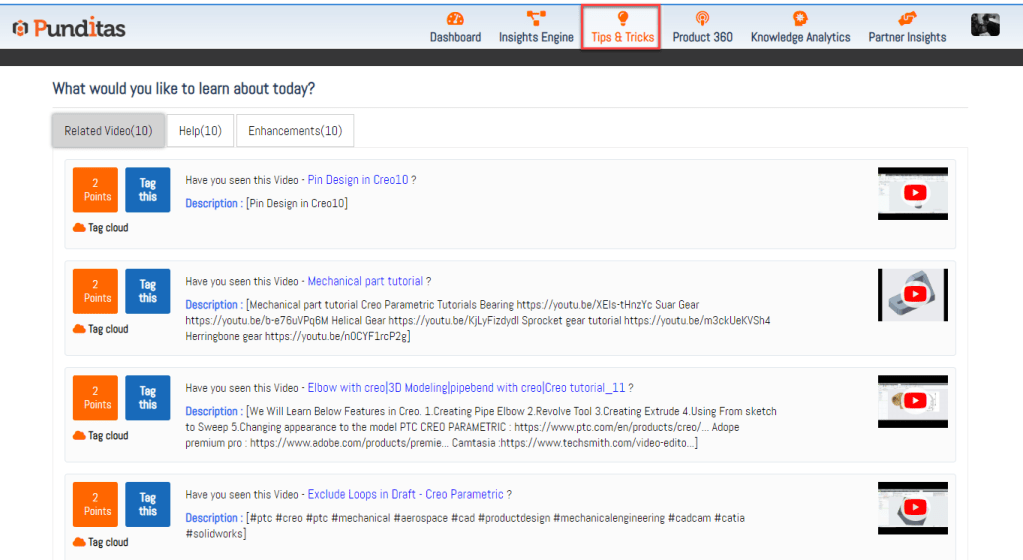
Why Punditas AI? Punditas AI offers a streamlined and user-friendly approach to managing and accessing crucial information. It goes beyond traditional search methods by delivering personalized, context-aware insights that are tailored to your needs. This focus on relevance and user experience makes Punditas AI an invaluable tool for both individual users and enterprises.
When Punditas AI is Helpful:
- Product Updates: Keep up with the latest changes and enhancements to your software.
- Learning and Development: Access curated videos and help resources to improve your skills.
- Troubleshooting: Quickly find solutions to issues with comprehensive help guides and FAQs.
Advantages of Punditas AI:
- Personalized Insights: Tailored recommendations and content based on your specific product and usage.
- Enhanced Learning: Access to a variety of educational resources, including videos and detailed guides.
- Up-to-Date Information: Stay informed about the latest product updates and industry trends.
Punditas AI’s Tips & Tricks module is your go-to resource for enhancing your software experience, providing you with the knowledge and tools you need to succeed.
What is Punditas AI Advisor?
Punditas AI Advisor provides real-time guidance as you work in the Creo environment. Information on “how to use” a feature in Creo or best practices for working with Creo are presented within context, removing the need to guess or search for such information. Punditas AI driven content helps you leverage Creo to create your designs faster and with confidence.
For more information about Punditas AI Advisor, visit our website at Punditas AI or contact us at contact@punditas.com
 Punditas
Leave a comment