

In today’s fast-paced technological landscape, efficient access to information is crucial for optimizing workflows and achieving productivity goals. Punditas AI stands at the forefront with its Advanced Search option tailored specifically for Creo users. Here’s how this feature enhances the search experience and supports users in navigating the complexities of enterprise software:
Understanding Punditas AI’s Advanced Search Options
Punditas AI’s Advanced Search feature is designed to cater specifically to users working with a variety of enterprise software products, prominently including PTC Creo Parametric, PTC Windchill, ThingWorx, Creo View, and others. It offers three distinct search types to accommodate different search needs:
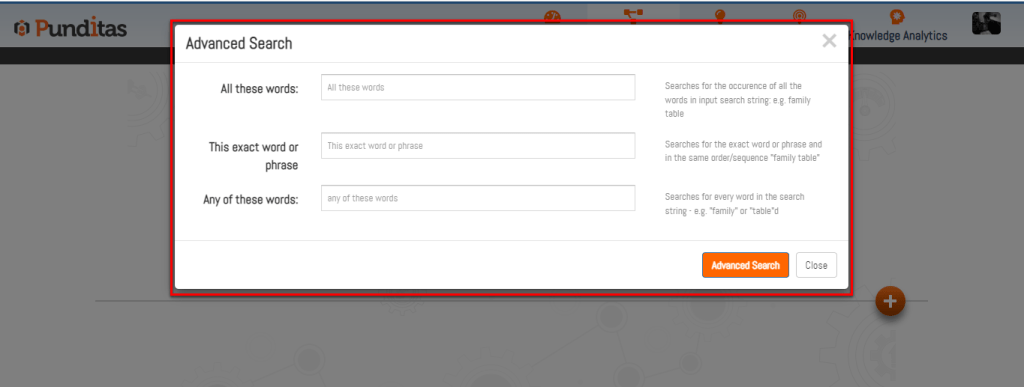
All Word Search: This search type looks for occurrences where all words in the input search string appear together, in any order. For example, searching for “family table” would return results where both “family” and “table” are present, regardless of their proximity in the text.
Exact Word Search: The exact word search option narrows results down to instances where the exact word or phrase appears in the specified order. For instance, searching for “family table” would only return results where this exact phrase appears without variations.
Any Word Search: This search type finds occurrences of any word from the search string, regardless of their order or proximity. For example, a search for “family” or “table” would return results containing either of these words.
How to Access Advanced Search on Punditas AI
Navigating the Advanced Search functionality on Punditas AI is straightforward, ensuring users can quickly locate the precise information they need:
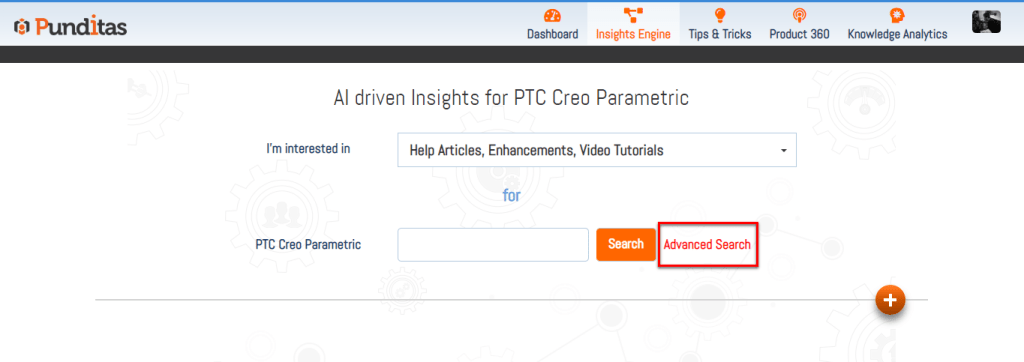
Step 1: Click on the “Advanced Search” button located within the Punditas AI interface.
Step 2: A dialog box will appear, presenting options for each search type (All word search, Exact word search, Any word search). Users can input their desired word, topic, or phrase into the respective search box based on the chosen search type.
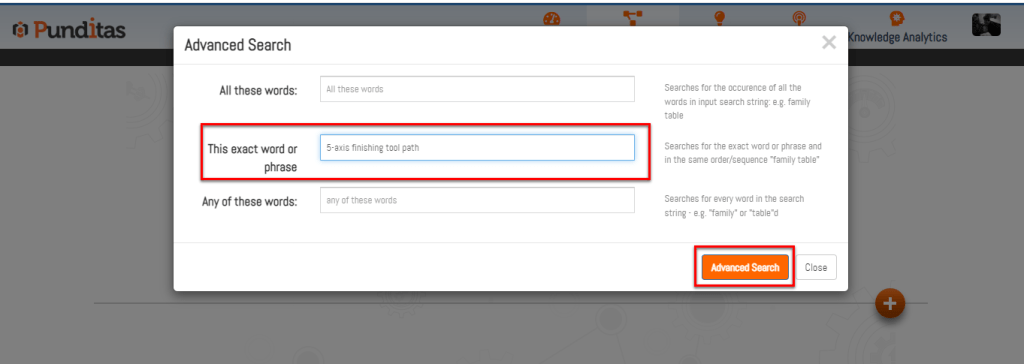
Step 3: Click on the “Advanced Search” button within the dialog box or simply hit the Enter key to initiate the search.
Why Punditas AI?
Punditas AI stands out as a valuable tool for Creo users and other enterprise software professionals due to several compelling advantages:
- Precision and Relevance: The Advanced Search options ensure that users can pinpoint specific information with accuracy, whether searching for detailed technical specifications, troubleshooting guides, or software feature explanations.
- Enhanced Efficiency: By offering multiple search types, Punditas AI streamlines the search process, saving users time and effort that would otherwise be spent sifting through irrelevant content.
- Tailored User Experience: The ability to choose between different search methods (All word, Exact word, Any word) allows users to customize their search experience based on their specific information retrieval needs and preferences.
- Comprehensive Coverage: Punditas AI spans across multiple products and software platforms, providing a centralized hub for comprehensive knowledge and resources related to Creo and other supported applications.
Advantages of Using Punditas AI’s Advanced Search
- Faster Information Retrieval: Users can quickly find relevant information without navigating through extensive menus or multiple platforms.
- Improved Decision-Making: Access to detailed and accurate information supports informed decision-making processes related to software usage, implementation, and troubleshooting.
- Continuous Learning: The robust search capabilities encourage continuous learning and skill development among users by facilitating access to up-to-date resources and tutorials.
Punditas AI’s Advanced Search feature empowers Creo users and enterprise software professionals alike by providing tailored, efficient access to comprehensive knowledge repositories. Whether searching for specific technical details or broadening one’s understanding of software functionalities, Punditas AI enhances productivity and supports informed decision-making in today’s dynamic business environment. Embrace Punditas AI to master Creo search and unlock the full potential of your enterprise software tools.
What is Punditas AI Advisor?
Punditas AI Advisor provides real-time guidance as you work in the Creo environment. Information on “how to use” a feature in Creo or best practices for working with Creo are presented within context, removing the need to guess or search for such information. Punditas AI driven content helps you leverage Creo to create your designs faster and with confidence.
For more information about Punditas AI Advisor, visit our website at Punditas AI or contact us at contact@punditas.com
 Punditas
Leave a comment