

In the dynamic landscape of software development and innovation, staying updated with the latest tools, features, and enhancements is paramount for professionals using complex applications like Creo. Punditas AI introduces its Product 360 module as a cutting-edge solution designed to provide comprehensive insights and quick tips tailored specifically for Creo users. Here’s a detailed exploration of how Punditas AI’s Product 360 module enhances user experience and productivity.

Exploring Punditas AI’s Product 360 Module
Punditas AI’s Product 360 module serves as a centralized hub where Creo users can access essential information about the newest tools, features, and enhancements. Here’s what makes this module indispensable:
- Interactive Banner Display: Upon entering the Product 360 module, users are greeted with three prominent banners that highlight key updates and features. These banners are strategically curated to provide quick snapshots of important developments, ensuring users are immediately informed about the latest enhancements.
- Quick Tips Integration: Leveraging advanced AI capabilities, Punditas AI analyzes Creo users’ search patterns and interactions within the Product 360 module. This analysis enables the AI to dynamically generate and present quick tips that are highly relevant to the user’s current activities and interests. Whether users are exploring new features or seeking productivity tips, Punditas AI ensures they receive timely and actionable insights.
- Version-Specific Enhancements: Recognizing the diversity of Creo versions and their respective updates, Punditas AI’s Product 360 module delivers detailed information tailored to the user’s chosen Creo version. This ensures that users can easily access comprehensive details about the enhancements and improvements specific to their preferred software iteration.
How to Access Tips in Product 360
To maximize the benefits of Punditas AI’s Product 360 module and access quick tips efficiently, follow these straightforward steps:
Click on the + Button: Initiate your exploration of the Product 360 module by clicking on the designated + button.
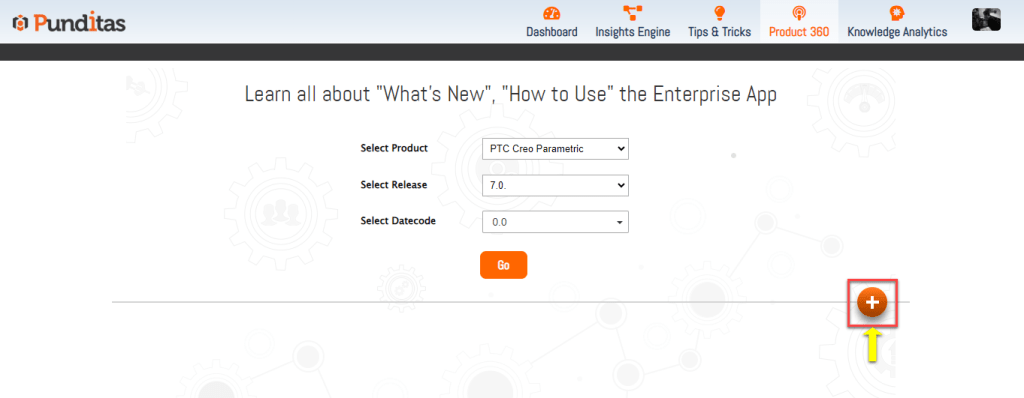
View Three Banners: Upon clicking, three informative banners will be displayed, each highlighting essential updates and features.

Maximize a Banner: Choose any banner that captures your interest and maximize it to view detailed information directly within the module.

Further Exploration: For in-depth insights, click on the banner to be redirected to the source platform where additional information, tutorials, or documentation related to the update can be accessed.
Why Choose Punditas AI?
Punditas AI stands out as a valuable tool for Creo users seeking to optimize their software experience and proficiency:
- Timely Updates: By displaying the latest tools and features through interactive banners, Punditas AI ensures users are promptly informed about important developments, enhancing their workflow efficiency.
- Personalized Tips: AI-driven quick tips are tailored to users’ specific actions and preferences within the Product 360 module, providing targeted assistance that accelerates learning and problem-solving.
- Version-Specific Details: Access to version-specific enhancements ensures users stay informed about relevant updates that directly impact their usage of Creo, facilitating informed decision-making and maximizing software capabilities.
Advantages of Punditas AI’s Product 360 Module
- Enhanced Productivity: Users can quickly grasp new features and enhancements, optimizing their workflow and productivity within Creo.
- Continuous Learning: Regular updates and quick tips foster continuous learning and skill development, empowering users to explore and utilize Creo’s full potential.
- Efficient Information Access: Centralized access to comprehensive information and interactive features streamlines the process of staying updated and informed, saving valuable time and effort.
Punditas AI’s Product 360 module revolutionizes how Creo users engage with software updates and enhancements. By integrating interactive banners, personalized tips, and version-specific insights, Punditas AI empowers users to harness the latest innovations effectively. Embrace Punditas AI’s Product 360 to elevate your Creo experience, stay ahead of the curve, and unlock new possibilities in software utilization and proficiency.
What is Punditas AI Advisor?
Punditas AI Advisor provides real-time guidance as you work in the Creo environment. Information on “how to use” a feature in Creo or best practices for working with Creo are presented within context, removing the need to guess or search for such information. Punditas AI driven content helps you leverage Creo to create your designs faster and with confidence.
For more information about Punditas AI Advisor, visit our website at Punditas AI or contact us at contact@punditas.com
 Punditas
Leave a comment