

Punditas AI introduces a powerful tool known as the Knowledge Graph in Product Perspective, designed to aggregate and present a comprehensive array of resources tailored to user needs. Let’s delve into the features, benefits, and practical applications of this innovative platform.
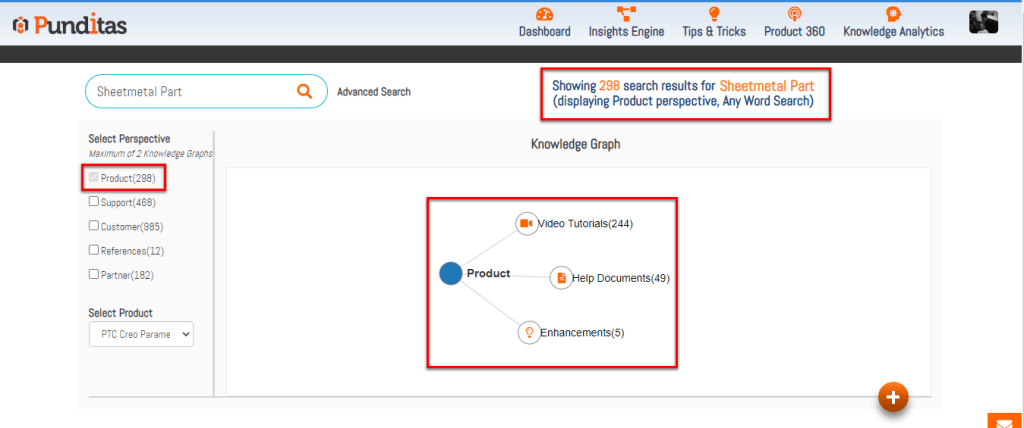
Understanding the Knowledge Graph in Product Perspective
The Knowledge Graph in Product Perspective by Punditas AI serves as a centralized repository that consolidates diverse types of content related to specific software topics, such as Creo Parametric’s Sheetmetal Part. Here’s an overview of its key components and functionalities:
Comprehensive Content Aggregation
Punditas AI gathers information from various authoritative sources, including:
- Video Tutorials: Curated from platforms like YouTube, Vimeo, and PTC Learning Connector, providing visual guides and demonstrations.
- Help Articles: Essential documentation and guides sourced from official channels and recognized repositories.
- Latest Enhancements: Updates and feature additions directly from software vendors, ensuring users stay informed about new capabilities.
Product Perspective Navigation
Users can explore the Knowledge Graph from a “Product Perspective,” focusing specifically on their chosen software topic—in this case, Creo Parametric’s Sheetmetal Part. This perspective offers a structured view of relevant resources, facilitating targeted learning and problem-solving.
Search Results Breakdown
The interface displays detailed insights into the available content:
- Total Results: Indicates the overall scope of information available within the Knowledge Graph for the selected topic.
- Content Types: Breakdown of resources by type, including Video Tutorials, Help Documents, and Enhancements, providing clarity on available learning formats.
Advantages of Using Punditas AI
Enhanced Learning Experience
- Centralized Access: Access a diverse range of learning materials from one platform, reducing the need to navigate multiple sources.
- Focused Relevance: Tailored content presentation based on specific software topics ensures relevance and efficiency in information retrieval.
Efficiency and Productivity
- Comprehensive Insights: Gain a holistic view of available resources, enabling informed decisions and optimized workflows.
- Time Savings: Quickly locate pertinent information without sifting through unrelated content, enhancing productivity.
Continuous Improvement and Adaptation
- AI-Driven Curation: Leveraging artificial intelligence to refine search results and recommendations based on user interactions and feedback.
- Dynamic Updates: Regular updates and additions to the Knowledge Graph ensure that users have access to the latest industry insights and software advancements.
Why Choose Punditas AI?
Punditas AI stands out as a valuable tool for enterprise software users due to:
- Advanced Data Integration: Aggregating information from diverse sources into a unified platform, offering a seamless user experience.
- Personalized Recommendations: AI-driven algorithms provide personalized recommendations based on user behavior and preferences.
- Industry-Leading Support: Dedicated to supporting professional growth and proficiency through accessible and comprehensive learning resources.
The Knowledge Graph in Product Perspective by Punditas AI represents a significant advancement in facilitating effective knowledge acquisition and utilization within enterprise software environments. By centralizing and organizing vast amounts of content into a structured format, Punditas AI empowers users to harness the full potential of software applications like PTC Creo Parametric’s Sheetmetal Part. Embrace the Knowledge Graph to streamline your learning journey, enhance productivity, and stay ahead in today’s competitive landscape with Punditas AI.
What is Punditas AI Advisor?
Punditas AI Advisor provides real-time guidance as you work in the Creo environment. Information on “how to use” a feature in Creo or best practices for working with Creo are presented within context, removing the need to guess or search for such information. Punditas AI driven content helps you leverage Creo to create your designs faster and with confidence.
For more information about Punditas AI Advisor, visit our website at Punditas AI or contact us at contact@punditas.com
 Punditas
Leave a comment