

Released on June 4, 2025, Creo 12.4.0.0 represents more than just another version update. It’s PTC’s latest answer to a question every engineering leader is wrestling with:
“How can we accelerate design without sacrificing depth, detail, or downstream accuracy?”
The answer lies in smarter design workflows—streamlined, intuitive, and informed at every step. That’s where Creo 12.4.0.0 shines. And that’s why Punditas AI Advisor now fully supports Creo 12.4.0.0, delivering the insights and guidance you need—right inside the CAD environment.
Designing at the speed of intelligence
Creo 12.4 is not just faster—it’s intelligently faster. It anticipates common workflows, shortens decision paths, and reduces rework. From feature presets to composite structure automation, Creo now enables engineers to shift their focus from how to model… to what to create.
But every new release has a learning curve. New tools, behaviors, and hidden gems often go unexplored for weeks—sometimes months.
That’s why Punditas AI Advisor is ready on Day 1.
Punditas AI: Making every new feature instantly useful
We’ve updated the Product 360 module in Punditas AI to fully support Creo 12.4.0.0, giving you instant access to:
- Guided walkthroughs for new features
- Contextual tips based on what you’re doing
- Video tutorials, enhancement notes, and practical use-cases
- Community discussions and real-world workarounds
Everything you need to unlock value faster—without leaving Creo.
Efficiency isn’t optional anymore
Let’s face it: teams are stretched thin. Time is tight. Deadlines don’t wait. And the old “figure-it-out-later” approach doesn’t cut it anymore. You can’t afford unused capabilities.
With Creo 12.4 and Punditas AI, every designer—junior or expert—can become an efficient power user in less time.
Whether you’re optimizing cable harness workflows, designing next-gen composites, or integrating sustainability insights from Windchill, Punditas AI Advisor gives you the confidence to explore, adopt, and succeed faster.
Why it matters now
Here’s what we’re hearing from product development teams across the globe:
- “We want to roll out new versions, but we’re worried about adoption.”
- “There’s no time for formal training anymore.”
- “Our teams don’t even know half of what Creo can already do.”
If any of this sounds familiar, the combo of Creo 12.4 + Punditas AI Advisor is your answer. It’s like giving each team member a real-time coach and a personal guide through Creo’s evolving ecosystem.
Your Creo. Your team. Supercharged.
The latest Creo update is an opportunity—if your team can capitalize on it.
So instead of waiting for “someone to make time” to explore new features, let Punditas AI guide every user in the flow of work. No training sessions. No hunting through PDFs. Just instant knowledge, right where it’s needed.
Start strong with Creo 12.4.0.0 and Punditas AI
There’s never been a better time to close the gap between what Creo can do—and what your team is actually using.
Creo 12.4.0.0: Smarter workflows, speed-focused enhancements, and deeper integration with sustainability and systems design.
Punditas AI Advisor: Feature-aware guidance, embedded learning, and product knowledge in your design space.
Let’s make this version the most adopted one yet.
The following modules of Creo Parametric are enhanced in Creo 12.4. The picture below shows the number of enhancements in each module
- Fundamentals (16 enhancements)
- Data Management/PDM Integration (3 enhancements)
- Data Exchange (4 enhancements)
- Detailing and Drawings (2 enhancements)
- Surfacing (21 enhancements)
- Simulation (15 enhancements)
- ECAD (7 enhancements)
- Part Modeling (21 enhancements)
- Assembly Design (6 enhancements)
- Composite Design (17 enhancements)
- Welding (4 enhancements)
- Manufacturing (16 enhancements)
- Sheetmetal (7 enhancements)
- Model Analysis (3 enhancements)
- Generative Design (7 enhancements)
- Model Based Definition (21 enhancements)
- Creo Toolkit (2 enhancements)
- System (4 enhancements)
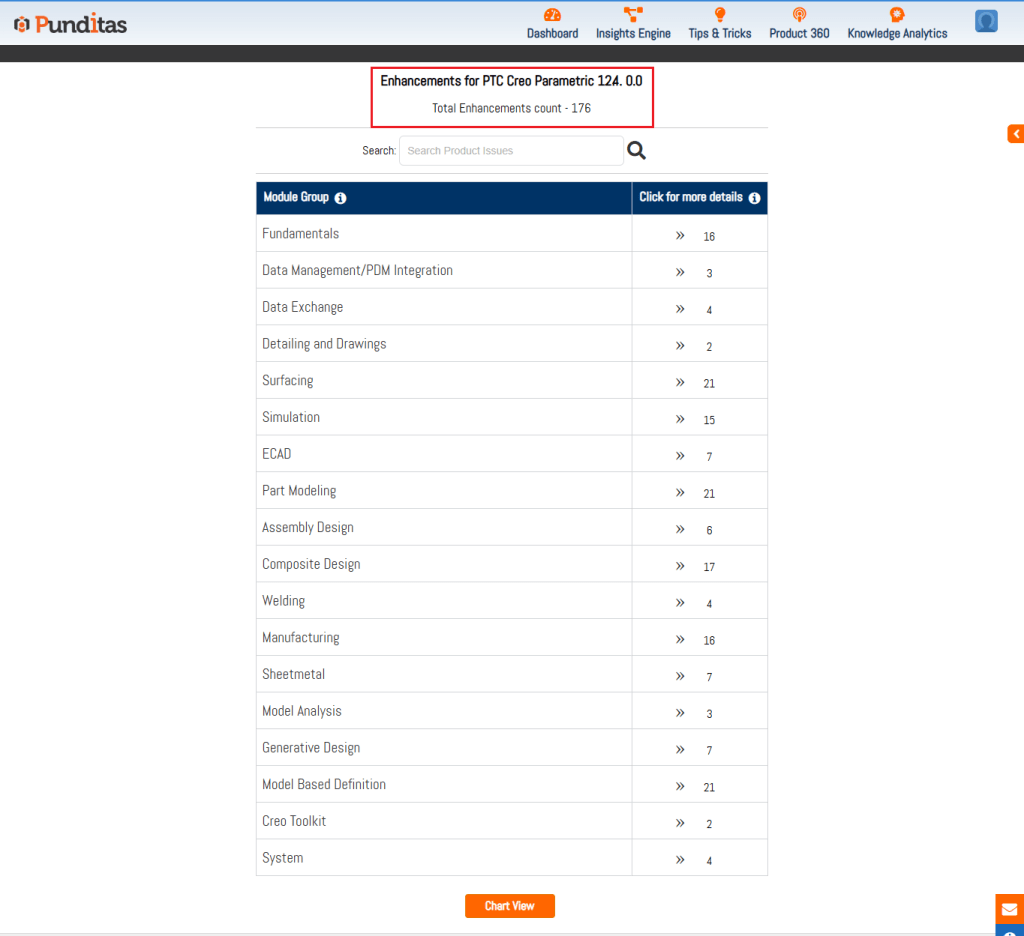
The Detailed View option in Punditas AI allows Creo Users to explore each enhancement in greater detail. The picture below shows the details of every enhancement in Creo 12.4.0.0. Not only is the list of enhancements displayed but also the associated Video tutorials, Online Help documentation (provided by PTC) as well as community discussions around this topic

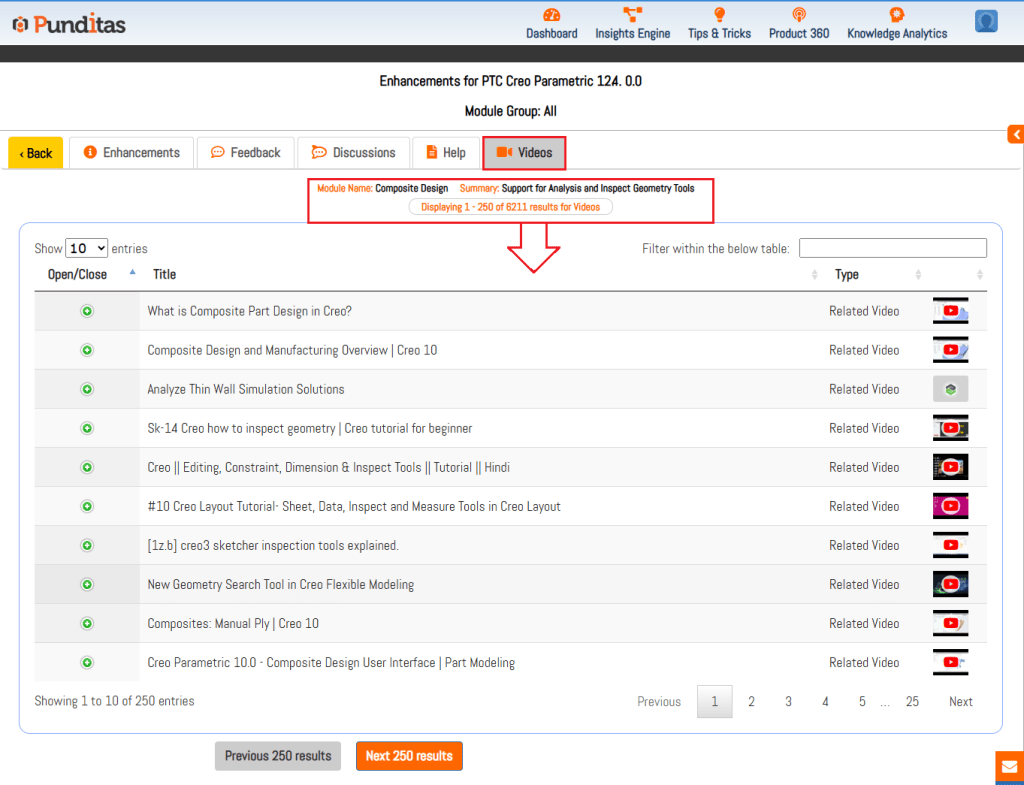
Punditas AI Advisor also offers Video Tutorials for every enhancement to help Users learn how to use the feature in Creo Parametric software. The image below shows the related videos for “Composite Design” that has been updated in Creo 12.4.0.0. These Videos are extracted and curated by Punditas AI engine from 10’s of repositories including PTC’s Learning Connector, YouTube, Vimeo, etc.
Punditas AI Advisor displays Help documentation for every enhancement as described by PTC in their Online Help. The image below shows Help articles that are relevant to “Detailed Drawings” enhancement added to Creo 12.4.0.0

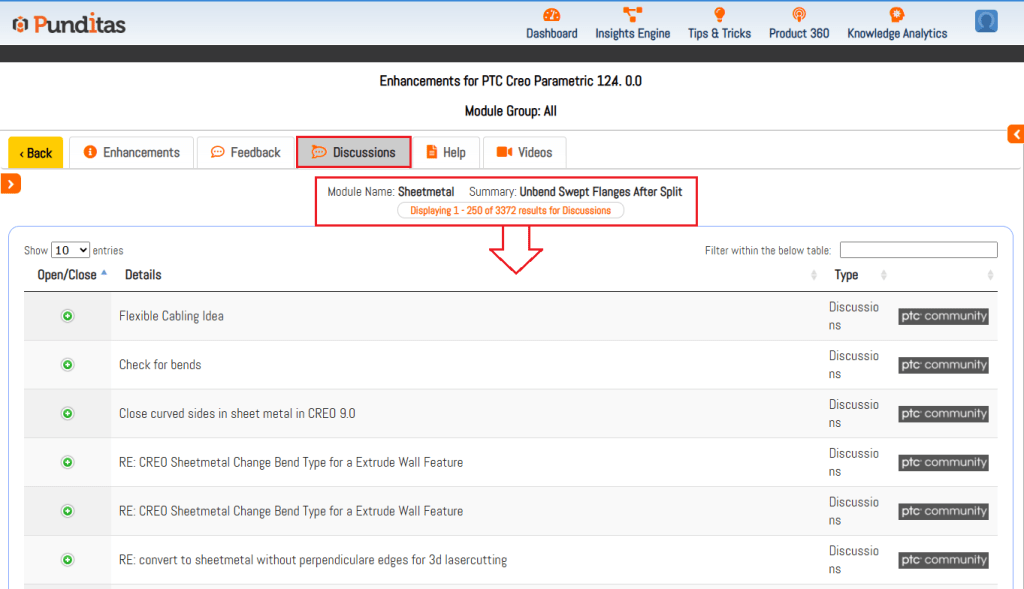
Punditas AI Advisor is a powerful platform as Users can access a single source of community chatter (discussions, opinions, suggestions) from both PTC and non-PTC sources. The image below shows discussions from PTC community related to “Sheetmetal” enhancement in Creo 12.4.0.0
What is Punditas AI Advisor?
Punditas AI Advisor provides real-time guidance as you work in the Creo environment. Information on “how to use” a feature in Creo or best practices for working with Creo are presented within context, removing the need to guess or search for such information. Punditas AI driven content helps you leverage Creo to create your designs faster and with confidence.
For more information about Punditas AI Advisor, visit our website at Punditas AI or contact us at contact@punditas.com
 Punditas
Leave a comment