

Every Creo user knows the tool is incredibly powerful—sometimes even overwhelming. With each new release, features, shortcuts, and updates come so fast it’s tough for most engineers to keep up. But what if you didn’t have to go searching for what’s new?
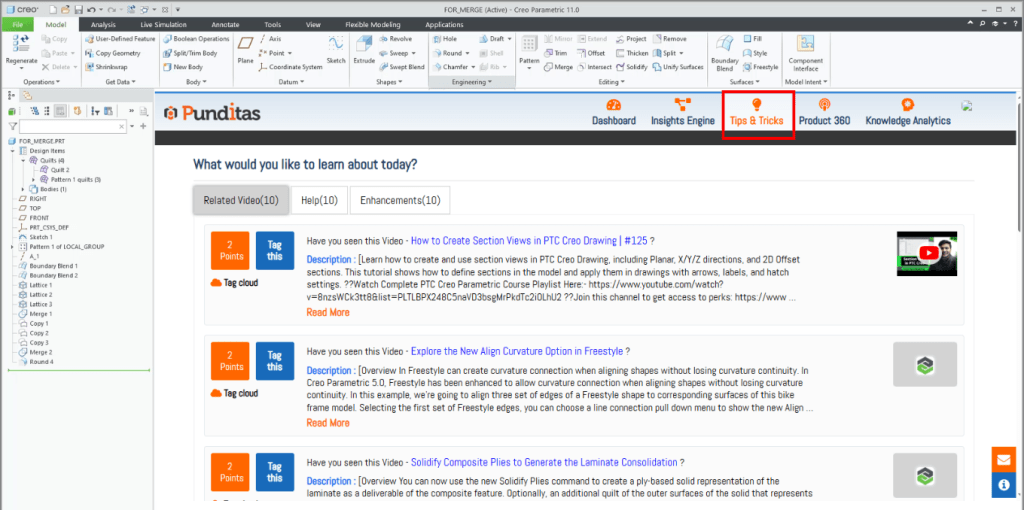
That’s exactly what Punditas AI’s Tips & Tricks module is designed for. It’s not just a typical “tips” page-it’s like having a smart companion that delivers the right knowledge to you, exactly when you need it.
🎬 Learn Creatively, Not Repetitively
Why spend hours digging through tutorials when curated content comes straight to your dashboard? The Related Videos tab handpicks the newest and most useful Creo tutorials and demos from trusted sources across the web. Plus, every video matches your specific Creo version so what you see is relevant to your work.
🧭 Help That Actually Helps
Forget endless hunting through forums or outdated docs. The Help tab gathers the most valuable articles and guides in one place—automatically tailored to your Creo version and focus area. It’s like having instant technical support, without waiting for tickets.
🚀 Discover Enhancements That Matter
Every Creo update brings new tools, but many fly under the radar. The Enhancements tab breaks down what’s new, what’s improved, and why it matters to your design work. Think of it as a live changelog that’s easy to understand and ready for action.
🧩 Why Engineers Love It
Users say Tips & Tricks feels like a personalized learning engine that keeps refreshing itself with verified knowledge. They’re not just learning more—they’re learning faster. Not just staying informed—but staying ahead.
⚙️ In Short
The Tips & Tricks module turns scattered Creo knowledge into focused, actionable insights. It saves time, reduces hassle, and helps every engineer get the most out of every design session. If you haven’t tried it yet, this could be the smartest upgrade you make this week.
What is Punditas AI Advisor?
Punditas AI Advisor provides real-time guidance as you work in the Creo environment. Information on “how to use” a feature in Creo or best practices for working with Creo are presented within context, removing the need to guess or search for such information. Punditas AI driven content helps you leverage Creo to create your designs faster and with confidence.
For more information about Punditas AI Advisor, visit our website at Punditas AI or contact us at contact@punditas.com
 Punditas
Leave a comment