
Engineers rely heavily on official help resources to understand commands, explore workflows, and troubleshoot issues. But navigating multiple help portals and trying to figure out which documentation is accurate, current, or relevant can be overwhelming and time-consuming.
The Help Documents node within Punditas AI transforms this experience by centralizing, verifying, and intelligently delivering the most relevant help content, powered by the platform’s advanced Insights Engine.
Verified for authenticity and reliability
Unlike basic aggregators, Punditas AI does not simply collect documents, It verifies them.
This additional validation step ensures:
- Content is genuine
- Information is taken from trusted sources
- Documentation reflects the latest updates and corrections
- Users avoid outdated or incorrect references
With Punditas AI, engineers can rely on the Help Documents node with full confidence.
Insights Engine + Knowledge Graph: Delivering the right Help at the right time
What makes the Help Documents node especially powerful is its integration with the Insights Engine, supported by a robust Knowledge Graph.
Here’s how it works:
- Users type a search topic, phrase, or feature name
- The Insights Engine analyzes intent using advanced semantic understanding
- The Knowledge Graph maps the query to related commands, workflows, and topics
- The system retrieves the most relevant help documents from the verified collection
- Results appear instantly under the Help Documents node
This ensures that users don’t have to scroll through pages of irrelevant text – they receive highly targeted, meaningful content every time.
A smarter, faster way to use help documentation
The Help Documents node offers major advantages:
✔ Saves time
Users no longer need to manually navigate complex help portals or dig through multiple versions.
✔ Reduces confusion
All results come from validated, official sources – no contradictions, no outdated instructions.
✔ Enhances learning
By combining relevance scoring with semantic search, engineers understand Creo commands and workflows more quickly.
✔ Boosts productivity
The right help resource appears instantly, allowing teams to work more efficiently and solve problems faster.
How to access the help documents node
It takes just a few simple steps:
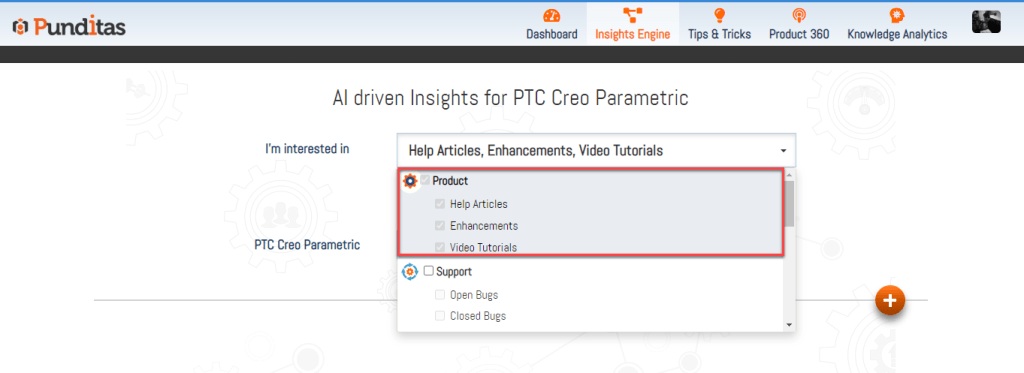
Step 1: Select Product perspective
Choose the appropriate product (e.g., Creo, Windchill, SolidWorks) from the dropdown.
This ensures search results are aligned with the specific platform you’re working with.
Step 2: Enter a word, phrase, or topic
Type your search query such as:
- “Draft feature”
- “Family table rules”
- “Windchill workspace conflicts”
- “Creo assemblies troubleshooting”
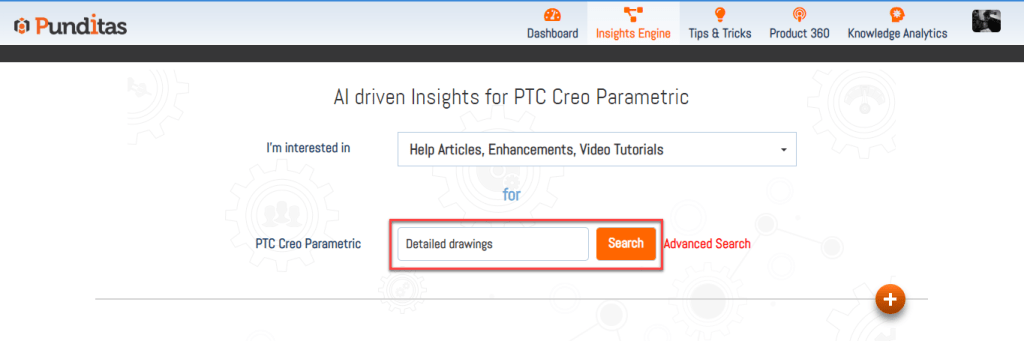
Then click Search.
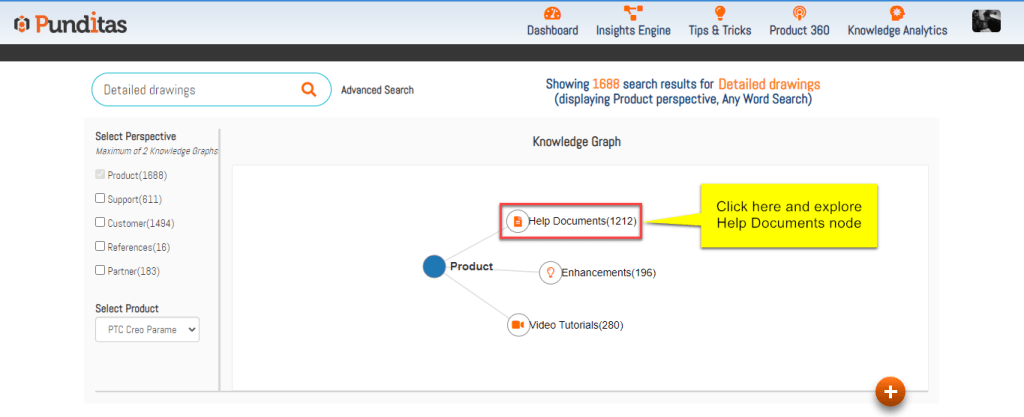
Step 3: Click the Help Documents Node
The system displays the Knowledge Graph connected to your query.
Select Help Documents to instantly view the most relevant, verified documents.
Helping engineers work smarter, not harder
The Help Documents node brings clarity, accuracy, and speed to the way engineers consume technical documentation. Instead of navigating complex help portals, users get curated, validated, and deeply relevant information right when they need it.
Backed by Punditas AI’s Insights Engine and powered by its Knowledge Graph, the Help Documents node ensures that learning, troubleshooting, and understanding software capabilities is simpler, smarter, and far more efficient.
What is Punditas AI Advisor?
Punditas AI Advisor provides real-time guidance as you work in the Creo environment. Information on “how to use” a feature in Creo or best practices for working with Creo are presented within context, removing the need to guess or search for such information. Punditas AI driven content helps you leverage Creo to create your designs faster and with confidence.
For more information about Punditas AI Advisor, visit our website at Punditas AI or contact us at contact@punditas.com
 Punditas
Leave a comment