
Every new software release brings along improvements new capabilities, workflow refinements, UI enhancements, performance boosts, bug fixes, and feature updates. While these advancements are meant to empower users, keeping up with every change across multiple versions and platforms can be overwhelming.
Punditas AI solves this challenge with the Enhancements node, a powerful component of its Insights Engine that programmatically collects, verifies, and intelligently presents all product enhancements in one place.
Staying updated shouldn’t be difficult
Software like Creo, Windchill, SolidWorks, and other engineering tools evolve constantly. Official release notes are long, scattered across platforms, and often difficult to navigate. Users frequently miss important enhancements that could significantly improve productivity.
Punditas AI eliminates this gap by:
- Tracking new releases
- Extracting enhancement information
- Aggregating content across product versions
- Verifying accuracy
- Presenting enhancements in an easy-to-explore format
This ensures that every user engineer, designer, admin, or manager can stay informed without effort.
A programmatic system for reliable enhancement tracking
Punditas AI uses an automated, intelligent system to:
- Programmatically collect enhancements from authoritative product sources
- Aggregate them into a unified repository
- Verify them for accuracy and relevance
- Organize them using the Punditas Knowledge Graph
This process ensures that users are always viewing the most current, validated, and impactful product enhancements available.
Enhancements node: Your centralized hub for what’s new
When users interact with Punditas AI’s Insights Engine, the Enhancements node becomes the dedicated place to explore all the improvements related to a product.
Within the node, users can:
- View enhancement descriptions
- Explore version-specific updates
- Understand what has changed and why
- Identify improvements relevant to their workflows
- Learn about new capabilities across releases
It’s the quickest way to understand how a product is evolving and how those changes can benefit your work.
AI-driven matching for faster, smarter discovery
To enhance the search experience, Punditas AI leverages the full power of its Insights Engine and Knowledge Graph.
When a user types a word, phrase, or topic:
- The Insights Engine analyzes the search intent
- It maps the query to related product features and enhancements
- It retrieves the enhancements that best match the input
- It presents the results within the Enhancements node
This ensures users receive precise, context-aware, and highly relevant enhancement information instantly.
No more scrolling through lengthy release notes.
No more missing important updates.
No more guesswork.
How to Access the Enhancements Node
Getting to the latest enhancements is simple:
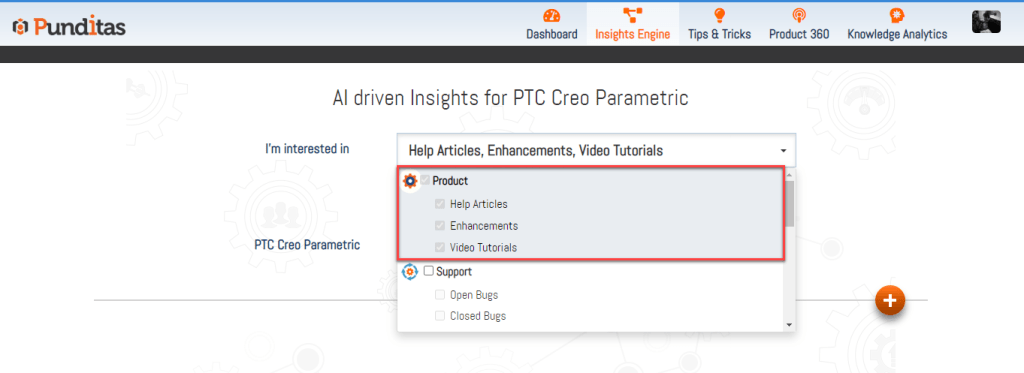
Step 1: Select Product Perspective
Choose the product (e.g., Creo, Windchill, SolidWorks) from the dropdown list.
Step 2: Enter a Word, Phrase, or Topic
Examples include:
- “Pattern updates”
- “Sketch enhancements”
- “Windchill publishing improvements”
- “Creo 10 features”
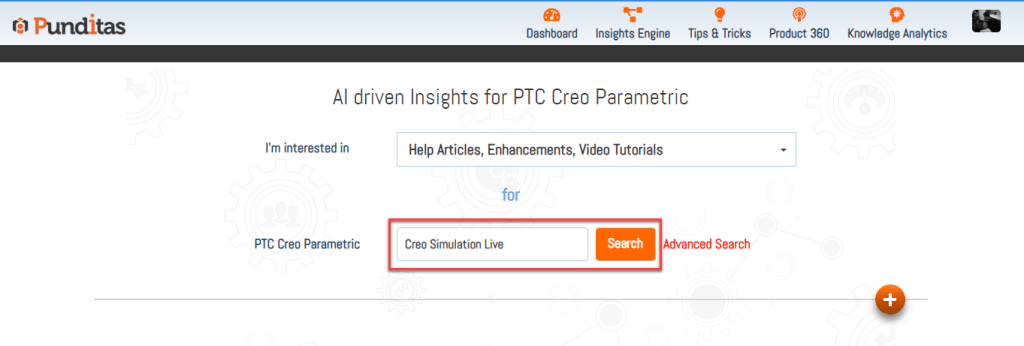
Then hit Search.
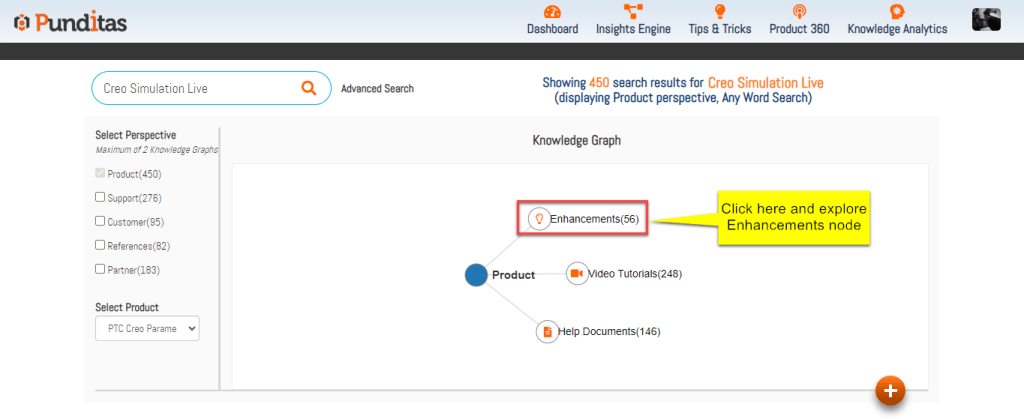
Step 3: Click on the Enhancements Node
The Knowledge Graph will show connected content categories.
Select Enhancements to instantly view all related updates.
Why the Enhancements Node matters
✔ Stay informed effortlessly
Users always know what’s new without digging through release notes.
✔ Improve productivity
Discover enhancements that streamline workflows or introduce new capabilities.
✔ Support better decision-making
Admins and team leads can determine when to adopt new versions or features.
✔ Personalized relevance
AI ensures your search results align with your actual needs.
A smarter way to track product evolution
The Enhancements node transforms how users stay updated with the latest software improvements. By programmatically collecting enhancements, verifying them, and delivering AI-matched results, Punditas AI makes it incredibly simple to keep pace with evolving product capabilities.
With the Enhancements node, users not only stay informed they stay ahead.
What is Punditas AI Advisor?
Punditas AI Advisor provides real-time guidance as you work in the Creo environment. Information on “how to use” a feature in Creo or best practices for working with Creo are presented within context, removing the need to guess or search for such information. Punditas AI driven content helps you leverage Creo to create your designs faster and with confidence.
For more information about Punditas AI Advisor, visit our website at Punditas AI or contact us at contact@punditas.com
 Punditas
Leave a comment