
Engineering teams depend on reliable technical documentation – configuration options, installation guides, hardware notes, administration instructions, and more to manage complex CAD and PLM environments effectively. But these documents are often scattered across platforms, difficult to find, and time-consuming to navigate.
Punditas AI’s Reference Docs node eliminates this challenge by collecting, organizing, and intelligently delivering the most essential reference documents across supported products. Whether you’re a CAD administrator, or power user, the Reference Docs node ensures that critical information is always one search away.
A centralized repository of trusted reference materials
Punditas AI compiles high-value reference documentation directly from authoritative sources.
For PTC Creo Parametric, this includes essential resources such as:
- Configuration Options
- Hardware Notes and system requirements
- Installation Guides
- Administration Guides
- Creo Platform documentation
- Creo Parametric TOOLKIT Guides
- Data Management instructions
- Release Notes
- Troubleshooting references
- System configuration and performance guides
These documents cover the foundational knowledge required to install, configure, maintain, and scale Creo in real production environments.
And importantly Punditas AI is capable of performing the same aggregation and organization for other products as well, ensuring broad coverage across the engineering tool ecosystem.
Powered by Punditas AI’s search intelligence
Finding the right reference material can be difficult when documentation is extensive and highly technical.
Punditas AI solves this by combining:
- Advanced keyword and semantic search
- Knowledge Graph–based mapping
- Relevance scoring algorithms
When a user enters a search term such as “config.pro options”, “Windchill installation”, or “graphics hardware for Creo” the Insights Engine analyzes the input and identifies the most appropriate documents from its verified repository.
This ensures users receive precise, contextual, and meaningful reference results instantly.
Why the Reference Docs node matters
✔ One place for all critical documentation
No more hunting through vendor websites or outdated local folders.
✔ Trusted, authoritative sources only
Punditas AI aggregates documents exclusively from validated, official platforms.
✔ Faster, smarter access to technical knowledge
Keyword search combined with AI-driven relevance ensures high-quality matches.
✔ Ideal for admins and power users
Installation, configuration, performance tuning, and system-level information is always accessible.
✔ Supports multiple products across the enterprise
Whether your organization works with Creo, Windchill, SolidWorks, or others-Reference Docs keeps information unified.
How to access the reference Docs node
Exploring reference documents through Punditas AI is simple and intuitive.
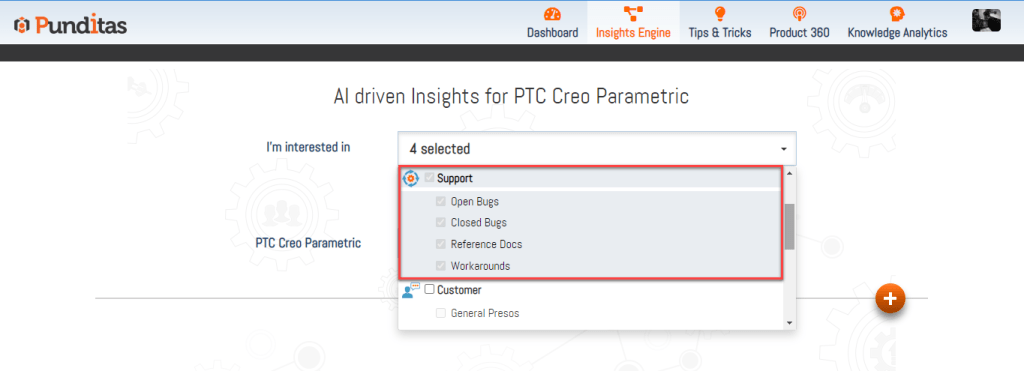
Step 1: Select Support Perspective
From the dropdown, choose Support Perspective to activate access to administration- and configuration-focused resources.
Step 2: Enter a word, phrase, or topic
Examples include:
- “Installation guide”
- “Toolkit documentation”
- “Admin tutorials”
- “Release notes Creo 10”
- “Data management workflow”

Then click Search.
Step 3: Click the Reference Docs Node
The Knowledge Graph displays all relevant categories.
Select Reference Docs to instantly view the documents aligned with your query.

Empowering administrators, engineers, and support teams
The Reference Docs node serves as a powerful knowledge hub for teams who maintain, configure, and support engineering environments. By centralizing technical documentation and enabling intelligent search, Punditas AI ensures that users always have the right references at their fingertips-leading to smoother installations, optimized configurations, and greater operational efficiency.
With Punditas AI, critical information becomes accessible, searchable, and actionable.
What is Punditas AI Advisor?
Punditas AI Advisor provides real-time guidance as you work in the Creo environment. Information on “how to use” a feature in Creo or best practices for working with Creo are presented within context, removing the need to guess or search for such information. Punditas AI driven content helps you leverage Creo to create your designs faster and with confidence.
For more information about Punditas AI Advisor, visit our website at Punditas AI or contact us at contact@punditas.com
 Punditas
Leave a comment