

Engineering software is powerful but like any complex system, it sometimes includes issues, defects, or unresolved bugs that can affect workflows. These open bugs are documented across support portals and customer-facing knowledge bases, but locating them is often difficult. Users may not know whether a problem they’re facing is a known issue, an open ticket, or an upcoming fix.
Punditas AI solves this challenge with its Open Bugs node, a dedicated feature within the Support Perspective that compiles and intelligently surfaces validated information about unresolved issues across different Creo modules and versions.
A centralized source for unresolved issues
Punditas AI gathers open bugs from trusted, authoritative sources and organizes them systematically.
For Creo Parametric, this includes open issues across major functional areas such as:
- Part Modeling
- Part & Assembly Design
- Installation / Administration
- Data Exchange
- Detailing & Drawing
- Surfacing
- Rendering
- Layout
- Advanced Framework Design
- Welding
- Electrical Design
- Piping
- Manufacturing
- Sheetmetal
- And more…
Users can instantly explore known issues tied specifically to their modules of interest.
This same capability extends broadly to other supported products, ensuring unified access to unresolved issues across an entire engineering ecosystem.
Verified, Structured, and Always Relevant
Unlike manually searching through support portals or browsing lengthy bug lists, Punditas AI offers:
- Verified information
- Mapped bug details
- Structured lists categorized by module
- Clear descriptions of the issue
- Version-specific and context-conscious results
This helps users quickly determine whether a behavior they’re experiencing is already documented as an open issue.
Powered by Punditas AI’s insights engine
The Open Bugs node leverages the full intelligence of the Insights Engine and its Knowledge Graph mapping system.
When a user types a word, phrase, or topic, the AI engine:
- Interprets the search intent
- Matches the input against known open bug descriptions
- Finds bugs related to specific features, workflows, or modules
- Prioritizes results using AI-driven relevance scoring
- Presents them directly in the Open Bugs node
This ensures that users don’t sift through dozens of unrelated defects they see exactly the issues relevant to their query.
Why the open bugs node matters
✔ Clear visibility into known issues
Users gain immediate access to unresolved bugs that may affect their work.
✔ Saves time & avoids troubleshooting dead ends
Before spending hours diagnosing a problem, users can check if it’s already a known issue.
✔ Better decision-making
Teams can plan updates, workarounds, or patch strategies based on awareness of open defects.
✔ Supports multiple products
The node is not limited to Creo—other engineering platforms also benefit.
✔ Valuable for CAD admins & support teams
Admins can quickly verify if any reported user issue aligns with existing open bugs.
How to access the open bugs node
Accessing open defect information through Punditas AI is simple:
Step 1: Select Support Perspective
Choose Support Perspective from the dropdown to activate support-related insights.
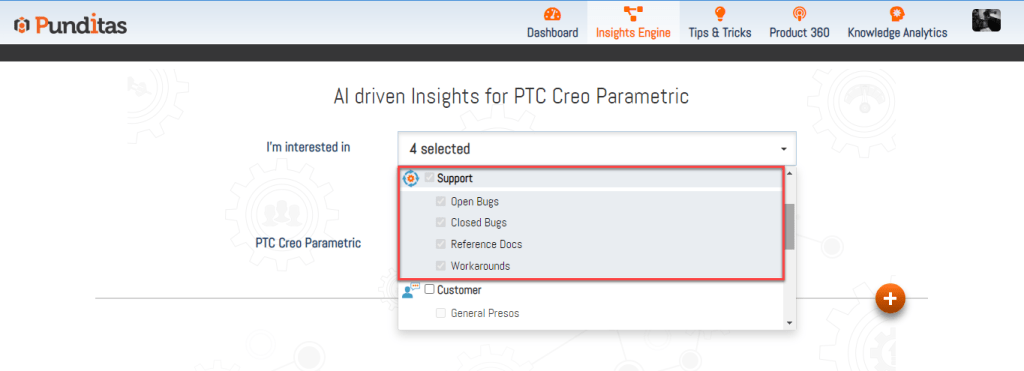
Step 2: Enter a word, phrase, or topic
Example queries include:
- “Pattern failing”
- “Drawing view crash”
- “Assembly regeneration issue”
- “Graphics bug”
- “Export problem Creo”
Then click Search.

Step 3: Click on the open bugs node
The Knowledge Graph displays connected insights.
Select Open Bugs to instantly view unresolved issues relevant to your search.

Making problem-solving smarter
The Open Bugs node is more than a list-it’s a powerful, intelligent guide that helps engineers, designers, and administrators save time, avoid confusion, and work more effectively. By bringing together trusted unresolved issues and pairing them with AI-driven search matching, Punditas AI empowers users to stay informed and act confidently.
With the Open Bugs node, you always know what’s a bug, what’s known, and where the software stands so you can focus on designing, not debugging.
What is Punditas AI Advisor?
Punditas AI Advisor provides real-time guidance as you work in the Creo environment. Information on “how to use” a feature in Creo or best practices for working with Creo are presented within context, removing the need to guess or search for such information. Punditas AI driven content helps you leverage Creo to create your designs faster and with confidence.
For more information about Punditas AI Advisor, visit our website at Punditas AI or contact us at contact@punditas.com
 Punditas
Leave a comment