
Finding the right video tutorial can be challenging especially when content is scattered across YouTube, Vimeo, training portals, and various learning centers. Engineers often waste valuable time searching, filtering, and validating whether a video is useful or even accurate.
Punditas AI eliminates this pain.
The Video Tutorials node, powered by Punditas AI’s robust collection and verification system, delivers curated, relevant, and high-quality videos to help users learn faster and with confidence.
A smarter way to discover Creo tutorials
Punditas AI continuously aggregates video content from multiple trusted platforms including:
- YouTube
- Vimeo
- PTC Learning Connector
- Official training libraries
But collecting videos is just the beginning. What makes the Video Tutorials node exceptional is the intelligence behind it.
Verified content for reliable learning
Unlike platforms that simply pull feeds or search results, Punditas AI verifies the videos and courses it collects. This ensures:
- No irrelevant content
- No outdated information
- No low-quality or misleading uploads
- No search algorithm noise
Users get clean, accurate, and trustworthy video results every time.
Powered by the Insights Engine + Knowledge Graph
The real magic happens when Punditas AI’s Insights Engine and Knowledge Graph work together.
When a user enters a search term whether it’s a feature name, a topic, a workflow phrase, or a troubleshooting question the system:
- Understands the intent behind the query
- Maps the query across thousands of indexed keywords, features, and topics
- Fetches only the most relevant videos
- Ranks and prioritizes them using AI-based relevance scoring
This means users are not just browsing video libraries they’re accessing precisely the videos that match their needs.
Every search becomes smarter, faster, and more meaningful.
How to access the video tutorials node
Getting to the most relevant videos takes just a few seconds. Follow these simple steps:
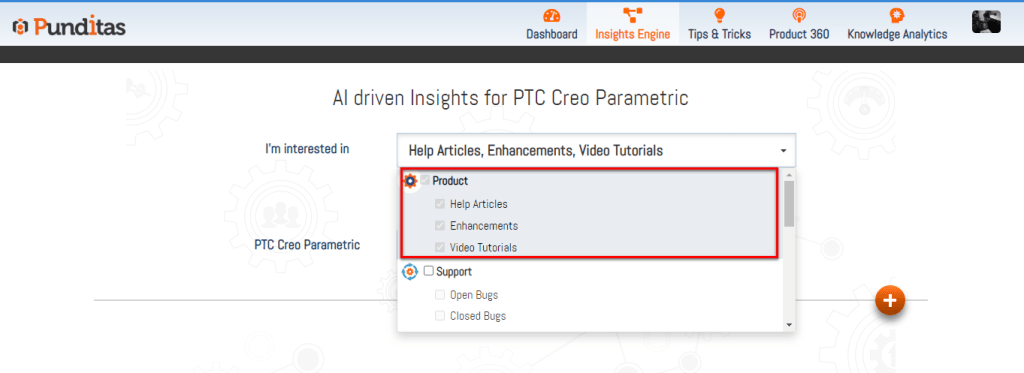
Step 1: Select Product Perspective
Choose the appropriate product (e.g., Creo, Windchill, SolidWorks, etc.) from the dropdown list.
This ensures that the search is targeted to the product ecosystem you care about.
Step 2: Enter a Word, Phrase, or Topic
Type your query such as:
- “Sweep feature”
- “Creo pattern troubleshooting”
- “Windchill workspace tips”
- “Sheetmetal bends”
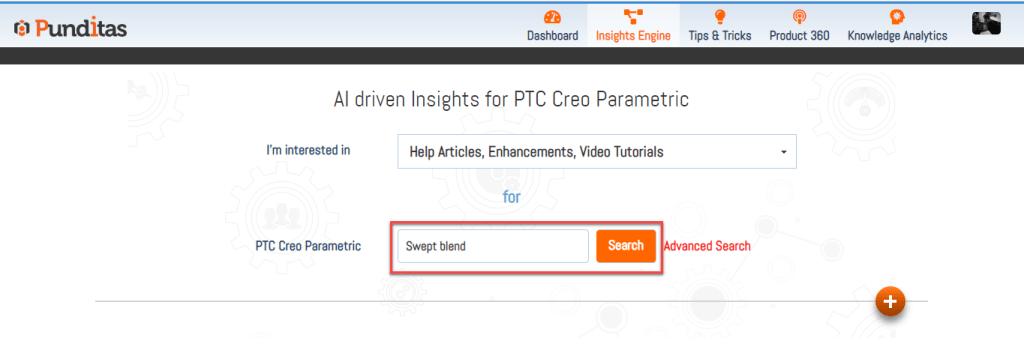
Then click Search.
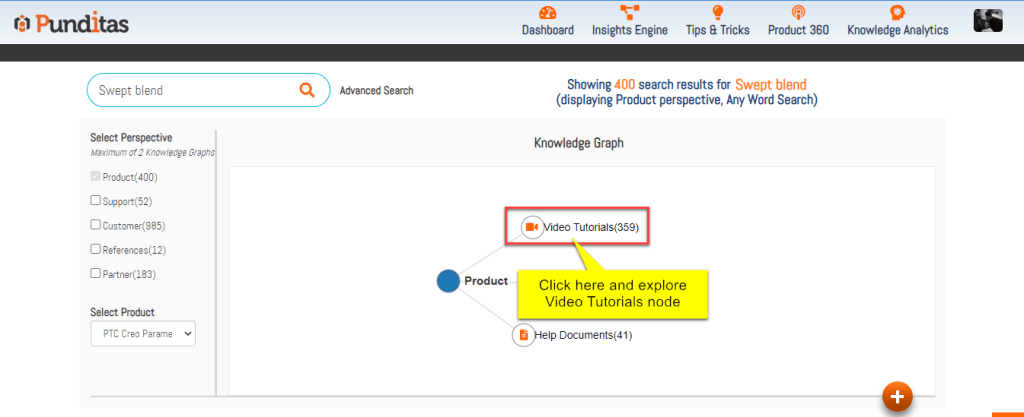
Step 3: Click on the Video Tutorials Node
The Knowledge Graph visually displays the nodes connected to your search.
Select Video Tutorials to instantly explore verified, relevant videos curated specifically for your query.
Why the video tutorials node stands out
✔ Highly relevant results
AI-driven matching ensures you see only the videos that matter.
✔ Verified & reliable content
Every video is screened for quality and accuracy.
✔ Multi-platform coverage
Users access a unified view of videos from all major learning sources.
✔ Faster skill development
Engineers spend less time searching and more time learning.
✔ Context-aware learning
The Insights Engine understands product features, workflows, challenges, and enhancements making every recommendation smart and contextual.
A powerful learning companion for every engineer
Whether you’re new to a tool, exploring an advanced workflow, or trying to troubleshoot an issue, the Video Tutorials node provides immediate access to the most helpful learning resources available anywhere.
Punditas AI ensures you don’t just find videos
You find the right videos.
What is Punditas AI Advisor?
Punditas AI Advisor provides real-time guidance as you work in the Creo environment. Information on “how to use” a feature in Creo or best practices for working with Creo are presented within context, removing the need to guess or search for such information. Punditas AI driven content helps you leverage Creo to create your designs faster and with confidence.
For more information about Punditas AI Advisor, visit our website at Punditas AI or contact us at contact@punditas.com
 Punditas
Leave a comment