

When working with complex engineering tools like Creo, Windchill, SolidWorks, and other enterprise applications, users frequently encounter issues that require practical guidance workarounds, troubleshooting steps, configuration instructions, or support-provided solutions. However, these fixes are often buried across customer support portals, knowledge bases, and version-specific documentation.
Punditas AI simplifies this with its Workarounds node, a powerful solution that aggregates validated CS Articles and support documents, organizes them intelligently, and delivers highly relevant results tailored to your search queries.
A centralized hub for trusted support knowledge
Punditas AI collects and organizes Workarounds from trusted, authoritative sources, ensuring users always have access to:
- Verified CS Articles
- Step-by-step instructions
- Configuration guidance
- Solutions for known issues
- Troubleshooting workflows
- Detailed problem descriptions and resolutions
- Download instructions and setup guidance
- Version-specific fix explanations
For example, Creo users can quickly find:
- How to implement configuration options
- How to fix installation or startup errors
- How to access Creo download pages
- How to resolve regeneration or modeling failures
- How to navigate platform-specific issues across releases
The same capability applies to other supported products, making Workarounds an essential tool for engineers, admins, and IT teams alike.
Powered by Punditas AI’s Insights Engine
Simply gathering support articles isn’t enough users need the right information, not a long list of unrelated results.
The Workarounds node is powered by:
- Insights Engine intelligence
- Knowledge Graph mapping
- Semantic relevance scoring
- Keyword and phrase matching
When a user enters a search query, the Insights Engine analyzes the intent behind the keyword or phrase and identifies the most appropriate Workarounds in the system.
Whether the query is simple such as “license error” or complex like “regeneration failure in Creo pattern features” Punditas AI ensures the results are precise and useful.
Why the Workarounds node is critical
✔ Fast, accurate troubleshooting
Users no longer need to dig through multiple support portals or ticketing systems.
✔ High-quality, verified content
All Workarounds come from trusted sources, ensuring reliability and correctness.
✔ Saves time for engineers & support teams
Faster resolution means less downtime, fewer delays, and minimized disruptions.
✔ Supports multiple products
The system is not limited to Creo—Workarounds are provided for a wide range of engineering tools.
✔ Ideal for admins, it teams & power users
Installation issues, update problems, configuration conflicts, migration steps—everything becomes easier to find.
How to access the workarounds node
Accessing actionable solutions through Punditas AI is simple:
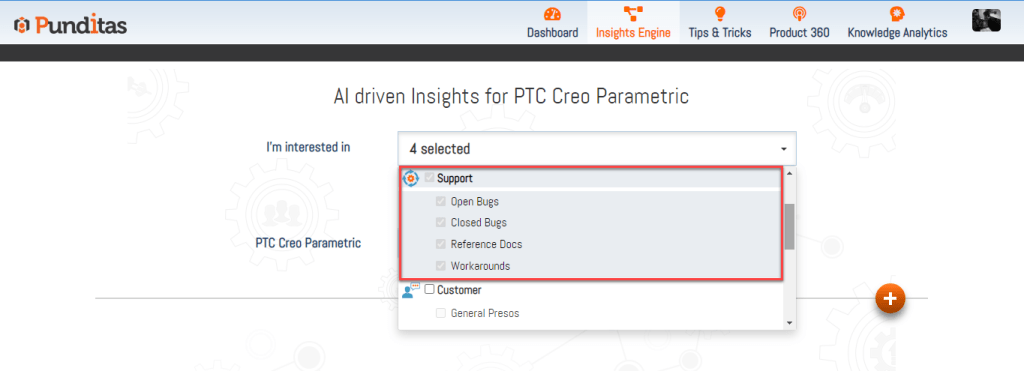
Step 1: Select Support Perspective
Choose Support Perspective from the dropdown menu. This activates access to troubleshooting- and support-focused knowledge.
Step 2: Enter a word, phrase, or topic
Example searches include:
- “Install error”
- “Creo license issue”
- “Windchill upload failure”
- “Graphics performance fix”
- “Creo option to disable snap”
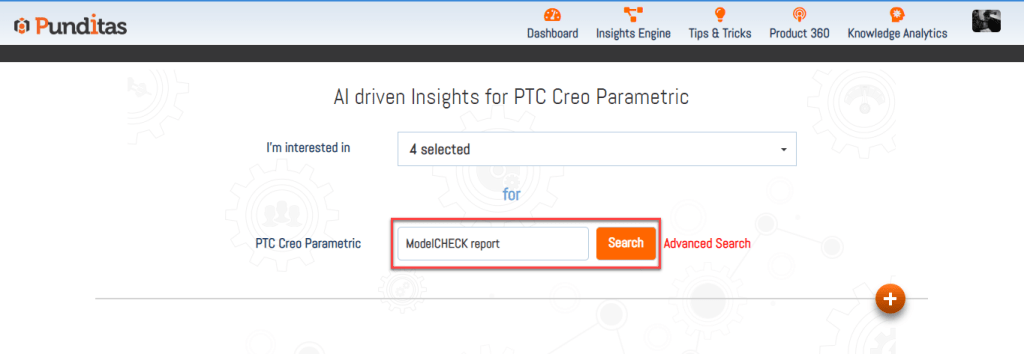
Then click Search.
Step 3: Click on the Workarounds Node
The Knowledge Graph displays nodes related to your query.
Select Workarounds to instantly view targeted solutions and verified support articles.

Empowering users with clear, actionable fixes
The Workarounds node is more than a document repository.
It is a smart troubleshooting companion that helps users solve problems quickly, learn best practices, and keep their tools running smoothly.
By combining trusted support knowledge with AI-powered relevance matching, Punditas AI ensures every user from designers and engineers to CAD admins has access to the information they need, exactly when they need it.
With the Workarounds node, problem-solving becomes faster, clearer, and significantly more efficient.
What is Punditas AI Advisor?
Punditas AI Advisor provides real-time guidance as you work in the Creo environment. Information on “how to use” a feature in Creo or best practices for working with Creo are presented within context, removing the need to guess or search for such information. Punditas AI driven content helps you leverage Creo to create your designs faster and with confidence.
For more information about Punditas AI Advisor, visit our website at Punditas AI or contact us at contact@punditas.com
 Punditas
Leave a comment