
When working with advanced engineering tools like Creo, Windchill, SolidWorks, or other complex platforms, many issues users face are already resolved in recent updates or patches. But finding out whether a problem has been fixed and in which version is often a challenge.
Punditas AI solves this problem with the Closed Bugs node, a powerful feature designed to help users quickly identify resolved issues, understand fix histories, and verify whether a problem has already been addressed by the vendor.
A comprehensive hub for resolved issues
Punditas AI gathers and organizes information about closed bugs, resolved issues, and closed tickets from trusted, official sources. For Creo Parametric, this includes closed bugs across major functional areas such as:
- Part Modeling
- Part & Assembly Design
- Installation / Administration
- Data Exchange
- Detailing & Drawing
- Surfacing
- Rendering
- Layout
- Advanced Framework Design
- Welding
- Electrical Design
- Piping
- Manufacturing
- Sheetmetal
- And many more…
This same capability applies to other supported products, ensuring users have access to verified fix information regardless of the system they use.
Verified and organized fix information
Punditas AI doesn’t simply collect resolved issues, it validates and structures them to ensure accuracy and relevance.
The Closed Bugs node helps users:
- See the resolution details for previously known issues
- Identify the software version where the bug was fixed
- Understand the root cause and resolution path
- Cross-check if a past issue matches their current experience
- Gain confidence that upgrading versions will resolve specific problems
This allows engineers, designers, and admins to make informed decisions about updates and troubleshooting.
Powered by the Punditas Insights Engine
Finding relevant closed bug information manually can be tedious.
The Closed Bugs node uses the full intelligence of:
- Punditas AI’s Insights Engine
- Knowledge Graph mapping
- Semantic intent recognition
- Relevance scoring
When a user enters a search topic, word, or phrase, the system:
- Interprets the intent of the query
- Maps the search to related closed bugs
- Identifies resolved issues that match the keywords
- Displays them directly under the Closed Bugs node
This ensures fast, accurate, and context-aware results without users digging through release notes or long support articles.
Why the closed bugs node matters
✔ Faster troubleshooting
Users can quickly determine whether an issue they encountered has already been fixed.
✔ Better upgrade planning
Admins can see which bugs were resolved in new versions, supporting decisions to update software.
✔ Reduced support overhead
Users spend less time opening tickets for problems that already have documented fixes.
✔ Guaranteed accuracy
All closed bugs are taken from verified, trusted sources.
✔ Supports multiple products
The node provides consistent fix-history visibility across various engineering platforms.
How to access the Closed Bugs node
Finding resolved issues in Punditas AI is simple:
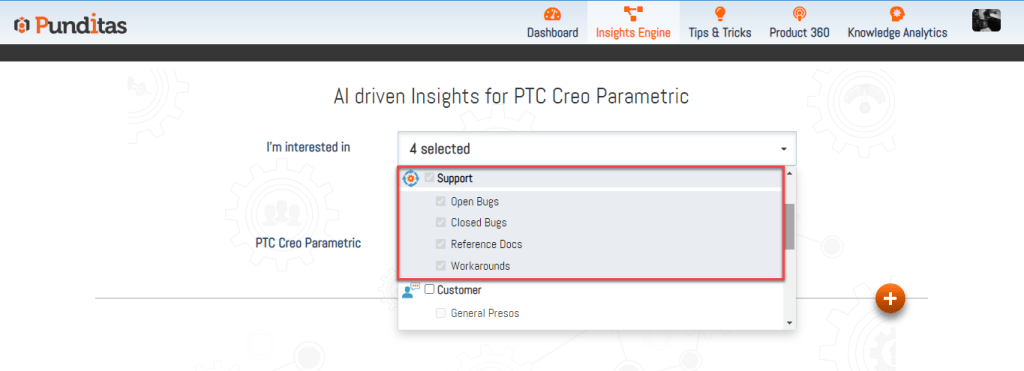
Step 1: Select Support Perspective
Choose Support Perspective to activate access to support-related insights.
Step 2: Enter a word, phrase, or topic
Example queries include:
- “Pattern fix”
- “Drawing issues resolved”
- “Windchill upload bug fixed”
- “Regeneration crash solved”
- “Creo 10 closed tickets”
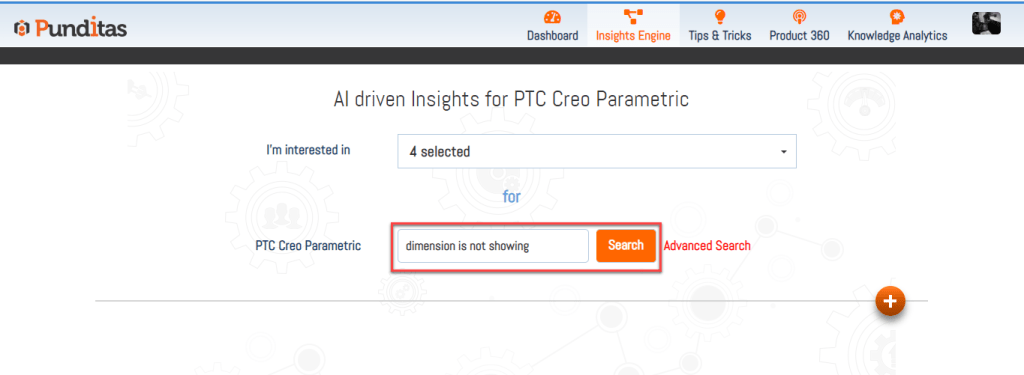
Then click Search.
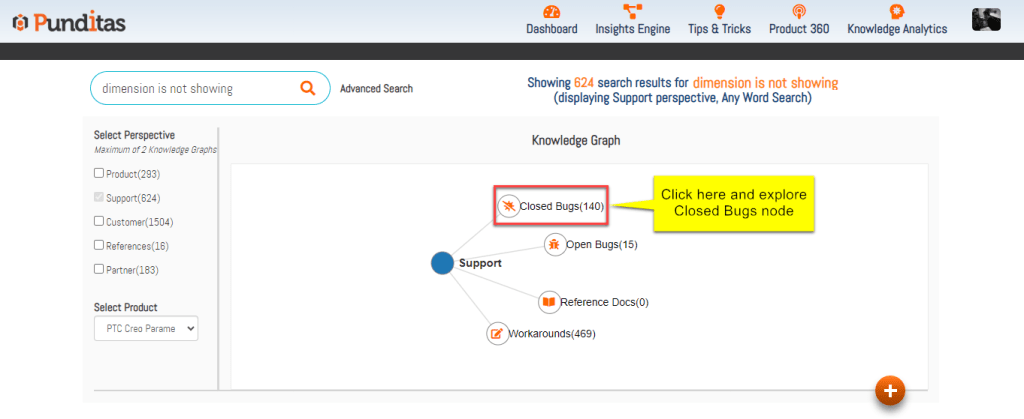
Step 3: Click on the closed bugs node
The Knowledge Graph will display nodes relevant to your query.
Select Closed Bugs to instantly view resolved issues aligned with your search.
Bringing clarity to fix history
The Closed Bugs node empowers users, administrators, and support teams with a clear understanding of what issues have been addressed across various product versions. By centralizing verified fix histories and pairing them with AI-driven search intelligence, Punditas AI helps users work smarter, eliminate uncertainty, and make better decisions about troubleshooting and upgrades.
With the Closed Bugs node, you always know what’s fixed, when it was fixed, and how it impacts your workflow.
What is Punditas AI Advisor?
Punditas AI Advisor provides real-time guidance as you work in the Creo environment. Information on “how to use” a feature in Creo or best practices for working with Creo are presented within context, removing the need to guess or search for such information. Punditas AI driven content helps you leverage Creo to create your designs faster and with confidence.
For more information about Punditas AI Advisor, visit our website at Punditas AI or contact us at contact@punditas.com
 Punditas
Leave a comment