
Engineers working with advanced technologies such as CAD, PLM, IoT, and AR often need high-quality customer presentations to understand how enterprise software tools are being used across industries. Presentations that showcase real-world applications of PTC Creo Parametric, Windchill PDMLink, Onshape, Vuforia, ThingWorx, and other platforms help engineers gain perspective, compare solutions, and make more informed decisions.
However, finding these customer presentations across different websites, product pages, forums, and industry portals can be time-consuming and inconsistent.
Punditas AI solves this challenge with its Customer Presentations node.
A curated source for customer-focused content
Punditas AI continuously gathers customer presentations and related resources from numerous reliable, trusted websites. This includes materials that highlight:
- Industry case studies
- Real-world product usage
- Customer success stories
- Innovation showcases
- Digital transformation examples
- Product comparisons and capability demonstrations
These materials provide engineers with valuable perspective on how different organizations leverage engineering technologies to solve business challenges and improve productivity.
Powered by Punditas AI’s Knowledge Graph
Once customer presentation content is curated, the Punditas AI algorithm processes it through the Knowledge Graph, ensuring that results are:
- Highly relevant
- Accurately matched to the search term
- Organized by context
- Easy to discover and explore
When users enter keywords, phrases, or topics, the Insights Engine intelligently identifies customer presentations that align with the user’s search intent. This transforms a manual search process into an effortless, AI-driven experience.
Why the customer presentations node matters
✔ Discover real-world industry examples
Engineers can quickly explore how organizations apply CAD, PLM, IoT, and AR technologies in practical scenarios.
✔ Support better decision-making
Insights from customer presentations make it easier to select the right tools, workflows, or modules for enterprise engineering environments.
✔ Stay updated with technology trends
Users gain visibility into how industries adopt new features, tools, and digital engineering methods.
✔ Access curated, high-quality content
Punditas AI ensures that the presentations come from trusted and reputable sources, improving the reliability of insights.
✔ Simplify research and evaluation
Instead of browsing multiple websites, engineers can access everything from one centralized node.
How to access the customer presentations node
Accessing industry presentations through Punditas AI is simple:
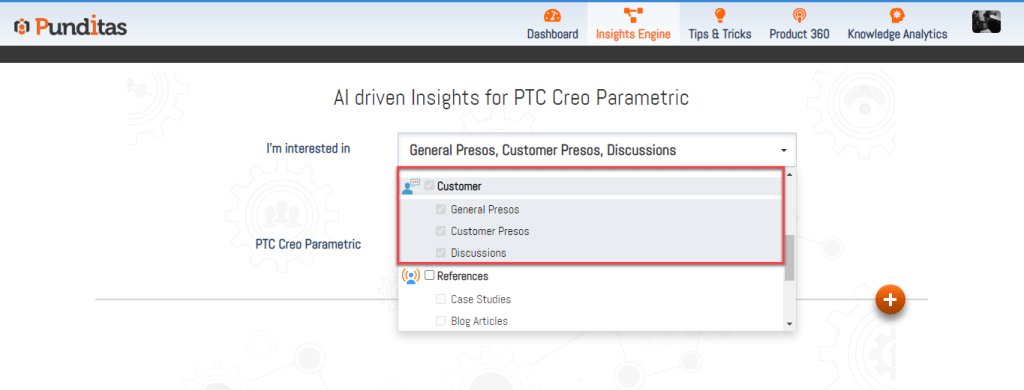
Step 1: Select Customer Perspective
Choose Customer Perspective from the dropdown. This activates access to customer-focused insights.
Step 2: Enter a word, phrase, or topic
Example searches:
- “Creo simulation case study”
- “Windchill digital thread example”
- “Onshape customer story”
- “ThingWorx IoT production use case”
- “Vuforia AR adoption”
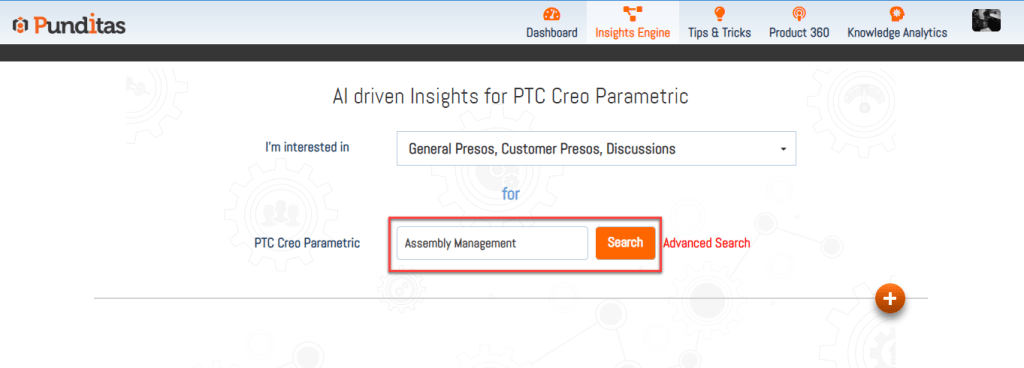
Then click Search.
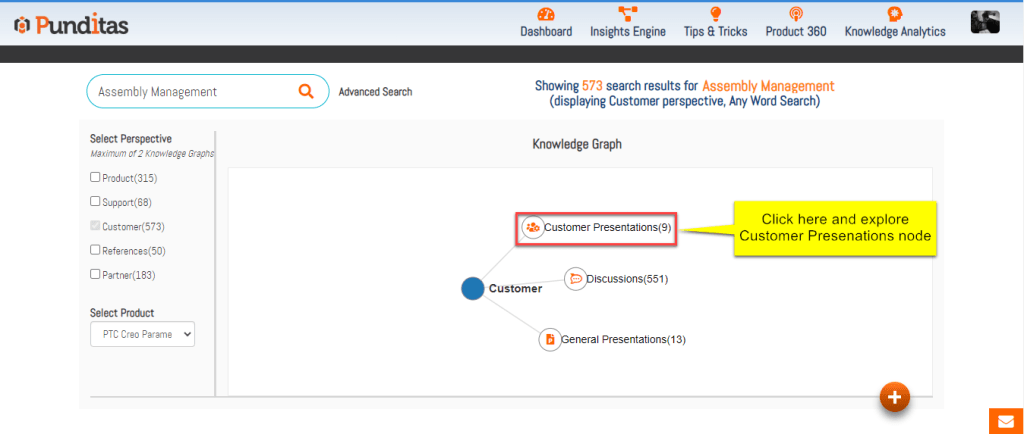
Step 3: Click on the Customer Presentations Node
The Knowledge Graph appears with connected nodes.
Select Customer Presentations to explore curated customer materials relevant to your search.
Turning Customer Insights Into Engineering Advantage
The Customer Presentations node gives engineers the ability to understand product capabilities not just from documentation but from real-world usage across industries. It bridges the gap between what the software can do and how it is actually applied in day-to-day engineering workflows.
By organizing customer insights through the Knowledge Graph and delivering relevant matches through the Insights Engine, Punditas AI empowers engineers to make smarter, more informed decisions about the tools they use.
What is Punditas AI Advisor?
Punditas AI Advisor provides real-time guidance as you work in the Creo environment. Information on “how to use” a feature in Creo or best practices for working with Creo are presented within context, removing the need to guess or search for such information. Punditas AI driven content helps you leverage Creo to create your designs faster and with confidence.
For more information about Punditas AI Advisor, visit our website at Punditas AI or contact us at contact@punditas.com
 Punditas
Leave a comment