PTC introduced Stochastic lattices (random lattices) in Creo Parametric 6.0. This first implementation of the stochastic lattices used Voronoi diagram algorithm. Voronoi is a common algorithm when you want a lattice to conform to bionic shapes. However, starting with Creo Parametric 7.0.0.0, Delaunay triangulation was introduced. The Delaunay triangulation generates a set of triangles to use... Continue Reading →
Did you know that you can use Bodies as design tools for Multibody Part Design?
In Creo 7.0 we can now create and use bodies that are intended to act as modification tools to change geometry in other design bodies. Using these operations increases productivity by applying faster and easier design workflows and reducing the need to switch to surface or quilt-based workflows and tools. Geometry creation tools such as Extrude or Revolve... Continue Reading →
Did you know that Mirror tool in Creo Sketcher is enhanced?
Starting with Creo 7.0 release, Mirror tool in Sketcher has been made easier. To mirror, select the sketched entities to mirror and select reference. Allowed entities for mirror reference are horizontal and vertical sketch reference lines, and other straight geometric entities, such as model edges, projected geometry, curves, standard and construction sketched lines and center lines.... Continue Reading →
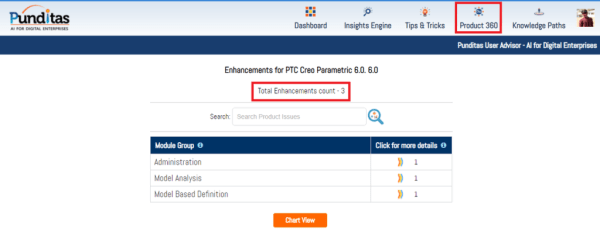
Punditas AI Advisor now supports Creo 6.0.6.0
PTC released Creo 6.0.6.0 recently. Punditas AI Advisor now supports this latest version of Creo 6.0.6.0. Punditas AI allows users to learn more about “How”, What” and “Why” of these enhancements through Product 360 module. The picture below shows the Module groups and the corresponding enhancements added within each group. To try this out, please... Continue Reading →
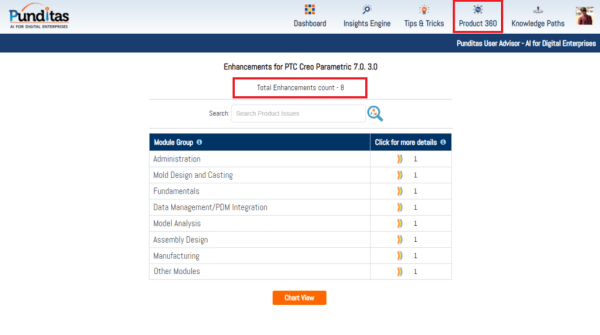
Punditas AI Advisor now supports Creo 7.0.3.0
PTC released Creo 7.0.3.0 recently. Punditas AI Advisor now supports this latest version of Creo 7.0.3.0 . Punditas AI allows users to learn more about “How”, What” and “Why” of these enhancements through Product 360 module. The picture below shows the Module groups and the corresponding enhancements added within each group. To try this out,... Continue Reading →
Punditas AI Advisor now supports Creo 4.0 M140
PTC released Creo 4.0 M140 recently. Punditas AI Advisor now supports this latest version of Creo 4.0 M140. Punditas AI allows users to learn more about “How”, What” and “Why” of these enhancements through Product 360 module. The picture below shows the Module groups and the corresponding enhancements added within each group. To try this... Continue Reading →
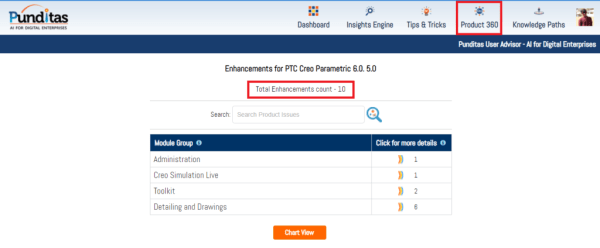
Punditas AI Advisor now supports Creo 6.0.5.0
PTC released Creo 6.0.5.0 recently. Punditas AI Advisor now supports this latest version of Creo 6.0.5.0. Punditas AI allows users to learn more about “How”, What” and “Why” of these enhancements through Product 360 module. The picture below shows the Module groups and the corresponding enhancements added within each group. To try this out, please... Continue Reading →
Have you tried any of these 3 MBD enhancements in Creo?
The following are 6 MBD related enhancements in Creo 7.0 - Control gap between a GTOL frame and Indicator frame If you have a drawing that is designed against the 2012 version of ISO 1101, and you need to make it compliant with the 2017 version , you can use this detail option to help... Continue Reading →
How to align Ordinate dimensions with a baseline in Creo?
Starting with Creo 7.0, there's better control over the placement of ordinate dimensions that are created in models and drawings. Prior to this Creo 7.0 release, when creating ordinate dimensions per ANSI standards, these dimensions would get placed when they are aligned with the baseline. However, this can now be controlled using "default_ansi_ord_dim_aligned" config option.... Continue Reading →
Have you tried to accurately remove hidden lines for intersecting components in Creo?
If you have a part with interfering bodies or an assembly with interfere hidden lines removed. You might also want to see a drawing for a part or assembly with interfering parts or components, correctly with hidden lines removed. Starting with Creo 7.0, you can use the below config option to accurately remove the Hidden... Continue Reading →