
Engineering teams work best when the right knowledge reaches the right people at the right time. But with information scattered across documents, tutorials, help centers, forums, and internal resources, staying informed can be overwhelming.
Punditas AI’s Knowledge Analytics module solves this by giving users and organizations the ability to personalize, analyze, and share knowledge ensuring everyone stays aligned and empowered with the insights they truly need.
This module is designed to put users in control of their learning journey while enabling enterprises to streamline knowledge distribution and foster collaboration across teams.
What is Knowledge analytics?
Knowledge Analytics is a powerful module within Punditas AI that allows users to curate, control, and customize the information they receive from the Advisor. Instead of receiving an endless stream of updates, engineers can fine-tune their knowledge preferences to match their roles, responsibilities, and skill needs.
At the same time, organizations benefit from seamless knowledge sharing, structured learning pathways, and centralized communication all built to strengthen teamwork and improve engineering proficiency.
Why Knowledge Analytics matters
✔ Personalized Knowledge Delivery
Users can define exactly what topics, product areas, or interests they want to focus on. This eliminates noise and ensures every insight they receive is relevant and valuable.
✔ Effortless Collaboration
Knowledge can be easily shared with colleagues, enabling teams to learn together, stay aligned, and elevate overall capability.
✔ Enterprise-Grade Knowledge Control
Administrators can guide learning paths, highlight priority content, share organizational resources, and distribute important updates all inside the Punditas AI ecosystem.
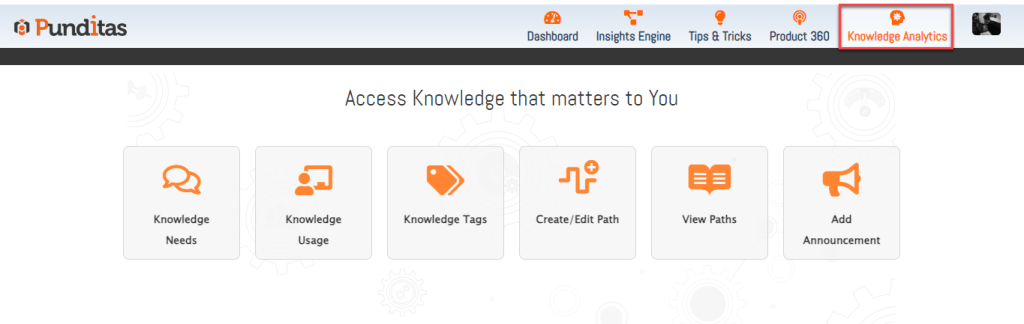
The six core modules inside knowledge analytics
1. Knowledge Needs
Admin Users select the specific areas that their team members want to learn about such as part modeling, simulation, surfacing, Windchill updates, or new Creo enhancements.
This ensures that all future insights, recommendations, and learning materials align with their personal objectives.
2. Knowledge Usage
A detailed view of how users consume knowledge across Punditas AI.
It highlights:
- What topics users engage with most
- Which content types they prefer
- How learning patterns evolve
This helps both individuals and organizations better understand knowledge adoption.
3. Knowledge Tags
Tags allow users to categorize and organize content based on themes or personal preferences.
This creates a more structured, searchable, and personalized knowledge library that becomes easier to revisit and share.
4. Create/Edit Path
A robust tool for building custom learning paths.
Users and administrators can:
- Curate content
- Add steps and milestones
- Personalize training sequences
- Guide new team members or trainees
This transforms scattered resources into guided, outcome-oriented learning experiences.
5. View Paths
A centralized location to browse all shared or personal Knowledge Paths.
Users can follow curated paths created by colleagues, managers, or domain experts helping them quickly acquire new skills or master complex workflows.
6. Add Announcements
A communication hub for sharing important updates across the organization.
Teams can broadcast:
- Process changes
- New standards
- Best-practice updates
- Release notices
- Training reminders
This ensures everyone stays informed without relying on emails or scattered messages.
Driving Smarter Learning Across the Enterprise
Knowledge Analytics transforms how organizations learn. By combining personalization, collaboration, analytics, and structured guidance, it empowers teams to:
- Stay aligned
- Improve skill development
- Reduce onboarding time
- Ensure consistent knowledge adoption
- Strengthen enterprise engineering standards
With Knowledge Analytics, Punditas AI turns information into an intelligent, customizable, and shareable asset helping engineers grow faster and work smarter.
What is Punditas AI Advisor?
Punditas AI Advisor provides real-time guidance as you work in the Creo environment. Information on “how to use” a feature in Creo or best practices for working with Creo are presented within context, removing the need to guess or search for such information. Punditas AI driven content helps you leverage Creo to create your designs faster and with confidence.
For more information about Punditas AI Advisor, visit our website at Punditas AI or contact us at contact@punditas.com
 Punditas
Leave a comment