
Within the Video Tutorial node, Punditas AI pays crucial importance on giving the latest and most pertinent content to consumers, suited to their search queries. Acknowledging the different interests and requirements of users, Punditas AI adds a filtering mechanism to refine search results based on relevancy. This filtering option allows users to fine-tune their search experience, prioritizing videos that closely align with their specific needs and interests. As a result, users have access to videos that are very likely to meet their needs and provide the information they seek. Through the provision of this relevance-based filtering feature, Punditas AI not only enriches the user experience but also empowers users to streamline their learning and knowledge acquisition endeavors.
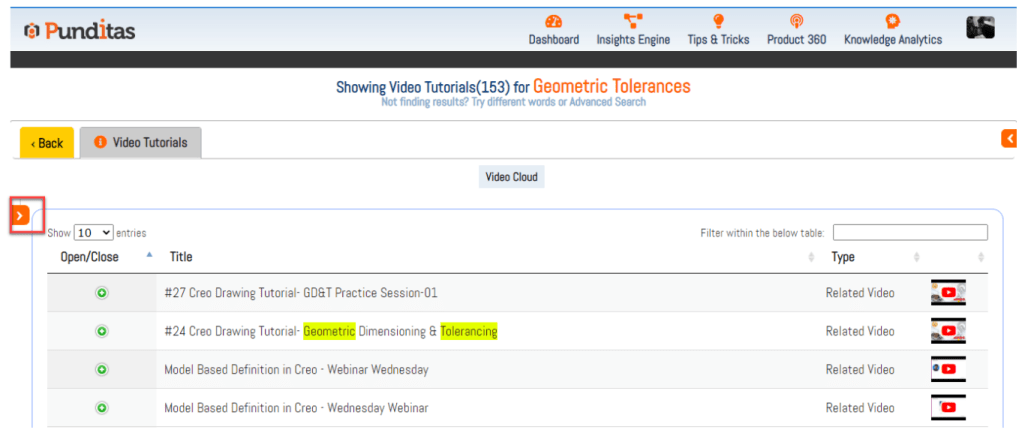
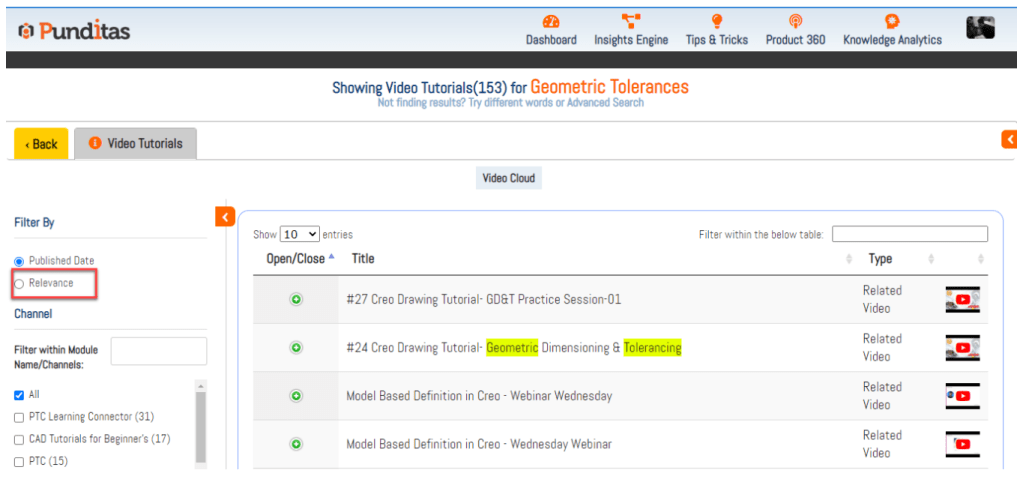
Follow the steps and use Filter by Relevance feature
Step 1:- Expand or Open Side navigation bar by clicking on > Arrow button
Step 2:- Click on Relevance Option
What is Punditas AI Advisor?
Punditas AI Advisor provides real-time guidance as you work in the Creo environment. Information on “how to use” a feature in Creo or best practices for working with Creo are presented within context, removing the need to guess or search for such information. Punditas AI driven content helps you leverage Creo to create your designs faster and with confidence.
For more information about Punditas AI Advisor, visit our website at Punditas AI or contact us at contact@punditas.com
 Punditas
Leave a comment