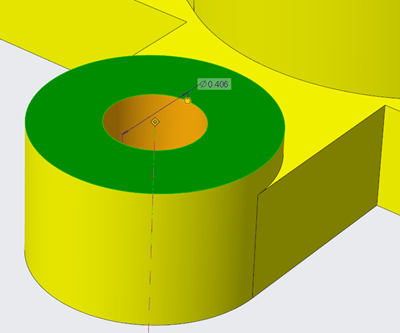
Creo Parametric Tip #4: Arrowheads for Dimensions

Did you know that all arrow leader dimensions are created as closed and filled arrowheads with Creo Parametric 6.0.0.0 release? Also, Radial dimensions that are attached to surfaces, are  automatically a filled dot arrowhead style. This applies to dimension arrowheads in Detailed Drawings and Model-Based Definition Punditas, a PTC partner offers AI driven content for... Continue Reading →

Single Source of Product Information with Punditas AI

Punditas AI is your gateway to all information about CAD-PLM-IoT-ERP-Enterprise Softwares. The  Knowledge Graph within presents five dimensions of content for the Enterprise Software at hand. This content is unlocked by the Punditas AI engine by tapping into 100's of  internal & external repositories to Discover, Curate & Deliver pertinent Tips, Tricks, Tutorials, Best Practices,... Continue Reading →

Creo Parametric Tip#2: Improved visibility of objects in the graphics window

There are new configuration options for displaying or controlling the appearance of dimensions in Creo Parametric 6.0.0.0 release Use the below configuration options to control the appearance of background for dimensions 1. dim_background 2. dim_background_color 3. dim_background_trans A semi-transparent dimension background is set by default. This makes it easier to see and decipher dimension information... Continue Reading →

Punditas AI Advisor now supports Creo 4.0 M100

Punditas AI Advisor supports Creo 4.0 M100. Punditas AI allows users to learn more about “How”, What” and “Why” of these enhancements through Product 360 module. The picture below shows the Module groups and the corresponding enhancements added within each group. To try this out, please signup for a FREE trial at Punditas AI Modules and... Continue Reading →

Punditas AI Advisor now supports Creo 5.0.5.0

PTC released Creo 5.0.5.0 recently. Punditas AI Advisor now supports this latest version of Creo 5.0.5.0. Punditas AI allows users to learn more about “How”, What” and “Why” of these enhancements through Product 360 module. The picture below shows the Module groups and the corresponding enhancements added within each group. To try this out, please... Continue Reading →

Punditas AI Advisor now supports Creo 6.0.1.0

PTC released Creo 6.0.1.0 recently. Punditas AI Advisor now supports this latest version of Creo 6.0.1.0. Punditas AI allows users to learn more about “How”, What” and “Why” of these enhancements through Product 360 module. The picture below shows the Module groups and the corresponding enhancements added within each group. To try this out, please... Continue Reading →

Punditas AI Advisor now supports Creo 6.0.0.0

PTC released Creo 6.0.0.0 recently. Punditas AI Advisor now supports this latest version of Creo 6.0.0.0. Punditas AI allows users to learn more about “How”, What” and “Why” of these enhancements through Product 360 module. The picture below shows the Module groups and the corresponding enhancements added within each group. To try this out, please... Continue Reading →

Unsung Creo Capabilities You Should Try

You probably know that Creo Parametric can create parts, assemblies, and drawings. But how familiar are you with the depth and breadth of Creo Parametric’s other capabilities? Creo is a complete Computer Aided Engineering platform for performing design, analysis, and manufacturing processes throughout your product’s life cycle. There are probably a few capabilities that Creo... Continue Reading →

MBD essentials with Creo Parametric 5.0

Reason #1: Conversion Tool for Legacy Set Datum Annotations in Model-Based Definition There is a tool to convert legacy set datum annotations. The tool to convert legacy set datum annotations, guides you through the process of converting legacy set datum annotations created in Creo Parametric 3.0 and earlier, into the modernized datum feature symbols. The associativity to... Continue Reading →

Website Powered by WordPress.com.

Up ↑