- Published by Ananth The landing page of Punditas AI Advisor has four tiles such as Events Spotlight, Partner Spotlight, User Spotlight and Product Spotlight The Partner Spotlight tile showcases complementary Products and Services from the PTC Partner ecosystem. These partners are discovered by Punditas AI Engine from numerous open sources including PTC Partner website... Continue Reading →
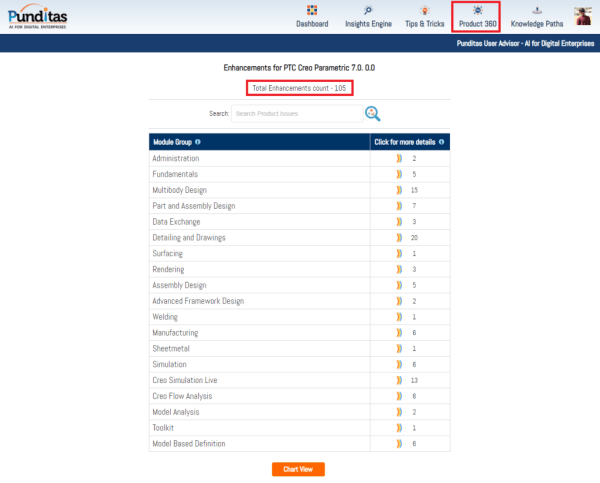
Punditas AI Advisor now supports Creo 7.0.0.0
PTC released Creo 7.0.0.0 recently. Punditas AI Advisor now supports this latest version of Creo 7.0.0.0 . Punditas AI allows users to learn more about “How”, What” and “Why” of these enhancements through Product 360 module. The picture below shows the Module groups and the corresponding enhancements added within each group. To try this out,... Continue Reading →
About User roles and licenses for Punditas AI?
Punditas AI Advisor supports 7 types of Users based on their License level and the Punditas Product they are using User typePunditas ProductSummaryLicense requirementsDemo UserPunditas User AdvisorDemo User has limited access to Punditas User functionality. Only one module (Insights Engine) is included No license neededTrial UserPunditas User AdvisorTrial User has access to most functionality within Punditas... Continue Reading →
What is Punditas AI?
Punditas is an Artificial Intelligence (AI) driven Knowledge Platform for CAD, PLM, IoT, ERP and other Enterprise Applications. Punditas AI delivers product knowledge and insights by discovering and curating content from 100's of sources across the product ecosystem The picture above shows the home page of Punditas AI for Creo Parametric. Home page in Punditas... Continue Reading →
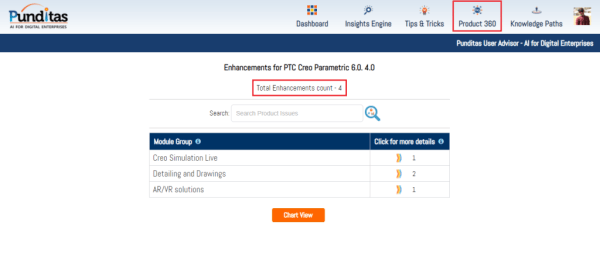
Punditas AI Advisor now supports Creo 6.0.4.0
PTC released Creo 6.0.4.0 recently. Punditas AI Advisor now supports this latest version of Creo 6.0.4.0. Punditas AI allows users to learn more about “How”, What” and “Why” of these enhancements through Product 360 module. The picture below shows the Module groups and the corresponding enhancements added within each group. To try this out, please... Continue Reading →
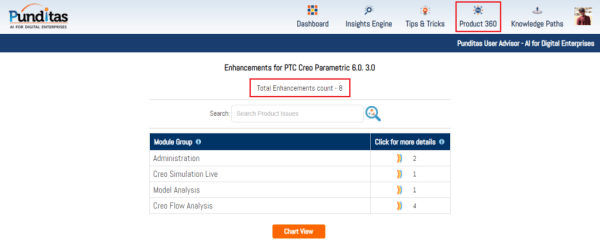
Punditas AI Advisor now supports Creo 6.0.3.0
PTC released Creo 6.0.3.0 recently. Punditas AI Advisor now supports this latest version of Creo 6.0.3.0. Punditas AI allows users to learn more about “How”, What” and “Why” of these enhancements through Product 360 module. The picture below shows the Module groups and the corresponding enhancements added within each group. To try this out, please... Continue Reading →
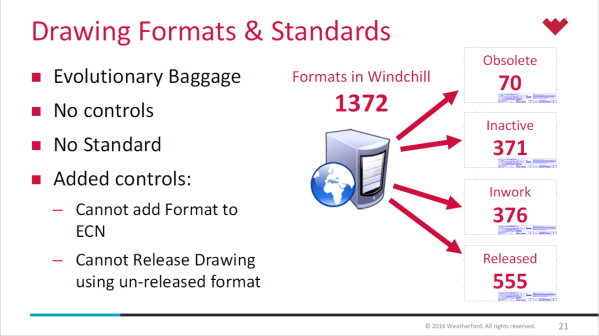
About Creo Drawing formats & Standards
Lewis Lawrence and William Friend from Weatherford, covered Drawing Formats & Standards in one of their webinar. Here are some snippets from their presentation- Creo uses startup scripts to copy standards in place Creo Standard Configurations in place by product line Every install of Creo uses a defined set of configuration files, specific to location... Continue Reading →
Creo Parametric Tip #4: Arrowheads for Dimensions
Did you know that all arrow leader dimensions are created as closed and filled arrowheads with Creo Parametric 6.0.0.0 release? Also, Radial dimensions that are attached to surfaces, are automatically a filled dot arrowhead style. This applies to dimension arrowheads in Detailed Drawings and Model-Based Definition Punditas, a PTC partner offers AI driven content for... Continue Reading →
Single Source of Product Information with Punditas AI
Punditas AI is your gateway to all information about CAD-PLM-IoT-ERP-Enterprise Softwares. The Knowledge Graph within presents five dimensions of content for the Enterprise Software at hand. This content is unlocked by the Punditas AI engine by tapping into 100's of internal & external repositories to Discover, Curate & Deliver pertinent Tips, Tricks, Tutorials, Best Practices,... Continue Reading →
Creo Parametric Tip#3: Creo Simulation Live evaluation just got easier
You no longer have to request an eval license for test driving Creo Simulation Live. Starting with Creo 6.0.1.0, you can click install a 20–day license of CSL and within minutes you can start testing the software to learn about what it has to offer. Note: License is automatically added to your machine. If there... Continue Reading →