A new modernized Chart tool replaces Graph tool starting with Creo Parametric 6.0 release. Chart tool has more options and provides more control over the chart settings. Chart-Tool can be used to view and customize different types of graphs. Once the graph is displayed, the graph can be changed for border colors, fonts, background colors,... Continue Reading →
How to project a Datum Point onto a planar surface in Creo Parametric?
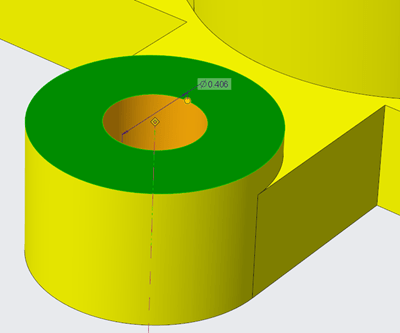
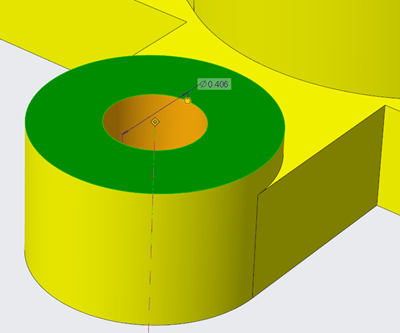
In Creo Parametric 6.0, the Datum point feature is enhanced. A constraint option is added to the datum point feature to project a datum point, a vertex or a curve endpoint onto a planar surface, datum plane, straight edge line or axis. Also, note that datum points created with project constraints can also be used... Continue Reading →
Did you know that display of dimensions is improved in Creo 6.0?
Starting with Creo Parametric 6.0.0.0, there are new configuration options for displaying dimensions. This improves the visibility of objects that are frequently used in the graphics window. To control the appearance of the background for dimensions use the following new configuration options dim_background —Shows the background under dimensions when new dimensions appear. Values are always,... Continue Reading →
Creo Parametric Tip#2: Improved visibility of objects in the graphics window
There are new configuration options for displaying or controlling the appearance of dimensions in Creo Parametric 6.0.0.0 release Use the below configuration options to control the appearance of background for dimensions 1. dim_background 2. dim_background_color 3. dim_background_trans A semi-transparent dimension background is set by default. This makes it easier to see and decipher dimension information... Continue Reading →
Creo Parametric Tip#1: Did you know that you can easily zoom into the selected reference in the model
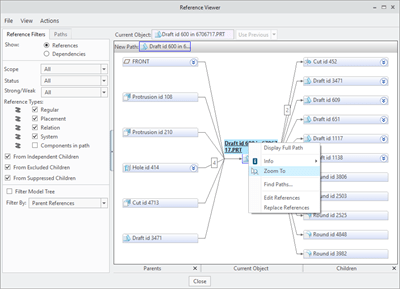
In Creo Parametric 6.0.0.0, you can zoom into the selected reference in the model, and to place it in the center of the graphics window. This makes it easier to identify and locate references when you are investigating. For this just goto Tools --> Reference Viewer in Creo Parametric Punditas AI based Knowledge-Centric system automatically... Continue Reading →
Punditas AI Advisor now supports Creo 4.0 M100
Punditas AI Advisor supports Creo 4.0 M100. Punditas AI allows users to learn more about “How”, What” and “Why” of these enhancements through Product 360 module. The picture below shows the Module groups and the corresponding enhancements added within each group. To try this out, please signup for a FREE trial at Punditas AI Modules and... Continue Reading →
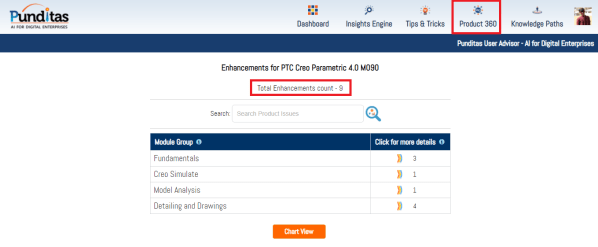
Punditas AI Advisor now supports Creo 4.0 M090
Punditas AI Advisor supports Creo 4.0 M090.Punditas AI allows users to learn more about “How”, What” and “Why” of these enhancements through Product 360 module. The picture below shows the Module groups and the corresponding enhancements added within each group. To try this out, please signup for a FREE trial at Punditas AI Modules and Enhancements... Continue Reading →
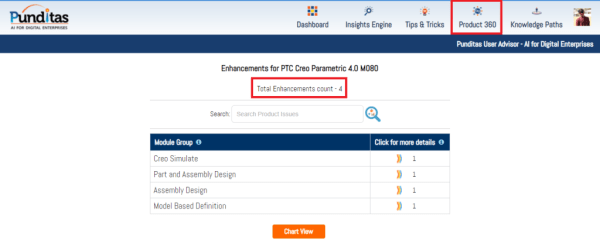
Punditas AI Advisor now supports Creo 4.0 M080
Punditas AI Advisor supports Creo 4.0 M080.Punditas AI allows users to learn more about “How”, What” and “Why” of these enhancements through Product 360 module. The picture below shows the Module groups and the corresponding enhancements added within each group. To try this out, please signup for a FREE trial at Punditas AI Modules and Enhancements... Continue Reading →
Punditas AI Advisor now supports Creo 4.0 M070
Punditas AI Advisor supports Creo 4.0 M070. Punditas AI allows users to learn more about “How”, What” and “Why” of these enhancements through Product 360 module. The picture below shows the Module groups and the corresponding enhancements added within each group. To try this out, please signup for a FREE trial at Punditas AI Modules and... Continue Reading →
Punditas AI Advisor now supports Creo 4.0 M050
Punditas AI Advisor supports Creo 4.0 M050.Punditas AI allows users to learn more about “How”, What” and “Why” of these enhancements through Product 360 module. The picture below shows the Module groups and the corresponding enhancements added within each group. To try this out, please signup for a FREE trial at Punditas AI Modules and Enhancements... Continue Reading →