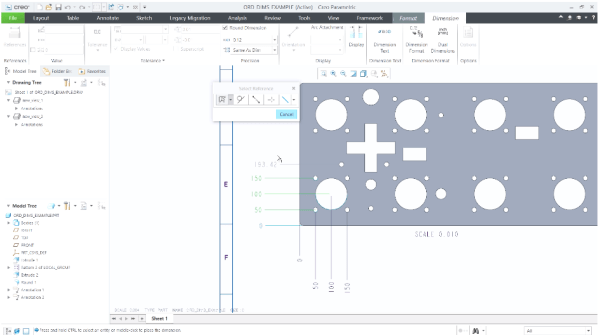
Starting with Creo Parametric 7.0.0.0, there's better control over the placement of ordinate dimensions that are created in models and drawings. This can be done by setting the detail option, default_ansi_ord_dim_aligned. Your options for this option are Yes - Align with the baseline dimensionNo - Stay at the position of the pointer until you place it. When... Continue Reading →
Punditas AI Advisor now supports Creo 4.0 M130
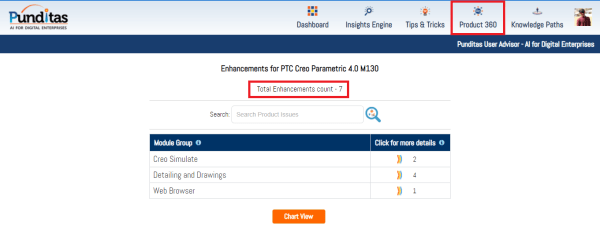
PTC released Creo 4.0 M130 recently. Punditas AI Advisor now supports this latest version of Creo 4.0 M130. Punditas AI allows users to learn more about “How”, What” and “Why” of these enhancements through Product 360 module. The picture below shows the Module groups and the corresponding enhancements added within each group. To try this... Continue Reading →
Do you like the improved appearance of handles, text, dimensions, and lines in Creo?
Starting with Creo 5.0, the appearance of handles, text, dimensions, and lines (2D and 3D) displayed in the graphics area have improved visibility. In addition, Lines Anti-Aliasing and Text Anti-Aliasing can also be controlled. For example - you can set Lines Anti-Aliasing to On even if the Anti-Aliasing is set to Off. I think these are improvements are definitely useful. What are your thoughts?... Continue Reading →
Have you tried Lines Anti-Aliasing in Creo?
Starting with Creo Parametric 5.0.0.0, there are 2 new options to control anti-aliasing of lines or text - Lines Anti-Aliasing and Text Anti-Aliasing To turn On or Off these controls, just goto File > Options > Entity Display as shown below Below is an excerpt from PTC that shows how you can set Lines Anti-Aliasing to On even if the Anti-Aliasing is set to Off. Notes about... Continue Reading →
How do you indicate placement of datum target on a surface in Creo?
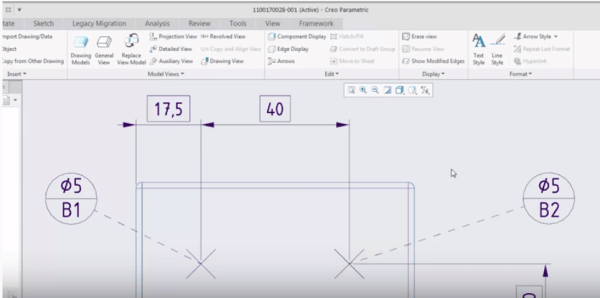
With PTC Creo 4.0, the dashed leader line option can be used to indicate the placement of datum target on surface on the far side of the drawing view. To set the dashed leader line, select the "Far side" option in the Datum Target tab as shown below About Datum Target ribbon The Datum Target ribbon in Creo... Continue Reading →
What is Punditas AI?
Punditas is an Artificial Intelligence (AI) driven Knowledge Platform for CAD, PLM, IoT, ERP and other Enterprise Applications. Punditas AI delivers product knowledge and insights by discovering and curating content from 100's of sources across the product ecosystem The picture above shows the home page of Punditas AI for Creo Parametric. Home page in Punditas... Continue Reading →
Did you know about these hole placement enhancements in Creo?
Starting with Creo 4.0, you can place a hole using an axis or point and a surface as references, even if - the axis is not normal to the surface or the point is not on the surface. Note: you can define the orientation of the hole regardless of how the hole is placed. When... Continue Reading →
Have you tried splitting surfaces in Creo?
In Creo, some shape surface sets that are selected for removal contain surfaces that are shared by shapes included in the surface set, and shapes that are not included in the surface set. The system automatically splits these shared surfaces so that only the portions of the shared surfaces that belong to the selected shapes... Continue Reading →
Punditas AI Advisor now supports Creo 4.0 M090
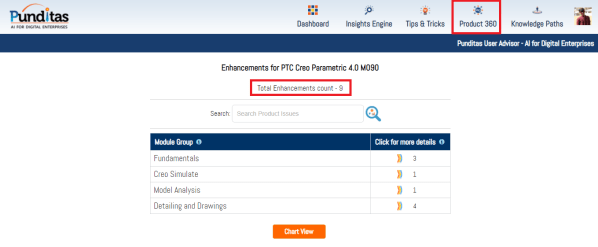
Punditas AI Advisor supports Creo 4.0 M090.Punditas AI allows users to learn more about “How”, What” and “Why” of these enhancements through Product 360 module. The picture below shows the Module groups and the corresponding enhancements added within each group. To try this out, please signup for a FREE trial at Punditas AI Modules and Enhancements... Continue Reading →
Punditas AI Advisor now supports Creo 4.0 M080
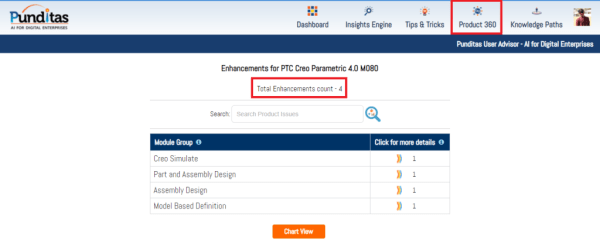
Punditas AI Advisor supports Creo 4.0 M080.Punditas AI allows users to learn more about “How”, What” and “Why” of these enhancements through Product 360 module. The picture below shows the Module groups and the corresponding enhancements added within each group. To try this out, please signup for a FREE trial at Punditas AI Modules and Enhancements... Continue Reading →