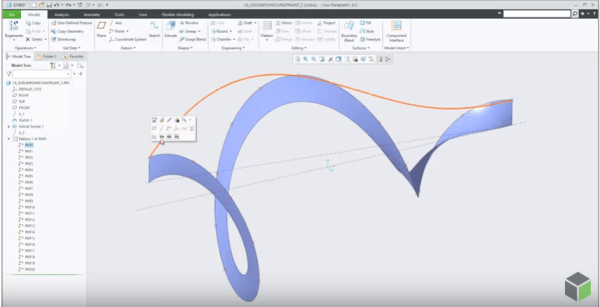
A new modernized Chart tool replaces Graph tool starting with Creo Parametric 6.0 release. Chart tool has more options and provides more control over the chart settings. Chart-Tool can be used to view and customize different types of graphs. Once the graph is displayed, the graph can be changed for border colors, fonts, background colors,... Continue Reading →
How to project a Datum Point onto a planar surface in Creo Parametric?
In Creo Parametric 6.0, the Datum point feature is enhanced. A constraint option is added to the datum point feature to project a datum point, a vertex or a curve endpoint onto a planar surface, datum plane, straight edge line or axis. Also, note that datum points created with project constraints can also be used... Continue Reading →
Creo Patterning
Mark Ganzer@Toro has done an excellent job covering Patterning in Creo - Basics, Performance & Tips in one his presentations. Here are some excerpts from his slide deck. Check out the Tips (below) in particular ... Continue Reading →
About Creo Drawing formats & Standards
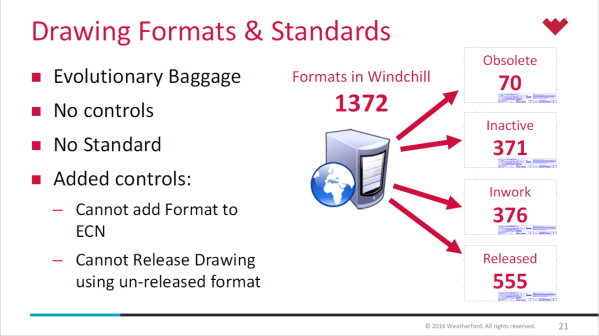
Lewis Lawrence and William Friend from Weatherford, covered Drawing Formats & Standards in one of their webinar. Here are some snippets from their presentation- Creo uses startup scripts to copy standards in place Creo Standard Configurations in place by product line Every install of Creo uses a defined set of configuration files, specific to location... Continue Reading →
Punditas AI Advisor now supports Creo 6.0.2.0
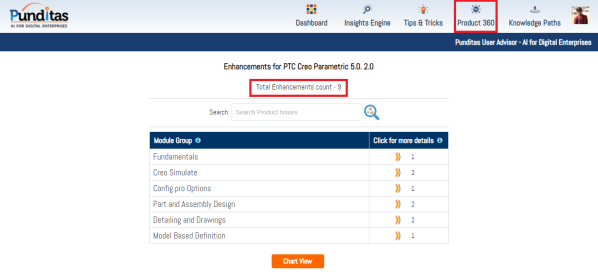
PTC released Creo 6.0.2.0 recently. Punditas AI Advisor now supports this latest version of Creo 6.0.2.0. Punditas AI allows users to learn more about “How”, What” and “Why” of these enhancements through Product 360 module. The picture below shows the Module groups and the corresponding enhancements added within each group. To try this out, please... Continue Reading →
Punditas AI Advisor now supports Creo 6.0.1.0
PTC released Creo 6.0.1.0 recently. Punditas AI Advisor now supports this latest version of Creo 6.0.1.0. Punditas AI allows users to learn more about “How”, What” and “Why” of these enhancements through Product 360 module. The picture below shows the Module groups and the corresponding enhancements added within each group. To try this out, please... Continue Reading →
Punditas AI Advisor now supports Creo 6.0.0.0
PTC released Creo 6.0.0.0 recently. Punditas AI Advisor now supports this latest version of Creo 6.0.0.0. Punditas AI allows users to learn more about “How”, What” and “Why” of these enhancements through Product 360 module. The picture below shows the Module groups and the corresponding enhancements added within each group. To try this out, please... Continue Reading →
MBD essentials with Creo Parametric 5.0
Reason #1: Conversion Tool for Legacy Set Datum Annotations in Model-Based Definition There is a tool to convert legacy set datum annotations. The tool to convert legacy set datum annotations, guides you through the process of converting legacy set datum annotations created in Creo Parametric 3.0 and earlier, into the modernized datum feature symbols. The associativity to... Continue Reading →
Punditas AI Advisor now supports Creo 5.0.2.0
PTC released Creo 5.0.2.0 recently. Punditas AI Advisor now supports this latest version of Creo 5.0.2.0. Punditas AI allows users to learn more about “How”, What” and “Why” of these enhancements through Product 360 module. The picture below shows the Module groups and the corresponding enhancements added within each group. To try this out, please... Continue Reading →
Not steakholders but stakeholders for your Model Based journey
No, I'm not talking about Steakholders but Stakeholders for realizing Model Based Definition & Model Based Enterprise. Let me begin by defining MBD and MBE. Model Based Definition (MBD) is about creating rich “Technical Data Packages (TDP)” which includes 3D model and associated data elements that fully define the product in a manner that can... Continue Reading →