
Mark Ganzer@Toro has done an excellent job covering Patterning in Creo - Basics, Performance & Tips in one his presentations. Here are some excerpts from his slide deck. Check out the Tips (below) in particular ... Continue Reading →
Creo Patterning

Mark Ganzer@Toro has done an excellent job covering Patterning in Creo - Basics, Performance & Tips in one his presentations. Here are some excerpts from his slide deck. Check out the Tips (below) in particular ... Continue Reading →

Did you know that all arrow leader dimensions are created as closed and filled arrowheads with Creo Parametric 6.0.0.0 release? Also, Radial dimensions that are attached to surfaces, are automatically a filled dot arrowhead style. This applies to dimension arrowheads in Detailed Drawings and Model-Based Definition Punditas, a PTC partner offers AI driven content for... Continue Reading →

Punditas AI is your gateway to all information about CAD-PLM-IoT-ERP-Enterprise Softwares. The Knowledge Graph within presents five dimensions of content for the Enterprise Software at hand. This content is unlocked by the Punditas AI engine by tapping into 100's of internal & external repositories to Discover, Curate & Deliver pertinent Tips, Tricks, Tutorials, Best Practices,... Continue Reading →

You no longer have to request an eval license for test driving Creo Simulation Live. Starting with Creo 6.0.1.0, you can click install a 20–day license of CSL and within minutes you can start testing the software to learn about what it has to offer. Note: License is automatically added to your machine. If there... Continue Reading →
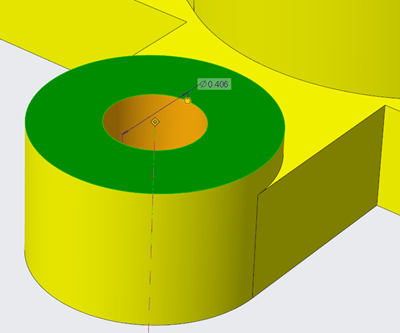
There are new configuration options for displaying or controlling the appearance of dimensions in Creo Parametric 6.0.0.0 release Use the below configuration options to control the appearance of background for dimensions 1. dim_background 2. dim_background_color 3. dim_background_trans A semi-transparent dimension background is set by default. This makes it easier to see and decipher dimension information... Continue Reading →
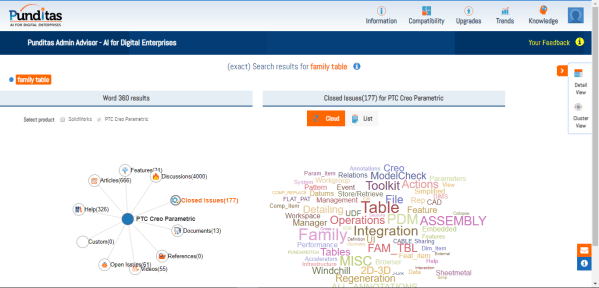
Artificial intelligence is changing how Users adopt and use Enterprise Application Software by making it easier to find content from a multitude of sources. With the help of AI and Machine Learning, Content discovery is undergoing a generational upgrade, where recommendations are more intelligent, tailored to User based on each individuals style and preference, Search functions... Continue Reading →
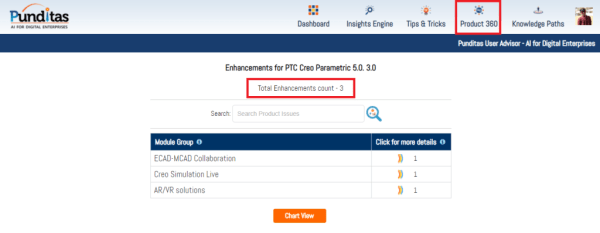
PTC released Creo 5.0.3.0 recently. Punditas AI Advisor now supports this latest version of Creo 5.0.3.0. Punditas AI allows users to learn more about “How”, What” and “Why” of these enhancements through Product 360 module. The picture below shows the Module groups and the corresponding enhancements added within each group. To try this out, please... Continue Reading →

Reason #1: Conversion Tool for Legacy Set Datum Annotations in Model-Based Definition There is a tool to convert legacy set datum annotations. The tool to convert legacy set datum annotations, guides you through the process of converting legacy set datum annotations created in Creo Parametric 3.0 and earlier, into the modernized datum feature symbols. The associativity to... Continue Reading →
I came across some interesting definitions of Metadata from various sources and here's a compilation of the best I found... A Love Note to the Future “A love note to the future” is how Jason Scott refers to metadata. Metadata, you see, is really a love note – it might be to yourself, but in... Continue Reading →
What would you rather do this upcoming weekend? Preview a movie or Dimensions in Creo Parametric 4.0? I know what you are thinking.... I don't blame you... Just in case you are stuck with Creo, have fun previewing dimensions.....:-) Starting with Creo Parametric 4.0, when you create a dimension or a GTOL you can immediately see... Continue Reading →

